
Best Monitor with Webcam and Speakers (2026): 8 Picks Compared
 By Theo LangUpdated
Buy the CUNPU 24" Monitor with Camera for video calls that need no extra camera, microphone or speakers: its pop-up 5MP webcam, dual-channel stereo microphone and speaker cover remote work, online learning and video calls. The 120Hz Full HD 1920×1080 IPS panel keeps presentations and spreadsheets clear. Larger screens and sharper panels follow below.
Your shortlist at a glance
PCKitHQ scores range from 9.2 to 9.8. See how we pick.
| Product and key specifications | Score and retailer |
|---|---|
01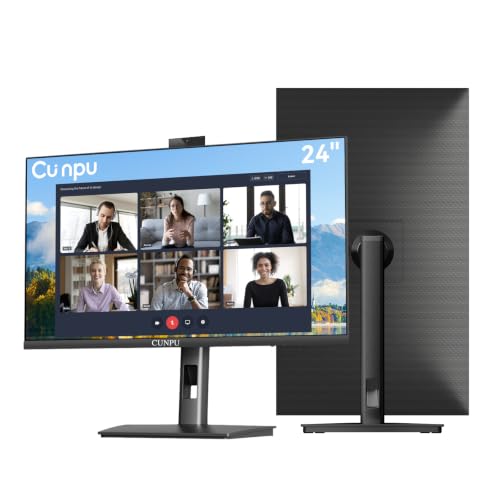 | 9.8PCKitHQ scoreView on Amazon |
02 | 9.7PCKitHQ scoreView on Amazon |
03 | 9.6PCKitHQ scoreView on Amazon |
04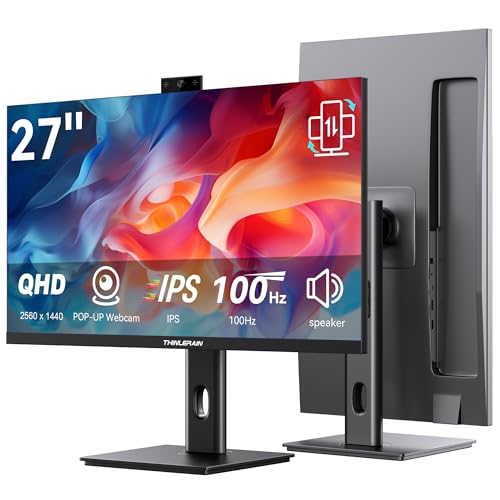 | 9.5PCKitHQ scoreView on Amazon |
05 | 9.5PCKitHQ scoreView on Amazon |
06 | 9.4PCKitHQ scoreView on Amazon |
07 | 9.3PCKitHQ scoreView on Amazon |
08 | 9.2PCKitHQ scoreView on Amazon |
A closer look at each configuration
CUNPU 24-inch Monitor
score
The pop-up 5MP webcam, dual-channel stereo microphone and speaker make this 24-inch monitor a complete video-call station.
- Native refresh rate
- 120 Hz
- Screen size
- 24 in
- Panel
- IPS
- HDMI
- Yes
- Weight
- 8.05 lb
The CUNPU 24-inch monitor pairs a Full HD 1920×1080 IPS panel at 120Hz with a pop-up 5MP webcam, a dual-channel stereo microphone and a speaker. The panel has a 96% sRGB color gamut. Its stand adjusts 5.31 inches in height with ±35° swivel, 90° pivot and -5° to 15° tilt, plus 100×100mm VESA mounting. HDMI 1.4 and VGA cover video input, and the monitor weighs 8.05 lb with a 1-year warranty.
Choose it if
- You want a 24-inch screen for video calls
- You want a pop-up webcam for privacy
Consider another if
- You need the 27-inch screen of the CUNPU 27-inch monitor
- You need a 34-inch ultrawide screen
CUNPU 27-inch Monitor
score
The 27-inch 2560×1440 panel at 120Hz pairs a larger screen with the pop-up 5MP webcam.
- Resolution
- 2560×1440
- Native refresh rate
- 120 Hz
- Screen size
- 27 in
- HDMI
- Yes
- Weight
- 9.81 lb
The CUNPU 27-inch monitor has a 2560×1440 QHD panel at 120Hz through HDMI 2.0 and DP 1.4. Its pop-up 5MP webcam, dual-channel stereo microphone and speaker cover video calls, and the webcam connects through USB-B 2.0 upstream. The stand adjusts 5.31 inches in height with ±35° swivel, 90° pivot and -5° to 15° tilt, plus 100×100mm VESA mounting. It weighs 9.81 lb and carries a 1-year warranty.
Choose it if
- You want a 27-inch screen for calls and documents
- You want 2560×1440 resolution for sharper text
Consider another if
- You need a 24-inch screen for a small desk
- You need the 3840×2160 panel of the Thinlerain 4K monitor
Thinlerain 27-inch 4K Monitor
score
The 3840×2160 IPS panel at 160Hz and the pop-up 3MP webcam suit editing, design and video calls.
- Resolution
- 3840×2160
- Native refresh rate
- 160 Hz
- Screen size
- 27 in
- Panel
- IPS
- USB-C
- Yes
- HDMI
- Yes
- DisplayPort
- Yes
- Warranty
- 1 Year
The Thinlerain 27-inch 4K monitor has a 3840×2160 IPS panel at 160Hz. Its pop-up 3MP webcam with a microphone hides away when not in use, and dual speakers cover audio. The webcam and microphone need the included USB-A to USB-B cable, so the computer needs a USB-A port. Two HDMI ports, DisplayPort and USB-C video input cover connections. The stand offers height, tilt, swivel and 90° pivot, and the warranty is 1 year.
Choose it if
- You want a 3840×2160 panel for editing and design
- You want a 160Hz refresh rate
Consider another if
- You need a 24-inch screen for a small desk
- You need a 23.8-inch screen for a compact desk
Thinlerain 27-inch Monitor
score
The 2560x1440 IPS panel at 100Hz pairs a pop-up 3MP webcam with USB-C webcam setup.
- Resolution
- 2560x1440
- Native refresh rate
- 100 Hz
- Screen size
- 27 in
- Panel
- IPS
- USB-C
- Yes
- HDMI
- Yes
- DisplayPort
- Yes
- Warranty
- 1 Year
The Thinlerain 27-inch 2K monitor has a 2560x1440 IPS display at 100Hz. Its 3MP pop-up webcam with a microphone and dual speakers covers video calls, and the webcam and microphone need the included USB-C cable. HDMI and DisplayPort deliver 2K at 100Hz video and audio. The stand offers height, tilt, swivel and 90° pivot, with VESA mounting, and the box includes an HDMI cable and USB-C cables. The warranty is 1 year.
Choose it if
- You want a 27-inch 2560x1440 screen at 100Hz
- You want a vertical pivot for documents and code
Consider another if
- You need a 160Hz refresh rate for fast motion
- You need the 3840×2160 panel of the Thinlerain 4K monitor
SKitphrati 23.8-inch Monitor
score
The compact 23.8-inch 1920x1080 IPS panel at 120Hz suits small desks and video calls.
- Resolution
- 1920x1080
- Native refresh rate
- 120 Hz
- Screen size
- 23.8 in
- Panel
- IPS
- HDMI
- Yes
- DisplayPort
- Yes
- Warranty
- 2-year
The SKitphrati 23.8-inch monitor has a 1920x1080 IPS panel at 120Hz. Its adjustable 3MP webcam, microphone array and dual speakers cover video calls without extra peripherals. HDMI, DisplayPort and VGA cover modern and legacy connections, USB 2.0 upstream supports the webcam, and an earphone jack allows private listening. Frameless styling, -5° to +5° tilt and VESA mounting suit a small desk, and the warranty is 2 years.
Choose it if
- You want a 23.8-inch screen for a small desk
- You want the 2-year warranty on this monitor
Consider another if
- You need a 27-inch screen for more room
- You need the 2560×1440 panel of the CUNPU 27-inch monitor
SKitphrati 27'' Webcam Monitor
score
The 27-inch 1080P IPS panel at 120Hz pairs a large screen with an adjustable 3MP webcam.
- Resolution
- 1080P
- Native refresh rate
- 120 Hz
- Screen size
- 27 in
- Panel
- IPS
- HDMI
- Yes
- DisplayPort
- Yes
- Weight
- 12.1 lb
- Warranty
- 2 year
The SKitphrati 27-inch monitor has a 1080P IPS panel at 120Hz with a frameless design and eye care technology. Its adjustable 3MP camera with a microphone array and stereo speakers covers video conferencing. HDMI, DisplayPort, VGA and USB 2.0 ports cover modern and legacy devices. The monitor weighs 12.1 lb and carries a 2-year warranty. The frameless display has eye care technology and adjustable settings for comfortable viewing during extended use.
Choose it if
- You want a 27-inch screen at 1080P resolution
- You want the 2-year warranty on this monitor
Consider another if
- You need 2560×1440 resolution for sharper text
- You need a 23.8-inch screen for a small desk
HP 5 Pro 527pm 27-inch USB-C Conferencing Monitor
score
The 27-inch 2560 x 1440 IPS panel at 100Hz pairs a 5MP webcam with USB-C and HDMI.
- Resolution
- 2560 x 1440
- Native refresh rate
- 100 Hz
- Panel
- IPS
- USB-C
- Yes
- HDMI
- Yes
- DisplayPort
- Yes
- Weight
- 17.37 lb
The HP Series 5 Pro 527pm has a 27-inch QHD 2560 x 1440 IPS panel at 100Hz with a 3-sided borderless micro-edge bezel. Its Poly Studio 5MP pop-up tiltable webcam and AI Noise Reduction mics pair with four 3W down-firing speakers for calls. USB-C, HDMI, DisplayPort and RJ-45 cover connections. The stand adjusts 150 mm in height with swivel, pivot and tilt. The monitor weighs 17.37 lb.
Choose it if
- You want USB-C, HDMI and DisplayPort in one monitor
- You want four 3W speakers for calls
Consider another if
- You need a 34-inch ultrawide screen
- You need a 160Hz refresh rate
HP 5 Pro 34-inch WQHD USB-C Monitor
score
The 34-inch curved ultrawide 3440 x 1440 screen pairs a 5MP webcam with USB-C.
- Resolution
- 3440 x 1440
- Curved screen
- Yes
- Ultrawide screen
- Yes
- USB-C
- Yes
- Warranty
- 1 Year
The HP Series 5 Pro 34-inch monitor has a 3440 x 1440 WQHD panel on a 34-inch ultrawide screen with 1500R curvature. Its Poly Studio 5MP pop-up webcam and AI Noise Reduction mics pair with four 3W down-firing speakers for calls. USB-C covers the connection, and a Dockztorm USB hub is included. The stand adjusts 150 mm in height with swivel and tilt. The warranty is 1 year.
Choose it if
- You want a 34-inch ultrawide screen for many projects
- You want a 1500R curved screen
Consider another if
- You need a 27-inch screen for a smaller desk
- You need a flat screen without curvature
Make the choice for your setup
Match screen size and resolution
The eight monitors span 23.8 inches to 34 inches. The SKitphrati 23.8-inch monitor has a 1920x1080 panel, the CUNPU 24-inch monitor has a 1920×1080 panel, and the SKitphrati 27-inch monitor has a 1080P panel. The CUNPU 27-inch monitor has a 2560×1440 panel, the Thinlerain 2K monitor has a 2560x1440 panel, and the HP 527pm has a 2560 x 1440 panel. The Thinlerain 4K monitor has a 3840×2160 panel, and the HP 34-inch monitor has a 3440 x 1440 panel on a curved ultrawide screen with 1500R curvature. Refresh rates are 100Hz on the Thinlerain 2K monitor and the HP 527pm, 120Hz on the CUNPU pair and both SKitphrati monitors, and 160Hz on the Thinlerain 4K monitor. Pick the size that fits the desk first.
Check the webcam and microphone setup
Every monitor here has a pop-up or adjustable webcam. The CUNPU monitors use a pop-up 5MP webcam with a dual-channel stereo microphone through USB-B 2.0 upstream. The Thinlerain 4K monitor has a pop-up 3MP webcam with a microphone, and its webcam and microphone need the included USB-A to USB-B cable. The Thinlerain 2K monitor has a 3MP pop-up webcam with a microphone and dual speakers, and its webcam and microphone need the included USB-C cable. The SKitphrati monitors have an adjustable 3MP camera with a microphone array, and the 23.8-inch model uses USB 2.0 upstream. The HP monitors have a 5MP pop-up webcam with AI Noise Reduction mics. For a closely related choice, read our guide to the Best Ultrawide Monitor Gaming and Work.
Check the ports before buying
Video inputs differ across the eight monitors. The CUNPU 24-inch monitor has HDMI 1.4 and VGA. The CUNPU 27-inch monitor has HDMI 2.0 and DP 1.4. The Thinlerain 4K monitor has two HDMI ports, DisplayPort and USB-C video input. The Thinlerain 2K monitor has HDMI and DisplayPort. The SKitphrati monitors have HDMI, DisplayPort and VGA. The HP 527pm has USB-C, HDMI, DisplayPort, RJ-45 and a Dockztorm USB hub. The HP 34-inch monitor has USB-C. Match the ports to the cables already on the desk, and confirm the webcam connection separately: the Thinlerain 4K monitor needs USB-B for its webcam even though it also has USB-C video input.
Comparing more options? See 24 vs 27 Inch Monitor.
FAQ: Monitor with Webcam and Speakers
Do all eight monitors include a webcam and speakers?
Yes. The CUNPU pair has a pop-up 5MP webcam, microphone and speaker. The Thinlerain pair has a pop-up 3MP webcam, microphone and dual speakers. The SKitphrati pair has a 3MP camera with a mic array and speakers. The HP pair has a 5MP pop-up webcam with AI Noise Reduction mics and four 3W speakers.
Which monitors need a USB connection for the webcam?
The Thinlerain 27 Inch 4K Monitor with Webcam needs the included USB-A to USB-B cable. The Thinlerain 27 Inch Monitor with Pop-Up Webcam needs the included USB-C cable for its webcam and microphone. The CUNPU monitors use USB-B 2.0 upstream, and the SKitphrati 23.8-inch monitor uses USB 2.0 upstream for its webcam.
Which monitors have a 2-year warranty?
The SKitphrati 23.8 Inch Monitor with Webcam and the SKitphrati 27'' Business Webcam Monitor. Both carry a 2-year term. The CUNPU monitors, the Thinlerain monitors and the HP Series 5 Pro 34-inch monitor carry a 1-year warranty.


