
Best Monitor Hz for Gaming (2026): 7 Models Side by Side
 By Theo LangUpdated
Choose the SANSUI 24.5 Inch 300hz 240hz if you want a 24.5-inch FHD monitor with a 300Hz native refresh rate and a 1ms MPRT response time. Its two DisplayPort 1.4 ports reach up to 300Hz, and its two HDMI 2.0 ports reach up to 240Hz. The other six monitors in this guide range from 144Hz to 380Hz with overclock.
Your shortlist at a glance
PCKitHQ scores range from 9.2 to 9.8. See how we pick.
| Product and key specifications | Score and retailer |
|---|---|
01 | 9.8PCKitHQ scoreView on Amazon |
02 | 9.7PCKitHQ scoreView on Amazon |
03 | 9.6PCKitHQ scoreView on Amazon |
04 | 9.5PCKitHQ scoreView on Amazon |
05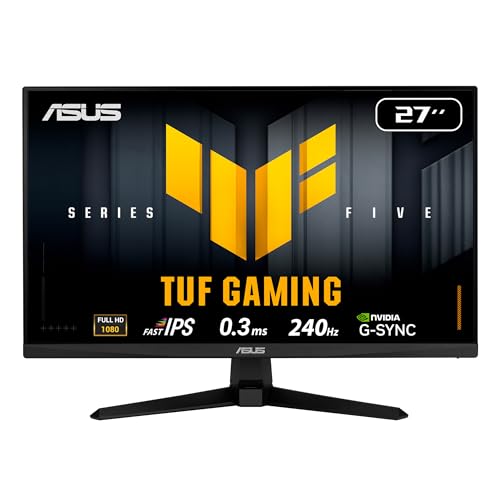 | 9.4PCKitHQ scoreView on Amazon |
06 | 9.3PCKitHQ scoreView on Amazon |
07 | 9.2PCKitHQ scoreView on Amazon |
A closer look at each configuration
SANSUI 24.5-inch G25X1
score
The SANSUI monitor pairs a 300Hz native refresh rate with a Fast IPS panel and a 1ms MPRT response time.
- Resolution
- FHD 1080P
- Native refresh rate
- 300 Hz
- Panel
- Fast IPS
- Warranty
- 30-day money-back and free replacement warranty
This SANSUI monitor has a 24.5-inch screen with FHD 1080P resolution, a 300Hz native refresh rate, and a 1ms MPRT response time. DisplayPort 1.4 reaches up to 300Hz, while HDMI 2.0 reaches up to 240Hz. The Fast IPS panel covers 120% sRGB with 300 nits, HDR, and a 178-degree viewing angle. An audio jack covers sound. Its warranty is a 30-day money-back and free replacement warranty.
Choose it if
- You want 300Hz through DisplayPort 1.4 on a 24.5-inch FHD screen
- You want 120% sRGB color with HDR on a Fast IPS panel
Consider another if
- You need the 380Hz overclock of the ASUS ROG monitor
- You need the built-in speakers of the Sceptre monitor
Dell 24 Gaming Monitor SE2426HG
score
The Dell monitor pairs a 240Hz refresh rate with a 0.5ms response time and 99% sRGB color.
- Resolution
- 1920x1080
- Native refresh rate
- 240 Hz
- Panel
- IPS
- HDMI
- Yes
- DisplayPort
- Yes
- Weight
- 7.41 lb
- Warranty
- 1-Year Advanced Exchange Service
This Dell monitor has a 23.8-inch screen with 1920x1080 resolution, a 240Hz native refresh rate, and a 0.5ms response time. Its IPS panel covers 99% sRGB with wide viewing angles. FreeSync Premium and HDMI VRR remove tearing for PC and console play. Two HDMI ports and DisplayPort 1.4 connect devices. At 7.41 lb, it moves easily between desks. Its warranty is 1-Year Advanced Exchange Service.
Choose it if
- You want 240Hz with a 0.5ms response time on a 23.8-inch screen
- You want 99% sRGB color on an IPS panel with wide viewing angles
Consider another if
- You need the 300Hz refresh rate of the SANSUI monitor
- You need the 2560x1440 resolution of the Acer monitor
Sceptre 24-inch Curved Gaming Monitor up to 180+Hz C248B-FWT168
score
The Sceptre curved monitor pairs up to 180Hz with a 1080p screen and built-in speakers.
- Resolution
- 1080p
- Curved screen
- Yes
- HDMI
- Yes
- DisplayPort
- Yes
- Weight
- 7 lb
- Warranty
- limited 1 year
This Sceptre monitor has a 24-inch curved screen with 1080p resolution and up to 180Hz through two HDMI ports and two DisplayPorts. Its screen covers 100% sRGB, and built-in speakers plus an audio out jack cover sound. Blue-Light Shift technology is included. A VESA wall mount pattern allows flexible viewing angles. At 7 lb, it moves easily between desks. Its warranty is limited 1 year.
Choose it if
- You want a 24-inch curved screen with up to 180Hz
- You want built-in speakers with an audio out jack
Consider another if
- You need a 240Hz refresh rate like the Dell monitor
- You need the 2560x1440 resolution of the Acer monitor
MSI PRO MP243L E14 24-inch Gaming Office Monitor
score
The MSI monitor pairs a 144Hz refresh rate with a 1920x1080 IPS panel and a 1ms response time.
- Resolution
- 1920 x 1080
- Native refresh rate
- 144 Hz
- Panel
- IPS
- HDMI
- Yes
- Weight
- 9.5 lb
- Warranty
- 3 Year Manufacturer
This MSI monitor has a 23.8-inch screen with 1920x1080 resolution, a 144Hz native refresh rate, and a 1ms response time. Its IPS panel has a 1500:1 contrast ratio with 178-degree viewing angles. FreeSync matches the refresh rate to the frame output. The stand tilts from minus 5 to 20 degrees, with VESA 100 by 100 mm mounting. HDMI 2.0 with HDMI-CEC and a D-Sub VGA port cover device connections. Eye-Q Check is included. Its warranty is 3 Year Manufacturer.
Choose it if
- You want a 144Hz refresh rate on a 23.8-inch FHD IPS screen
- You want HDMI 2.0 and a VGA port for older devices
Consider another if
- You need a 240Hz refresh rate like the Dell monitor
- You need the 2560x1440 resolution of the Acer monitor
ASUS TUF VG279QM5A 27-inch Fast Gaming Monitor
score
The ASUS TUF monitor pairs a 240Hz refresh rate with a Fast IPS panel and a 0.3ms response time.
- Resolution
- 1920 x 1080
- Native refresh rate
- 240 Hz
- Panel
- Fast IPS
- HDMI
- Yes
- DisplayPort
- Yes
- Weight
- 9.92 lb
- Warranty
- 3 Year Warranty with ARR
This ASUS monitor has a 27-inch screen with 1920x1080 resolution, a 240Hz native refresh rate, and a 0.3ms minimum response time. Its Fast IPS panel covers 99% sRGB. FreeSync Premium and G-Sync compatibility cover tear-free play. ELMB Sync pairs motion blur reduction with variable refresh rate. Variable Overdrive is included. DisplayWidget Center gives mouse control of monitor settings. A DisplayPort cable is included. Its warranty is 3 Year Warranty with ARR.
Choose it if
- You want 240Hz with a 0.3ms response time on a 27-inch screen
- You want ELMB Sync with FreeSync Premium and G-Sync compatibility
Consider another if
- You need the 300Hz refresh rate of the SANSUI monitor
- You need the 2560x1440 resolution of the Acer monitor
MONITOR Acer Nitro 27-inch Gaming XV272U W2bmiiprx
score
The Acer Nitro monitor pairs a 2560x1440 IPS screen with 240Hz through DisplayPort.
- Resolution
- 2560x1440
- Panel
- IPS
- HDMI
- Yes
- Weight
- 11.53 lb
- Warranty
- 3 year parts and labor
This Acer monitor has a 27-inch IPS screen with 2560x1440 resolution. The refresh rate reaches 240Hz through DisplayPort and 144Hz through HDMI. Response time is 1ms gray-to-gray, up to 0.5ms gray-to-gray. AMD FreeSync Premium is included, and sRGB coverage is 99%. Two speakers at 2 watts each and an audio out port cover sound. The ergo stand adjusts tilt, height, swivel, and pivot. VESA HDR400 is supported. Its warranty is 3 year parts and labor.
Choose it if
- You want 240Hz through DisplayPort on a 27-inch 2560x1440 screen
- You want an ergo stand with height, swivel, and pivot adjustment
Consider another if
- You need the 300Hz refresh rate of the SANSUI monitor
- You need the 380Hz overclock of the ASUS ROG monitor
ASUS ROG XG279CNS 27-inch USB-C Gaming Monitor
score
The ASUS ROG monitor pairs a 380Hz overclock with a Fast IPS panel and a 0.3ms response time.
- Resolution
- 1920x1080
- Panel
- IPS
- USB-C
- Yes
- Weight
- 14.3 lb
- Warranty
- 3 Year Warranty with Advanced Replacement and Repair service
This ASUS monitor has a 27-inch screen with 1920x1080 resolution and an overclock to a 380Hz refresh rate. Its Fast IPS panel gives a 0.3ms gray-to-gray response time. ELMB Sync pairs motion blur reduction with variable refresh rate. DisplayHDR 400 certification covers HDR support. A USB-C port is included. A tripod socket allows flexible mounting for streamers. DisplayWidget Center gives mouse control of monitor settings. Its warranty is 3 Year Warranty with Advanced Replacement and Repair service.
Choose it if
- You want a 380Hz overclock on a 27-inch 1080p screen
- You want USB-C connectivity with a tripod socket mount
Consider another if
- You need the 300Hz native refresh rate of the SANSUI monitor
- You need the 2560x1440 resolution of the Acer monitor
Make the choice for your setup
Compare refresh rates across the guide
Refresh rate is the deciding figure in this guide. The SANSUI monitor reaches a 300Hz native refresh rate, the ASUS ROG monitor overclocks to 380Hz, and the Dell and ASUS TUF monitors reach 240Hz. The Acer monitor reaches 240Hz through DisplayPort and 144Hz through HDMI. The Sceptre curved monitor reaches up to 180Hz, and the MSI monitor reaches 144Hz. Response times run from 0.3ms on the ASUS TUF and ASUS ROG monitors to 1ms on the SANSUI, MSI, and Acer monitors. The Dell monitor lists 0.5ms. Compare the refresh rate with the response time together, since neither figure alone describes motion.
Choose the screen size and resolution
The SANSUI, Dell, Sceptre curved, and MSI monitors measure 24.5 inches, 23.8 inches, 24 inches, and 23.8 inches, while the ASUS TUF, Acer, and ASUS ROG monitors measure 27 inches. Resolution splits the guide: the Acer monitor shows 2560x1440, while the other six monitors show 1920x1080 or FHD 1080p. The SANSUI and ASUS TUF panels are Fast IPS, the Dell, MSI, Acer, and ASUS ROG panels are IPS. The Sceptre curved monitor adds a curved screen to the guide. Match the screen size to the desk space, the panel type to the color you want, and the resolution to the detail you want from the image. A related shortlist covers the Best 32 Inch 4K Qd OLED Monitor.
Weigh ports, extras, and warranty
The SANSUI monitor has two DisplayPort 1.4 ports and two HDMI 2.0 ports, while the Dell monitor has two HDMI ports and DisplayPort 1.4. The Acer monitor has one DisplayPort 1.4 port and two HDMI 2.0 ports. The Sceptre curved monitor has two HDMI ports and two DisplayPorts with built-in speakers. The MSI monitor adds a D-Sub VGA port. The ASUS ROG monitor adds a USB-C port. The ASUS TUF and ASUS ROG monitors include DisplayWidget Center. Warranty terms run from a 30-day money-back and free replacement warranty on the SANSUI monitor to 3 years on the MSI, ASUS TUF, Acer, and ASUS ROG monitors. Compare the ports and extras against the devices on your desk.
Comparing more options? See 24 vs 27 Inch Monitor.
FAQ: Monitor Hz for Gaming
Which monitors reach 240Hz or higher?
The SANSUI monitor reaches 300Hz, the ASUS ROG monitor overclocks to 380Hz, and the Dell and ASUS TUF monitors reach 240Hz. The Acer monitor reaches 240Hz through DisplayPort. The Sceptre curved monitor reaches up to 180Hz, and the MSI monitor reaches 144Hz.
Which monitor has a 2560x1440 resolution?
The Acer monitor has a 2560x1440 resolution on a 27-inch IPS screen. The other six monitors show 1920x1080 or FHD 1080p. The Acer monitor reaches 240Hz through DisplayPort and 144Hz through HDMI, with a response time of 1ms gray-to-gray.
Which monitors include DisplayWidget Center?
The ASUS TUF and ASUS ROG monitors include DisplayWidget Center for mouse control of monitor settings. The ASUS TUF monitor also includes ELMB Sync and Variable Overdrive. The ASUS ROG monitor also includes a tripod socket and a USB-C port.


