
Best Monitor for Lightroom (2026): Our 4 Picks Ranked
 By Theo LangUpdated
The ASUS ProArt PA32QCV 32 Inch 6K DCI-P3 Thunderbolt 4 Monitor suits photo editors who want factory-calibrated color accuracy, with 98% DCI-P3 coverage, 100% sRGB, and Delta E below 2 on a 6016 x 3384 IPS panel. Dual Thunderbolt 4 ports and the built-in Auto KVM switch connect two machines to one keyboard and mouse. The Samsung ViewFinity S8 offers a 32-inch 4K panel, while the ASUS PA248Q and Dell P2415Q give 24-inch options.
Your shortlist at a glance
PCKitHQ scores range from 9.2 to 9.8. See how we pick.
| Product and key specifications | Score and retailer |
|---|---|
01 | 9.8PCKitHQ scoreView on Amazon |
02 | 9.6PCKitHQ scoreView on Amazon |
03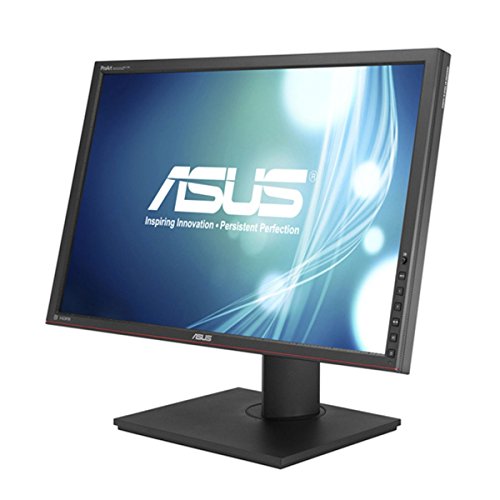 | 9.4PCKitHQ scoreView on Amazon |
04 | 9.2PCKitHQ scoreView on Amazon |
A closer look at each configuration
ASUS ProArt PA32QCV 32-inch 6K DCI-P3 Thunderbolt 4 Monitor for Mac
score
The 6016 x 3384 IPS panel with 98% DCI-P3, 100% sRGB, and Delta E below 2 defines this 32-inch ProArt monitor.
- Resolution
- 6016 x 3384
- Panel
- IPS
- HDMI
- Yes
- DisplayPort
- Yes
- Weight
- 20.5 lb
- Warranty
- 3 years
This ASUS ProArt PA32QCV has a 31.5-inch 6K LuxPixel AGLR display at 6016 x 3384 with an IPS panel and a 178-degree wide viewing angle. Its color coverage is 98% DCI-P3 and 100% sRGB, and its Calman Verified factory calibration delivers Delta E below 2. The M Model-P3 Color Preset Mode matches the color performance of a MacBook display. Light Sync uses an ambient light sensor and a backlight sensor for color performance from the start. Connectivity includes dual Thunderbolt 4 ports with up to 96W Power Delivery and daisy-chaining, HDMI 2.1, DisplayPort 1.4, and a built-in USB hub. The Auto KVM switch switches between two connected laptops or PCs with one keyboard and mouse. The ergonomic stand adjusts tilt, swivel, pivot, and height. The warranty is 5 years, with 3 years plus 2 years extension with online registration.
Choose it if
- You edit photos on a 32-inch 6K panel
- You want 98% DCI-P3 and 100% sRGB coverage
Consider another if
- You need the 24-inch screen of the PA248Q
- You need the 4K resolution of the ViewFinity S8
SAMSUNG 32-inch ViewFinity S8 (S80D) 4K UHD High Resolution Computer Monitor
score
The 32-inch 4K UHD panel with HDR10 and a height-adjustable stand defines this Samsung ViewFinity S8 monitor.
- Resolution
- 3840x2160
- HDMI
- Yes
- Weight
- 15.21 lb
- Warranty
- 3 year
This Samsung ViewFinity S8 has a 32-inch 4K UHD panel at 3840 x 2160, and HDR10 gives deeper contrast for darker darks and brighter brights. The Easy Setup Stand needs no tools or screws, and the height-adjustable stand swivels and tilts, with a screen that pivots 90 degrees for longer documents. Brightness and color temperature automatically optimize for the environment, and the monitor includes the TÜV-certified Eye Saver Mode. Connectivity includes HDMI, DisplayPort, USB-A, and USB-B ports. The monitor weighs 15.21 lb and carries a 3-year warranty.
Choose it if
- You want a 32-inch 4K UHD panel for photo work
- You connect devices through HDMI, DisplayPort, and USB-A ports
Consider another if
- You need the 6K resolution of the ProArt PA32QCV
- You need the 24-inch screen of the Dell P2415Q
ASUS PA248Q 24-inch ProArt Professional
score
The 24-inch 1920 x 1200 IPS panel with 100% sRGB and pre-calibrated Delta E below 5 defines this ASUS ProArt monitor.
- Resolution
- 1920 x 1200
- Panel
- IPS
- HDMI
- Yes
- DisplayPort
- Yes
- Weight
- 20 lb
- Warranty
- 3 year
This ASUS PA248Q has a 24-inch 1920 x 1200 IPS panel in a 16:10 aspect ratio with 100% sRGB coverage and pre-calibrated Delta E below 5. ASUS EyeCare technology is flicker free, and the ergonomically designed stand adjusts tilt, swivel, pivot, and height, with wall-mount capability on a VESA 100 x 100mm mount. Connectivity includes HDMI, D-Sub, DisplayPort, DVI-D, and four USB 3.0 ports. ASUS QuickFit, Splendid, and a 5-Way navigation key support the workflow. The monitor weighs 20 lb and carries a 3-year warranty.
Choose it if
- You want a 24-inch 1920 x 1200 IPS panel
- You want 100% sRGB coverage in a 16:10 display
Consider another if
- You need the 32-inch screen of the ViewFinity S8
- You need the 4K resolution of the Dell P2415Q
Dell Ultra HD 4K Monitor P2415Q 24-inch Screen LED-Lit Monitor
score
The 24-inch 4K panel with 99% sRGB coverage and a factory calibration report defines this Dell Ultra HD monitor.
- Resolution
- 4K
- HDMI
- Yes
- Weight
- 12.4 lb
This Dell P2415Q has a 24-inch 4K screen with 99% sRGB color coverage, and a factory color calibration report certifies that each monitor arrives at a deltaE below 3. The height-adjustable stand tilts and swivels, and the screen pivots from landscape to portrait to show full pages. The stand detaches for wall mounting with a VESA-compatible 100mm x 100mm wall mount kit, with the mounting equipment sold separately. The contrast ratio is 1000 to 1 typical, with a 2 million to 1 dynamic contrast ratio, and the response time is 8 ms typical and 6 ms gray-to-gray. The monitor weighs 12.4 lb.
Choose it if
- You want a 24-inch 4K panel for photo work
- You want 99% sRGB coverage with a calibration report
Consider another if
- You need the 32-inch screen of the ProArt PA32QCV
- You need the 1920 x 1200 panel of the PA248Q
Make the choice for your setup
Match resolution to your editing
The ASUS ProArt PA32QCV gives a 6016 x 3384 panel, the Samsung ViewFinity S8 and the Dell P2415Q give 4K panels, and the ASUS PA248Q gives a 1920 x 1200 panel. A higher pixel count shows more image detail across the frame, and the 32-inch panels show that detail across a wider surface than the 24-inch panels. Compare the 6016 x 3384 figure of the ProArt PA32QCV with the 3840 x 2160 figure of the ViewFinity S8 and the 1920 x 1200 figure of the PA248Q before choosing. The Dell P2415Q names 4K without a pixel figure in its verified specifications, so compare its named resolution with the stated pixel figures of the other three monitors. Choose the panel whose stated resolution and size match the image detail and workspace you need.
Compare color coverage and calibration
The ProArt PA32QCV covers 98% DCI-P3 and 100% sRGB with Calman Verified factory calibration at Delta E below 2. The Dell P2415Q covers 99% sRGB with a factory color calibration report certifying a deltaE below 3. The ASUS PA248Q covers 100% sRGB with pre-calibrated Delta E below 5. The Samsung ViewFinity S8 names HDR10 for deeper contrast for darker darks and brighter brights. Compare its HDR10 description with the stated gamut figures of the other three monitors. A stated calibration figure describes the color accuracy the manufacturer certifies for that monitor, and a higher coverage percentage describes a wider range of colors within the named gamut. Choose the monitor whose stated coverage and calibration match the color work you do. If that fits your setup better, see our guide to the Best LG Monitor for PS5.
Check connections and the stand
The ProArt PA32QCV connects through dual Thunderbolt 4 ports with up to 96W Power Delivery and daisy-chaining, HDMI 2.1, DisplayPort 1.4, and a built-in USB hub, and its Auto KVM switch switches between two connected laptops or PCs with one keyboard and mouse. The ViewFinity S8 connects through HDMI, DisplayPort, USB-A, and USB-B ports. The PA248Q connects through HDMI, D-Sub, DisplayPort, DVI-D, and four USB 3.0 ports. The Dell P2415Q names HDMI and a speaker-line out, with no inbuilt speakers. Every monitor in this guide has a height-adjustable stand, and the ProArt PA32QCV, the ViewFinity S8, and the PA248Q adjust tilt, swivel, pivot, and height, while the Dell P2415Q tilts, swivels, and pivots from landscape to portrait. Match the ports to the cables your computer uses and the stand to the desk space you have.
For a wider shortlist, start with 24 vs 27 Inch Monitor.
FAQ: Monitor for Lightroom
Which monitor has the highest resolution here?
The ASUS ProArt PA32QCV has a 6016 x 3384 panel, the highest pixel figure among the four monitors. The Samsung ViewFinity S8 has a 3840 x 2160 panel, the Dell P2415Q names 4K, and the ASUS PA248Q has a 1920 x 1200 panel.
Which monitors cover 100% sRGB?
The ASUS ProArt PA32QCV covers 100% sRGB alongside 98% DCI-P3, and the ASUS PA248Q covers 100% sRGB on its 1920 x 1200 IPS panel. The Dell P2415Q covers 99% sRGB with a factory calibration report, and the Samsung ViewFinity S8 names HDR10 for deeper contrast.
Which monitors adjust tilt, swivel, pivot, and height?
The ASUS ProArt PA32QCV, the Samsung ViewFinity S8, and the ASUS PA248Q each adjust tilt, swivel, pivot, and height. The Dell P2415Q has a height-adjustable stand that tilts and swivels, and its screen pivots from landscape to portrait.


