
Best Microsoft Ergonomic Keyboard and Mouse (2026): 5 Picks Compared
 By Theo LangUpdated
Choose the Microsoft Ergonomic Desktop if you want a wired USB keyboard and mouse with a split keyboard, cushioned wrist and palm support, and a dedicated Office key. Its wired USB connection suits a fixed desk, and the 3 years manufacturer warranty covers the whole device. Three of the other four Microsoft combos here are wireless, while the Comfort Curve Desktop 3000 is also wired.
Your shortlist at a glance
PCKitHQ scores range from 9.2 to 9.8. See how we pick.
| Product and key specifications | Score and retailer |
|---|---|
01 Best Overall Microsoft Ergonomic Desktop | 9.8PCKitHQ scoreView on Amazon |
02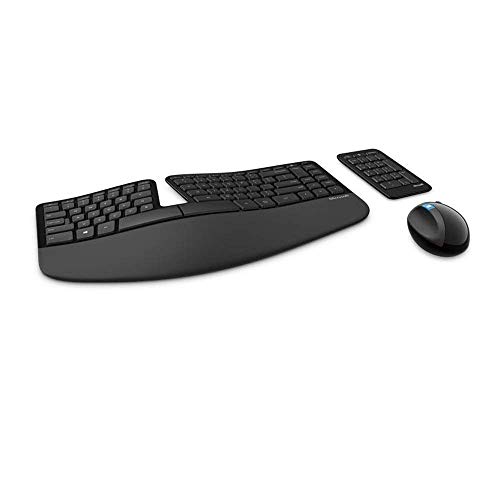 | 9.7PCKitHQ scoreView on Amazon |
03 Also Consider Microsoft Wireless Comfort Desktop 5050 | 9.5PCKitHQ scoreView on Amazon |
04 Also Consider Microsoft Sculpt Comfort Desktop | 9.3PCKitHQ scoreView on Amazon |
05 | 9.2PCKitHQ scoreView on Amazon |
A closer look at each configuration
Microsoft Ergonomic Desktop
score
The split keyboard, cushioned wrist and palm support, and dedicated Office key define this wired USB desktop set.
- Connection
- Usb
- Warranty
- 3 years manufacturer
This Microsoft Ergonomic Desktop connects by USB and includes a keyboard and a mouse. Its split keyboard and cushioned wrist and palm support are the central ergonomic features, and the keyboard has a dedicated Office key. The set is black, model RJU-00001, and carries a 3 years manufacturer warranty. A wired connection means no batteries to replace and no wireless receiver to keep track of at the desk.
Choose it if
- You want a split keyboard with cushioned wrist and palm support
- You want a wired USB connection for a fixed desk
Consider another if
- You need the wireless connection of the Microsoft Sculpt Ergonomic Wireless Desktop
- You need the separate number pad of the Microsoft Sculpt Ergonomic Wireless Desktop
Microsoft Sculpt Ergonomic Wireless Desktop Keyboard and Wireless Mouse L5V-00001
score
The split keyset, domed design, Natural Arc layout, and separate number pad define this wireless Bluetooth desktop set.
- Wireless
- Yes
- Connection
- Bluetooth USB module
- Weight
- 2.9 lb
This Microsoft Sculpt Ergonomic Wireless Desktop connects through a Bluetooth USB module and weighs 2.9 lb. Its split keyset, domed design, and Natural Arc key layout position wrists and forearms in a natural, relaxed position, and the cushioned palm rest provides support. The separate number pad gives greater flexibility for workspace setup. The box includes the keyboard, mouse, number pad, 2x AAA batteries, and the Bluetooth USB module. This keyboard features Advanced Encryption Standard (AES) technology, which is designed to help protect your information by encrypting your keystrokes.
Choose it if
- You want a wireless keyboard with a separate number pad
- You want a domed keyboard with a Natural Arc key layout
Consider another if
- You need the wired USB connection of the Microsoft Ergonomic Desktop
- You need the 1.98 lb weight of the Wireless Comfort Desktop 5050
Microsoft Wireless Comfort Desktop 5050
score
The comfort curve design, built-in palm rest, and wireless connection define this 1.98 lb desktop set.
- Wireless
- Yes
- Weight
- 1.98 lb
This Microsoft Wireless Comfort Desktop 5050 with AES is wireless and weighs 1.98 lb. Its comfort curve design encourages natural wrist posture, and the built-in palm rest helps support and straighten wrists. The wireless keyboard lets you work without tangled wires, and the set carries a limited warranty. It is black, model PP4-00002, and was released on 2019-03-26. The comfort curve design is ergonomist-approved and easy to use.
Choose it if
- You want a wireless keyboard with a built-in palm rest
- You want a comfort curve design that encourages natural wrist posture
Consider another if
- You need the wired USB connection of the Microsoft Ergonomic Desktop
- You need the separate number pad of the Microsoft Sculpt Ergonomic Wireless Desktop
Microsoft Sculpt Comfort Desktop
score
The contoured design, detachable palm rest, and split spacebar define this wireless desktop set with a USB wireless receiver.
- Wireless
- Yes
- Connection
- USB Wireless Receiver
- Weight
- 2.08 lb
This Microsoft Sculpt Comfort Desktop is wireless, connects through a USB wireless receiver, and weighs 2.08 lb. Its contoured keyboard design promotes a natural wrist position, the cushioned palm rest provides support, and the detachable palm rest can be removed for a sleek, compact look. The split spacebar with backspace functionality is designed to improve typing efficiency. The mouse has a Windows touch tab and 4-way touch scrolling, and BlueTrack Technology lets it work on virtually any surface. It comes with a manufacturer warranty.
Choose it if
- You want a detachable palm rest you can remove
- You want a mouse with 4-way touch scrolling
Consider another if
- You need the wired USB connection of the Microsoft Ergonomic Desktop
- You need the separate number pad of the Microsoft Sculpt Ergonomic Wireless Desktop
Microsoft Comfort Curve Desktop 3000 for 7ZJ-00018 Black USB Wired Ergonomic Keyboard and Mouse
score
The comfort curve design, wired USB connection, and 1.5 lb weight define this desktop set for business use.
- Connection
- USB
- Weight
- 1.5 lb
This Microsoft Comfort Curve Desktop 3000 for Business connects by USB and weighs 1.5 lb. Its ergonomist-approved comfort curve design is the central feature, and the set offers wired reliability with no batteries or receiver to manage. Hot keys and buttons help tap into Windows 7, and BlueTrack Technology is built into the mouse. The design offers comfort and control for either hand. It is black, model 7ZJ-00018, and was released on 2018-08-10.
Choose it if
- You want a wired USB keyboard and mouse at 1.5 lb
- You want BlueTrack Technology in the mouse
Consider another if
- You need the wireless connection of the Microsoft Sculpt Ergonomic Wireless Desktop
- You need the split keyboard of the Microsoft Ergonomic Desktop
Make the choice for your setup
Wired USB or wireless
Two of the five combos connect by wired USB: the Microsoft Ergonomic Desktop and the Comfort Curve Desktop 3000 for Business. A wired connection suits a fixed desk where the keyboard and mouse stay in one place. The other three combos are wireless. The Sculpt Ergonomic Wireless Desktop connects through a Bluetooth USB module and includes 2x AAA batteries, while the Sculpt Comfort Desktop connects through a USB wireless receiver. The Wireless Comfort Desktop 5050 is wireless as well. Choose wired when you want no batteries or receiver to manage, and wireless when you want room to move without tangled wires.
Split keyboards and palm support
The Microsoft Ergonomic Desktop has a split keyboard with cushioned wrist and palm support. The Sculpt Ergonomic Wireless Desktop has a split keyset, a domed design, a Natural Arc key layout, and a cushioned palm rest. The Wireless Comfort Desktop 5050 has a comfort curve design with a built-in palm rest. The Sculpt Comfort Desktop has a contoured design, a cushioned palm rest, a palm lift, and a detachable palm rest that can be removed for a sleek, compact look. The Comfort Curve Desktop 3000 has an ergonomist-approved comfort curve design. Compare these named shapes against the wrist position you want at your desk. If that fits your setup better, see our guide to the Best Pink Keyboard and Mouse.
Extra keys and mouse features
Only the Sculpt Ergonomic Wireless Desktop includes a separate number pad, which gives greater flexibility for workspace setup. The Microsoft Ergonomic Desktop has a dedicated Office key. The Sculpt Comfort Desktop has a split spacebar with backspace functionality. The Comfort Curve Desktop 3000 has hot keys and buttons for Windows 7. On the mouse side, the Sculpt Comfort Desktop has a Windows touch tab, 4-way touch scrolling, and BlueTrack Technology that works on virtually any surface. The Comfort Curve Desktop 3000 also has BlueTrack Technology. The Sculpt Ergonomic Wireless Desktop and the Wireless Comfort Desktop 5050 name Advanced Encryption Standard technology. The Sculpt Comfort Desktop names Advanced Encryption Standard 128-Bit Encryption.
Comparing more options? See Best Ergonomic Keyboard Mouse.
FAQ: Microsoft Ergonomic Keyboard and Mouse
Which of these Microsoft combos are wireless?
The Sculpt Ergonomic Wireless Desktop, the Wireless Comfort Desktop 5050, and the Sculpt Comfort Desktop are wireless. The Sculpt Ergonomic Wireless Desktop connects through a Bluetooth USB module. The Microsoft Ergonomic Desktop and the Comfort Curve Desktop 3000 connect by wired USB.
Which set has a separate number pad?
The Microsoft Sculpt Ergonomic Wireless Desktop includes a separate number pad, along with the keyboard, mouse, 2x AAA batteries, and Bluetooth USB module. The separate number pad gives greater flexibility for workspace setup. No other set in this guide includes a separate number pad.
What warranty does the Microsoft Ergonomic Desktop carry?
It carries a 3 years manufacturer warranty. The Wireless Comfort Desktop 5050 carries a limited warranty, and the Sculpt Comfort Desktop comes with a manufacturer warranty. The Comfort Curve Desktop 3000 connects by wired USB and weighs 1.5 lb.


