
Best Membrane Keyboard (2026): Our 6 Picks Ranked
 By Theo LangUpdated
Choose the AULA Keyboard if you want a 99-key membrane keyboard with a number pad, RGB backlight, and three connection modes for up to five devices. Its rotary knob adjusts volume and lighting, and the foldable two-stage kickstand sets the tilt. The five keyboards below compare layouts, connections, lighting, and media controls across membrane designs.
Your shortlist at a glance
PCKitHQ scores range from 9.2 to 9.8. See how we pick.
| Product and key specifications | Score and retailer |
|---|---|
01 | 9.8PCKitHQ scoreView on Amazon |
02 | 9.7PCKitHQ scoreView on Amazon |
03 Also Consider EPOMAKER Aula S102 PRO Membrane Gaming Keyboard w/ TFT Screen & Volume KnobSwitch type: Membrane, Layout: Full Size, Wireless: Yes | 9.6PCKitHQ scoreView on Amazon |
04 Also Consider Corsair K55 CORE RGB Membrane Wired GamingSwitch type: Membrane, Layout: QWERTY US Layout, Backlight: Yes | 9.4PCKitHQ scoreView on Amazon |
05 | 9.3PCKitHQ scoreView on Amazon |
06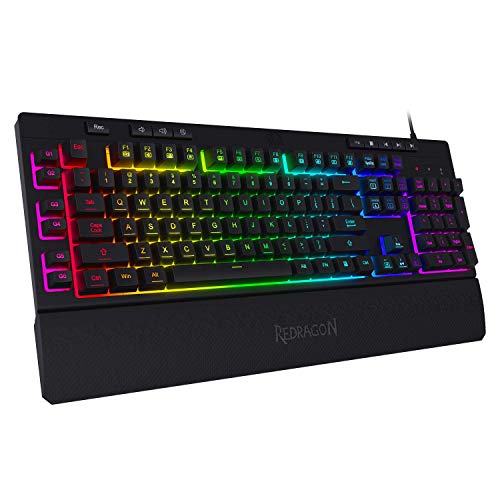 Also Consider Redragon K512 RGB Membrane Gaming KeyboardSwitch type: Membrane, Layout: 104 Keys, Backlight: Yes | 9.2PCKitHQ scoreView on Amazon |
A closer look at each configuration
AULA Keyboard
score
The 96% layout, number pad, RGB backlight, and three connection modes suit shared desks and multi-device setups.
- Switch type
- Membrane
- Layout
- 96%
- Wireless
- Yes
- Backlight
- Yes
- Connection
- 3-connectivity modes
- Weight
- 2.64 lb
- Warranty
- 1 Year Manufacturer
The AULA Keyboard uses a 96% layout with 99 keys and a separate number pad. Its RGB backlight adjusts in brightness and speed through the knob or FN key combinations, and macro software creates lighting setups. Three connection modes link up to five devices at once, switching with FN key combinations. A dual-mode rotary knob adjusts volume, audio, and lighting effects. The foldable two-stage kickstand sets the tilt angle, and M1, M2, and M3 buttons remap key functions or merge several keys into one. It weighs 2.64 lb and carries a 1 year manufacturer warranty.
Choose it if
- You want a 99-key layout with a number pad
- You want three connection modes for five devices
Consider another if
- You need a wired-only keyboard for your desk
- You need a two-year warranty on your keyboard
AULA 99 Key Keyboard
score
The 99-key layout, 16.8 million RGB colors, and tri-mode connection suit colorful multi-device desks.
- Switch type
- Membrane
- Layout
- 99-Key
- Wireless
- Yes
- Backlight
- Yes
- Connection
- Bluetooth 5.0, 2.4GHz wireless and USB wired mode
- Warranty
- 1 Year Manufacturer
The AULA 99 Key Keyboard is a membrane keyboard with 99 keys and a number pad. Its RGB backlight offers 16.8 million colors with 16 preset lighting effects, adjustable in brightness and speed through the knob or FN key combinations. All keys support macro customization for recording and editing macros. Three connection modes cover Bluetooth 5.0, 2.4GHz wireless, and USB wired mode, with a dual-mode rotary knob for volume, audio, and lighting. A 2000mAh rechargeable battery powers wireless use. The foldable two-stage kickstand sets the tilt, and M1, M2, and M3 buttons remap functions. It is a membrane keyboard and does not support hot-swapping.
Choose it if
- You want 16.8 million RGB colors with 16 effects
- You want Bluetooth 5.0, 2.4GHz, and USB-C
Consider another if
- You need a keyboard that supports hot-swapping
- You need a two-year warranty on your keyboard
EPOMAKER Aula S102 PRO Membrane Gaming Keyboard w/ TFT Screen & Volume Knob
score
The full-size layout, TFT screen, volume knob, and silent silicone structure suit quiet office and late-night use.
- Switch type
- Membrane
- Layout
- Full Size
- Wireless
- Yes
- Backlight
- Yes
- Connection
- BT/2.4G/USB
- Warranty
- 1 Year Warranty
The EPOMAKER Aula S102 PRO is a full-size membrane keyboard with a dedicated number pad and a full set of function keys. Its TFT screen shows connection status and battery percentage at a glance, and the rotary knob adjusts volume while FN shortcuts cycle RGB settings. The silicone structure keeps typing quiet, and the 2 cm mid-height front with a sculpted Cherry profile keeps hands in a neutral position. Adjustable kickstands offer three typing angles. Gaming mode turns the ASDW keys into arrow keys. It carries a 1 year warranty.
Choose it if
- You want a TFT screen showing connection and battery
- You want a silent keyboard with a number pad
Consider another if
- You need a keyboard that supports hot-swapping
- You need a two-year warranty on your keyboard
Corsair K55 CORE RGB Membrane Wired Gaming
score
The ten-zone RGB, dedicated media buttons, and 300 ml spill resistance suit wired gaming desks.
- Switch type
- Membrane
- Layout
- QWERTY US Layout
- Backlight
- Yes
- Connection
- Wired
- Weight
- 1.66 lb
- Warranty
- 2 Years Manufacturer
The Corsair K55 CORE is a wired membrane keyboard with a QWERTY US layout. Ten zones of customizable RGB light the desktop, and four dedicated media buttons control volume and playback, with Win lock and brightness buttons nearby. It withstands spills up to 300 ml. Twelve-key rollover with 1000Hz polling keeps the keyboard up with fast play. Its quiet, responsive switches suit long gaming sessions. It works with PC and Mac, weighs 1.66 lb, and carries a 2 years manufacturer warranty.
Choose it if
- You want ten-zone RGB lighting on your desk
- You want dedicated media buttons for playback
Consider another if
- You need a wireless connection for your setup
- You need three connection modes for five devices
Razer Ornata V3 Gaming Keyboard
score
The mecha-membrane switches, low-profile keys, and magnetic wrist rest suit long typing sessions.
- Switch type
- Mecha-Membrane
- Backlight
- Yes
- Weight
- 3.1 lb
- Warranty
- 2 year manufacturer
The Razer Ornata V3 uses mecha-membrane switches that fuse the snappy, clicky feedback of a mechanical switch with the feel of a conventional keyboard. Its low-profile keys use slimmer keycaps and shorter switches for natural hand positioning during long hours. UV-coated keycaps resist fading and wear from frequent use. Backlit media keys pause, play, skip, and adjust brightness and volume. The magnetic soft-touch wrist rest snaps to the keyboard for wrist support. It weighs 3.1 lb and carries a 2 year manufacturer warranty.
Choose it if
- You want low-profile keys for long hours
- You want a magnetic wrist rest for support
Consider another if
- You need a keyboard under 2 lb for travel
- You need 26-key anti-ghosting for your games
Redragon K512 RGB Membrane Gaming Keyboard
score
The 104-key layout, six macro keys, and 13 lighting modes suit macro-heavy gaming without software.
- Switch type
- Membrane
- Layout
- 104 Keys
- Backlight
- Yes
- Weight
- 2.09 lb
- Warranty
- 1 year
The Redragon K512 is a membrane gaming keyboard with 104 keys. Six onboard macro keys record and reassign G1 through G6 on the fly for in-game combos or shortcuts, with no drivers or installation needed. Twenty-six anti-ghosting keys press at once without input conflicts, and dedicated media controls play, pause, or skip tracks. True RGB offers 13 lighting modes: seven presets plus six customizable slots, with brightness adjustable from vivid to completely off. A detachable magnetic wrist rest adds comfort, and double-shot keycaps resist fading. It weighs 2.09 lb and carries a 1 year warranty.
Choose it if
- You want six onboard macro keys for combos
- You want 13 RGB lighting modes for your desk
Consider another if
- You need a keyboard under 2 lb for travel
- You need a two-year warranty on your keyboard
Make the choice for your setup
Compare layouts and number pads
Layout decides how much desk space a keyboard takes and whether a number pad sits within reach. The AULA Keyboard uses a 96% layout with 99 keys and a separate number pad. The AULA 99 Key Keyboard also has 99 keys with a number pad. The EPOMAKER Aula S102 PRO is full size with a dedicated number pad and a full set of function keys. The Corsair K55 CORE uses a QWERTY US layout. The Redragon K512 has 104 keys. The Razer Ornata V3 uses low-profile keys with slimmer keycaps and shorter switches. Match the layout to the keys you press daily before weighing lighting or connections.
Weigh wireless against wired connections
Connection decides where a keyboard can sit and how many devices it serves. The AULA Keyboard offers three connection modes and links up to five devices at once, switching with FN key combinations. The AULA 99 Key Keyboard covers Bluetooth 5.0, 2.4GHz wireless, and USB wired mode. The pink AULA model runs on a 2000mAh rechargeable battery. The EPOMAKER Aula S102 PRO covers BT, 2.4GHz wireless, and USB, pairing with two devices over BT. The Corsair K55 CORE is wired, with four dedicated media buttons and Win lock controls at hand. Choose three-mode boards for several devices and the wired Corsair for a single fixed desk. Shoppers with a related need can compare our guide to the Best Sounding Mechanical Keyboard.
Check lighting, macros, and warranty
Lighting and macros change how a keyboard feels in daily use, and warranty sets the coverage behind it. The AULA Keyboard and the AULA 99 Key Keyboard both adjust RGB brightness and speed through a knob, and the pink model adds 16 preset effects with 16.8 million colors. The EPOMAKER Aula S102 PRO adds a TFT screen and a volume knob. The Corsair K55 CORE has ten-zone RGB and 300 ml spill resistance. The Redragon K512 offers 13 lighting modes and six onboard macro keys. The AULA models, the EPOMAKER, and the Redragon carry a 1 year warranty, and the Corsair and Razer carry a 2 year warranty.
For a wider shortlist, start with Mechanical vs Membrane Keyboard.
FAQ: Membrane Keyboard
Which keyboards here connect wirelessly?
The AULA Keyboard connects through three modes and links up to five devices. The AULA 99 Key Keyboard uses Bluetooth 5.0, 2.4GHz wireless, and USB wired mode. The EPOMAKER Aula S102 PRO uses BT, 2.4GHz wireless, and USB. The Corsair K55 CORE is wired.
Which keyboards here have a number pad?
The AULA Keyboard has a 99-key layout with a separate number pad. The AULA 99 Key Keyboard has a number pad. The EPOMAKER Aula S102 PRO has a dedicated number pad with a full set of function keys.
What warranty do these keyboards carry?
The AULA Keyboard, the AULA 99 Key Keyboard, the EPOMAKER Aula S102 PRO, and the Redragon K512 carry a 1 year warranty. The Corsair K55 CORE and the Razer Ornata V3 carry a 2 year warranty.


