
Best M 2 SSD for Operating System (2026): Our 4 Picks Ranked
 By Theo LangUpdated
Choose the Crucial P310 2TB SSD for an operating system drive in a laptop or desktop: its 2TB capacity holds the operating system, apps, and media, and its PCIe Gen4 NVMe interface reads at up to 7,100 MB/s. It fits an M.2 2280 slot and works with laptops, desktops, and select gaming consoles. The guide also covers a 1TB drive, a 512GB drive, and a compact M.2 2230 drive.
Your shortlist at a glance
PCKitHQ scores range from 9.2 to 9.8. See how we pick.
| Product and key specifications | Score and retailer |
|---|---|
01 | 9.8PCKitHQ scoreView on Amazon |
02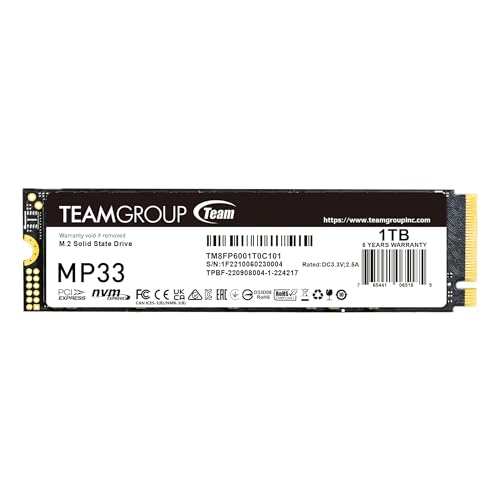 | 9.6PCKitHQ scoreView on Amazon |
03 | 9.4PCKitHQ scoreView on Amazon |
04 | 9.2PCKitHQ scoreView on Amazon |
A closer look at each configuration
Crucial P310 2TB SSD
score
The Crucial P310 2TB SSD pairs 2TB of capacity with PCIe Gen4 speeds up to 7,100 MB/s read in an M.2 2280 drive.
- Capacity
- 2TB
- Interface
- PCIe Gen4 NVMe
- Form factor
- M.2 2280
- Weight
- 0.02 lb
- Warranty
- 5-year limited warranty
The Crucial P310 2TB SSD is a PCIe Gen4 NVMe drive in the M.2 2280 form factor. It reads at up to 7,100 MB/s and writes at up to 6,000 MB/s, with 2TB of capacity for the operating system, AAA games, apps, and media. It works with laptops, desktops, and select gaming consoles, including the ROG Ally X, Lenovo Legion Go, and AYANEO Kun, and it stays backward compatible with PCIe Gen3 systems. Acronis data recovery software is included. The drive uses Micron G8 NAND with thermal control and carries a 5-year limited warranty.
Choose it if
- You want 2TB for the operating system, games, apps, and media
- You want PCIe Gen4 speeds up to 7,100 MB/s read
Consider another if
- You need the M.2 2230 form factor for a Steam Deck
- You need the 512GB capacity of the TEAMGROUP MP33 512GB
TEAMGROUP MP33 1TB SLC Cache 3D NAND
score
The TEAMGROUP MP33 1TB offers 1TB of NVMe PCIe Gen3x4 storage with read speeds up to 1,800 MB/s and SLC caching.
- Capacity
- 1TB
- Interface
- NVMe PCIe Gen3x4
- Form factor
- M.2 2280
- Weight
- 0.01 lb
- Warranty
- 5-year or TBW (Terabytes Written) limited warranty
The TEAMGROUP MP33 1TB is a PCIe Gen3x4 NVMe drive in the M.2 2280 form factor. Sequential read and write speeds reach up to 1,800 and 1,500 MB/s, and SLC caching supports computing performance. Its 1TB capacity holds the operating system, games, and software, and its transfer performance is rated 5 times higher than the SATA III interface. It supports Intel and AMD next-generation platforms and suits desktop and notebook use. The warranty is a 5-year or TBW limited warranty.
Choose it if
- You want 1TB for the operating system and daily software
- You want an M.2 2280 drive for a desktop or notebook
Consider another if
- You need 2TB of installed capacity for the operating system and files
- You need PCIe Gen4 read speeds up to 7,100 MB/s
TEAMGROUP MP33 512GB SLC Cache 3DNAND TLC
score
The TEAMGROUP MP33 512GB offers 512GB of NVMe PCIe Gen3x4 storage with read speeds up to 1,700 MB/s and SLC caching.
- Capacity
- 512GB
- Interface
- NVMe PCIe Gen3x4
- Form factor
- M.2 2280
- Weight
- 0.02 lb
- Warranty
- 5-year or TBW (Terabytes Written) limited warranty
The TEAMGROUP MP33 512GB is a PCIe Gen3x4 NVMe drive in the M.2 2280 form factor. Sequential read and write speeds reach up to 1,700 and 1,400 MB/s, and SLC caching supports computing performance. Its 512GB capacity holds the operating system and core software, and its transfer performance is rated 5 times higher than the SATA III interface. It supports Intel and AMD next-generation platforms and suits desktop and notebook use. Check that the motherboard, processor, and BIOS support the drive before buying. The warranty is a 5-year or TBW limited warranty.
Choose it if
- You want 512GB for the operating system and core software
- You want an M.2 2280 drive for a desktop or notebook
Consider another if
- You need 1TB of installed capacity for the operating system and files
- You need read speeds up to 1,800 MB/s
Crucial P310 2TB M.2 2230 SSD
score
The Crucial P310 2TB M.2 2230 SSD pairs 2TB of capacity with PCIe Gen4 speeds up to 7,100 MB/s read in a compact drive.
- Capacity
- 2TB
- Interface
- PCIe Gen4 NVMe
- Form factor
- M.2 2230
- Weight
- 0.01 lb
- Warranty
- 5-year limited warranty
The Crucial P310 2TB M.2 2230 SSD is a PCIe Gen4 NVMe drive in the compact M.2 2230 form factor. It reads at up to 7,100 MB/s and writes at up to 6,000 MB/s, with 2TB of capacity for the operating system, AAA games, apps, and media. It works with the Valve Steam Deck, ASUS ROG Ally, Microsoft Surface, and select Dell laptops, and it suits mini PCs and ultrabooks. It is engineered for low power draw on handheld consoles and laptops, and the drive uses Micron G8 NAND with thermal control. It carries a 5-year limited warranty.
Choose it if
- You want 2TB in an M.2 2230 drive for a Steam Deck
- You want PCIe Gen4 speeds up to 7,100 MB/s read
Consider another if
- You need the M.2 2280 form factor for a standard desktop slot
- You need the 1TB capacity of the TEAMGROUP MP33 1TB
Make the choice for your setup
Match the form factor to the slot
Three drives in this guide use the M.2 2280 form factor: the Crucial P310 2TB SSD, the TEAMGROUP MP33 1TB, and the TEAMGROUP MP33 512GB. The Crucial P310 2TB M.2 2230 SSD uses the shorter M.2 2230 form factor instead. A drive fits only a slot that matches its length, so check the slot in the laptop, desktop, handheld console, or mini PC before choosing. The M.2 2230 P310 is the drive in this guide that names the Valve Steam Deck, ASUS ROG Ally, Microsoft Surface, and select Dell laptops. The M.2 2280 P310 names laptops, desktops, and select gaming consoles, including the ROG Ally X, Lenovo Legion Go, and AYANEO Kun.
Weigh capacity against the operating system install
The two Crucial P310 drives each hold 2TB, or 2048 GB. That capacity holds the operating system plus AAA games, apps, and media. The TEAMGROUP MP33 1TB holds 1024 GB, and the TEAMGROUP MP33 512GB holds 512 GB. A 512GB drive holds the operating system and core software, while 1TB leaves more room for games and software. Compare the installed capacity with the files you intend to keep on the drive, including the operating system, applications, and games. Installed capacity is the figure to compare; expansion limits and optional upgrades do not change it. The 2TB drives suit a reader who wants the operating system and a large collection of games and media on one drive. A related shortlist covers the Best M.2 SSD with Heat Sink.
Compare rated Gen4 and Gen3 speeds
The two Crucial P310 drives use PCIe Gen4 NVMe and read at up to 7,100 MB/s and write at up to 6,000 MB/s. The TEAMGROUP MP33 drives use NVMe PCIe Gen3x4: the 1TB model reads at up to 1,800 MB/s and writes at up to 1,500 MB/s, while the 512GB model reads at up to 1,700 MB/s and writes at up to 1,400 MB/s. These are rated speeds, not measured results. Both MP33 drives use SLC caching, and the Crucial P310 2TB SSD stays backward compatible with PCIe Gen3 systems. Match the interface to the slot and the rated speeds to the work the drive will do.
For a wider shortlist, start with NVMe vs SSD.
FAQ: M 2 SSD for Operating System
Which drive suits a Steam Deck?
The Crucial P310 2TB M.2 2230 SSD names the Valve Steam Deck among its compatible devices. Its M.2 2230 form factor fits the handheld, and it pairs 2TB of capacity with PCIe Gen4 speeds up to 7,100 MB/s read. The M.2 2280 drives in this guide use the longer form factor.
What capacity should an operating system drive have?
It depends on the files kept on the drive. A 512GB drive holds the operating system and core software. A 1TB drive leaves more room for games and software. A 2TB drive holds the operating system plus AAA games, apps, and media. Compare the installed capacity with the files you intend to keep locally.
Do these drives fit an M.2 2280 slot?
Three of the four do. The Crucial P310 2TB SSD, the TEAMGROUP MP33 1TB, and the TEAMGROUP MP33 512GB are all M.2 2280 drives. The Crucial P310 2TB M.2 2230 SSD uses the shorter M.2 2230 form factor instead, so check the slot before choosing.


