
Best Laptop for College Students for Coding (2026): 5 Picks Compared
 By Theo LangUpdated
Choose the Apple 2024 MacBook Pro Laptop with M4 Pro if you code on a laptop every day and want 24GB of unified memory with a 512GB SSD. Its M4 Pro chip has a 12-core CPU and a 16-core GPU. The Dell 15.6-inch touchscreen gives you 32GB of DDR5 memory and a 1TB SSD if you want the most installed memory.
Your shortlist at a glance
PCKitHQ scores range from 9.2 to 9.8. See how we pick.
| Product and key specifications | Score and retailer |
|---|---|
01 | 9.8PCKitHQ scoreView on Amazon |
02 | 9.7PCKitHQ scoreView on Amazon |
03 | 9.5PCKitHQ scoreView on Amazon |
04 | 9.3PCKitHQ scoreView on Amazon |
05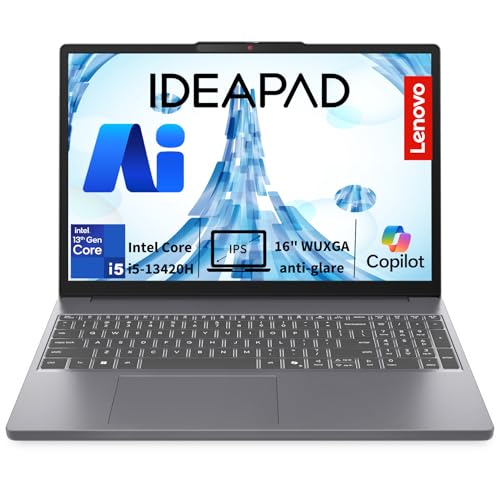 | 9.2PCKitHQ scoreView on Amazon |
A closer look at each configuration
Apple MacBook Pro Laptop
score
The MacBook Pro pairs an M4 Pro chip with 24GB of unified memory, a 512GB SSD and a 14.2-inch Liquid Retina XDR display.
- Installed memory
- 24 GB
- Installed storage
- 512GB
- Processor
- M4 Pro
- Graphics
- 16-core GPU
- Operating system
- macOS
- Screen size
- 14.2 in
- Weight
- 3.53 lb
- Warranty
- Apple One (1) Year Limited Warranty
The Apple 2024 MacBook Pro Laptop with M4 Pro runs a 12-core CPU and a 16-core GPU with 24GB of unified memory and a 512GB SSD. Its 14.2-inch Liquid Retina XDR display reaches up to 1600 nits peak brightness, and the laptop weighs 3.53 lb. The M4 Pro chip is built for Apple Intelligence, and Microsoft 365 and Adobe Creative Cloud run in macOS. The warranty is the Apple One (1) Year Limited Warranty.
Choose it if
- You code in macOS with 24GB of unified memory
- You want a 14.2-inch Liquid Retina XDR display
Consider another if
- You need the 32GB of DDR5 memory of the Dell
- You need the 1TB SSD of the Dell touchscreen
HiBook 6 15.6-inch Laptop Computers
score
The HiBook 6 pairs an Intel N150 with 16GB of DDR4 memory, a 512GB SSD and a 15.6-inch 1080P FHD display.
- Installed memory
- 16 GB
- Installed storage
- 512GB
- Processor
- Intel N150
- Operating system
- Win 11 Home
- Screen size
- 15.6 in
- Resolution
- 1080P FHD
- Weight
- 3.7 lb
- Warranty
- 3-Year Limited Warranty
The Huidun HiBook 6 runs an Intel N150 processor with 4 cores and speeds up to 3.6GHz, 16GB of DDR4 memory and a 512GB SSD. It runs Win 11 Home on a 15.6-inch 1080P FHD display with a numeric keypad, and it weighs 3.7 lb. The 84% screen-to-body ratio leaves narrow bezels around the display. The box includes a carrying bag, a wireless mouse and a mouse pad. It is expandable up to 32GB and 2TB, and the warranty is a 3-Year Limited Warranty.
Choose it if
- You want a 15.6-inch 1080P FHD display
- You want a bag, mouse and mouse pad in the box
Consider another if
- You need the 32GB of DDR5 memory of the Dell
- You need the 24GB of unified memory of the MacBook Pro
Dell 15.6-inch Touchscreen Laptop
score
The Dell pairs an Intel Ultra 7 255U with 32GB of DDR5 memory, a 1TB SSD and a 15.6-inch FHD touchscreen.
- Installed memory
- 32 GB
- Installed storage
- 1TB
- Processor
- Intel Ultra 7 255U
- Operating system
- Windows 11 Pro
- Screen size
- 15.6 in
- Resolution
- 1920x1080
- USB-C
- Yes
- HDMI
- Yes
- Wi-Fi
- Yes
- Weight
- 4.28 lb
- Warranty
- 1 year
The Dell 15.6-inch touchscreen laptop runs an Intel Ultra 7 255U processor with 12 cores and 14 threads and speeds up to 5.2GHz. It has 32GB of DDR5 memory and a 1TB SSD, and it runs Windows 11 Pro on a 15.6-inch FHD touchscreen display at 1920x1080. The narrow bezels leave more screen in the same body. It has USB-C and HDMI ports, Wi-Fi 6 and Bluetooth, and a backlit keyboard with a Copilot key and a numeric keypad. It weighs 4.28 lb, and the warranty is 1 year.
Choose it if
- You want 32GB of DDR5 memory for coding
- You want a 15.6-inch FHD touchscreen display
Consider another if
- You need the lighter 3.53 lb MacBook Pro
- You need the 16-inch screen of the Dell 16
Dell 16 Touchscreen Laptop for & Home Student
score
The Dell 16 pairs an Intel Core 7 150U with 16GB of DDR5 memory and a 16-inch 1920x1200 touchscreen.
- Installed memory
- 16 GB
- Processor
- Intel Core 7 150U
- Operating system
- Windows 11 Home
- Screen size
- 16 in
- Resolution
- 1920x1200
- USB-C
- Yes
- Wi-Fi
- Yes
- Touchscreen
- Yes
- Weight
- 4.37 lb
The Dell 16 runs an Intel Core 7 150U processor with 10 cores and 12 threads and speeds up to 5.4GHz. It has 16GB of DDR5 memory and runs Windows 11 Home on a 16-inch 1920x1200 touchscreen with a 16:10 aspect ratio. The 16:10 aspect ratio gives more vertical space for code and editing. It has USB-C with Power Delivery and DisplayPort, Wi-Fi 6E and Bluetooth 5.3, a fingerprint reader and a backlit keyboard with a numeric keypad. It has a 1080p FHD webcam and Office 365, and it weighs 4.37 lb.
Choose it if
- You want a 16-inch 1920x1200 touchscreen display
- You want Windows 11 Home with a Copilot key
Consider another if
- You need the 32GB of DDR5 memory of the Dell
- You need the 24GB of unified memory of the MacBook Pro
Lenovo 16-inch i5-13420H
score
The Lenovo pairs an Intel i5-13420H with 24GB of DDR5 memory, a 1TB SSD and a 16-inch WUXGA display.
- Installed memory
- 24 GB
- Installed storage
- 1TB
- Processor
- Intel 13th Gen i5-13420H
- Operating system
- Windows 11 Home
- Resolution
- 1920x1200
- Wi-Fi
- Yes
The Lenovo 16-inch laptop runs an Intel 13th Gen i5-13420H processor with 8 cores, 24GB of DDR5 memory and a 1TB SSD. Its 16-inch WUXGA display measures 1920x1200 and gives an 11% taller screen than standard FHD, and it runs Windows 11 Home with Copilot AI. It has a full-size keyboard with a numeric keypad, a 720p HD webcam with a privacy shutter, WiFi 6 and Bluetooth 5.2. It weighs 3.7 lb and includes Microsoft 365.
Choose it if
- You want 24GB of DDR5 memory for coding
- You want a 16-inch WUXGA display for code
Consider another if
- You need the 32GB of DDR5 memory of the Dell
- You need the lighter 3.53 lb MacBook Pro
Make the choice for your setup
Memory and storage for code
Memory and storage decide how many tools and files the laptop holds at once. The Dell 15.6-inch touchscreen has 32GB of DDR5 memory and a 1TB SSD. The MacBook Pro has 24GB of unified memory and a 512GB SSD, and the Lenovo has 24GB of DDR5 memory and a 1TB SSD. The Huidun has 16GB of DDR4 memory and a 512GB SSD. The Dell 16 has 16GB of DDR5 memory. Compare the installed memory and storage against your local files, tools and code projects, and keep the installed figures separate from expansion limits before you choose a laptop for your coding work.
Screens and keyboards for coding
Screen size and the keyboard shape long coding sessions. The MacBook Pro has a 14.2-inch Liquid Retina XDR display, and the Huidun has a 15.6-inch 1080P FHD display. The Dell 15.6-inch touchscreen has a 15.6-inch FHD touchscreen at 1920x1080. The Dell 16 and the Lenovo each have a 16-inch display at 1920x1200. The Dell 16 screen is a touchscreen. The Dell 16 screen uses ComfortView IPS technology with an anti-glare coating. The Huidun, the Dell 15.6-inch, the Dell 16 and the Lenovo each have a numeric keypad, and the Dell 15.6-inch and the Dell 16 have backlit keyboards with a Copilot key. The Lenovo keyboard is full-size with a dedicated numeric keypad. For a closely related choice, read our guide to the Best Laptop with 16gb RAM.
Operating systems and ports
The MacBook Pro runs macOS. The Huidun runs Win 11 Home. The Dell 15.6-inch runs Windows 11 Pro. The Dell 16 and the Lenovo run Windows 11 Home. The Dell 15.6-inch has USB-C and HDMI ports with Wi-Fi 6 and Bluetooth, and the Dell 16 has USB-C with Power Delivery and DisplayPort, Wi-Fi 6E and Bluetooth 5.3. The Lenovo has WiFi 6 and Bluetooth 5.2. The Huidun bundle includes a wireless mouse. Check the ports on the laptop against the monitor, keyboard and devices you connect, and check the operating system against the software you run before you buy a laptop for coding.
Before you decide, also read Best Laptop.
FAQ: Laptop for College Students for Coding
How much memory do these laptops have for coding?
The Dell 15.6-inch touchscreen has 32GB of DDR5 memory. The MacBook Pro has 24GB of unified memory, and the Lenovo has 24GB of DDR5 memory. The Huidun and the Dell 16 have 16GB of installed memory.
Which of these laptops have a touchscreen?
The Dell 15.6-inch touchscreen has a 15.6-inch FHD touchscreen at 1920x1080, and the Dell 16 has a 16-inch 1920x1200 touchscreen. The MacBook Pro has a 14.2-inch Liquid Retina XDR display, the Huidun has a 15.6-inch 1080P FHD display, and the Lenovo has a 16-inch WUXGA display.
What operating systems do these laptops run?
The MacBook Pro runs macOS. The Huidun runs Win 11 Home. The Dell 16 and the Lenovo run Windows 11 Home, and the Dell 15.6-inch runs Windows 11 Pro. Check that the coding tools and class software you need run on the system you pick before you buy.

