Best Keyboard for Living Room PC (2026): 4 Picks Compared
 By Theo LangUpdated
Buy the Arteck Universal 2.4G Wireless and Bluetooth Touch TV Keyboard Multi-Device if you control a TV-connected computer and want one keyboard that switches between 3 devices over 2.4G wireless and Bluetooth. The Arteck 2.4G Wireless Touch TV Keyboard connects over 2.4G wireless alone, so it suits a TV-connected computer, while the Logitech K830 adds backlit keys for dark rooms and the Wisoqu N5901 uses a trackball in place of a touchpad.
Your shortlist at a glance
PCKitHQ scores range from 9.2 to 9.8. See how we pick.
| Product and key specifications | Score and retailer |
|---|---|
01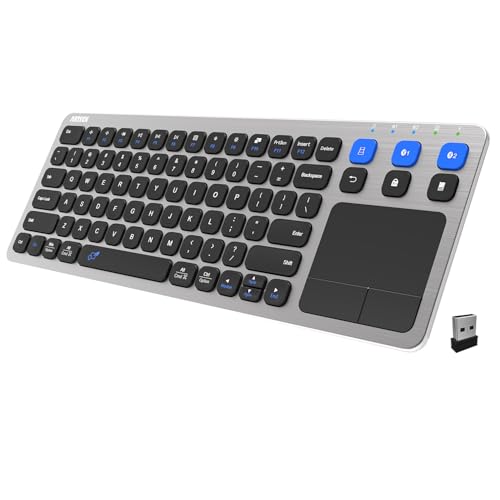 Best Overall Arteck Universal 2.4G Wireless and Bluetooth Touch TV Keyboard Multi-DeviceWireless: Yes, Connection: 2.4G USB Wireless + 2 Bluetooth | 9.8PCKitHQ scoreView on Amazon |
02 Second Pick Arteck 2.4G Wireless Touch TV KeyboardLayout: Full Size, Wireless: Yes, Connection: 2.4G Wireless | 9.6PCKitHQ scoreView on Amazon |
03 Also Consider Logitech K830 Illuminated Living-Room KeyboardWireless: Yes, Connection: Logitech Unifying or Bluetooth Smart | 9.4PCKitHQ scoreView on Amazon |
04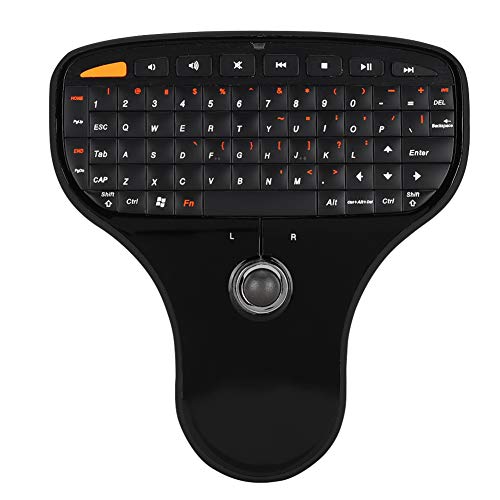 Also Consider Wisoqu N5901 Wireless KeyboardLayout: mini size, Wireless: Yes, Connection: 2.4G wireless | 9.2PCKitHQ scoreView on Amazon |
A closer look at each configuration
Arteck Universal 2.4G Wireless and Bluetooth Touch TV Keyboard Multi-Device
score
One keyboard that switches between 3 devices over 2.4G wireless and Bluetooth, with a built-in touchpad and media hot keys, defines this Arteck Universal for the living room.
- Wireless
- Yes
- Connection
- 2.4G USB Wireless + 2 Bluetooth
- Warranty
- 24
This Arteck Universal connects to 3 devices at the same time over 2.4G USB wireless and 2 Bluetooth connections, and a single key click switches between them. The built-in touchpad and media hot keys control a TV-connected computer or HTPC without a separate mouse. Its wireless range is 10 meters (33 feet). It works with Windows 10, 8, and 7, Mac, Android, and Chrome OS, plus TV-connected computers, desktops, laptops, iMac, Macbook, and HTPC. The box includes the keyboard, a nano USB receiver, a charging cable, and a welcome guide, and the warranty runs 24 months.
Choose it if
- You control a TV-connected computer from the couch
- You switch one keyboard between 3 devices
Consider another if
- You need the backlit keys of the Logitech K830
- You need the trackball of the Wisoqu N5901
Arteck 2.4G Wireless Touch TV Keyboard
score
A full-size layout, a built-in touchpad, and media hot keys over a single 2.4G wireless connection define this Arteck for one TV-connected computer.
- Layout
- Full Size
- Wireless
- Yes
- Connection
- 2.4G Wireless
- Weight
- 1 lb
- Warranty
- 24
This Arteck HW197 is a full-size keyboard with a solid stainless build in an ultra-compact form, and it connects over 2.4G wireless through a nano USB receiver. The built-in touchpad and media hot keys control a TV-connected computer, smart TV, or HTPC without a separate mouse. Its wireless range is 10 meters (33 feet). Setup means inserting the nano USB receiver and using the keyboard and trackpad at once. It works with Windows 10, 8, and 7, Chrome OS, TV-connected computers, and HTPC. The box includes 2 AAA batteries and a welcome guide, and the warranty runs 24 months. It weighs 1 lb.
Choose it if
- You want a full-size keyboard for your TV-connected computer
- You want a keyboard that runs on 2 AAA batteries
Consider another if
- You need Bluetooth connections for a second device
- You need the backlit keys of the Logitech K830
Logitech K830 Illuminated Living-Room Keyboard
score
Backlit keys that adjust to room light, a built-in touchpad with gestures, and media hot keys define this Logitech K830 for dark living rooms.
- Wireless
- Yes
- Connection
- Logitech Unifying or Bluetooth Smart
- Weight
- 1.09 lb
This Logitech K830 combines a keyboard and a mouse in one body, with a built-in touchpad that supports gestures for cursor control. A sensor detects the amount of light in the room and dims or brightens the backlight to suit the conditions, so typing stays readable in the dark. Media hot keys cover mute and volume, and shortcut keys simplify navigation with Windows or Android. It connects over Logitech Unifying or Bluetooth Smart with a 10 m (33 ft) wireless range. It works with Windows 7, Windows 8, Windows 10 or later, Android 5.0 or later, and Chrome OS, on a computer with a USB port or Bluetooth Smart. It weighs 1.09 lb.
Choose it if
- You type in a dark room and want backlit keys
- You want one keyboard and mouse for the couch
Consider another if
- You need the 3-device switching of the Arteck Universal
- You need the full-size layout of the Arteck HW197
Wisoqu N5901 Wireless Keyboard
score
A mini body, a full QWERTY layout, and a trackball for living room video control define this Wisoqu for control held in the hand.
- Layout
- mini size
- Wireless
- Yes
- Connection
- 2.4G wireless
- Warranty
- 90
This Wisoqu N5901 is a mini-size keyboard with an ultra-light design and an ultra-small USB receiver, built as a pocket keyboard and mouse 2-in-1. A full QWERTY keyboard and a trackball give remote control for living room video operations, and the smooth curve and non-slip finish suit a device held in the hand. It connects over 2.4G wireless with a control distance of 10 meters. The warranty runs 90 days.
Choose it if
- You want a mini keyboard that fits in your hand
- You want a trackball instead of a touchpad
Consider another if
- You need the touchpad of the Arteck Universal
- You need the backlit keys of the Logitech K830
Make the choice for your setup
Match the connection to your devices
Start with how many devices the keyboard must serve. The Arteck Universal connects to 3 devices at the same time over 2.4G USB wireless and 2 Bluetooth connections, switching with a single key click. The Arteck HW197 connects over 2.4G wireless through a nano USB receiver. The Logitech K830 connects over Logitech Unifying or Bluetooth Smart. The Wisoqu N5901 connects over 2.4G wireless. Match the connection to the ports on your TV-connected computer: a 2.4G receiver needs a USB port. The Arteck Universal covers both kinds of connection in one keyboard, so it fits a setup that mixes a TV box, a laptop, and a computer. The HW197 and the Wisoqu cover 2.4G wireless only, so check the port on your machine first.
Choose between touchpad and trackball
Three of these keyboards carry a built-in touchpad, and one carries a trackball. The Arteck Universal, the Arteck HW197, and the Logitech K830 each carry a built-in touchpad, so the mouse stays built into the keyboard on the couch. The Logitech touchpad adds gesture functions for cursor control. The Wisoqu N5901 instead pairs a full QWERTY keyboard with a trackball, in a mini body that fits in the hand. The touchpad keyboards keep the pointer on the keyboard surface, and the Wisoqu trackball sits in a mini body that fits in the hand. Pick the pointer your hand prefers, since each of the four keeps the pointer named for it. Shoppers with a related need can compare our guide to the Best Mechanical Keyboard for Office Work.
Weigh size, weight, and extras
Size and weight decide how the keyboard rests on the couch. The Arteck HW197 is a full-size keyboard with a solid stainless build, and it weighs 1 lb. The Logitech K830 weighs 1.09 lb in a compact, solid form with a metal-like finish. The Wisoqu N5901 is a mini-size keyboard with an ultra-light design that fits in the hand. The HW197 weighs 1 lb and the K830 weighs 1.09 lb, while the Wisoqu trades size for a pocket fit. Extras differ too: the Arteck Universal adds a charging cable and a 24-months warranty, the HW197 adds 2 AAA batteries and a 24-months warranty, the K830 adds backlit keys and shortcut keys, and the Wisoqu adds a 90-day warranty. Pick the size that fits your lap and the extras you will use.
Comparing more options? See Mechanical vs Membrane Keyboard.
FAQ: Keyboard for Living Room PC
Which keyboard connects to the most devices at once?
The Arteck Universal connects to 3 devices at the same time over 2.4G USB wireless and 2 Bluetooth connections, switching with a single key click. The Arteck HW197 connects over 2.4G wireless. The Wisoqu N5901 connects over 2.4G wireless. The Logitech K830 connects over Logitech Unifying or Bluetooth Smart.
Which keyboards have a built-in touchpad?
The Arteck Universal, the Arteck HW197, and the Logitech K830 each have a built-in touchpad, so no separate mouse is needed on the couch. The Wisoqu N5901 instead has a trackball with its full QWERTY keyboard in a mini body.
Which keyboard is best for typing in the dark?
The Logitech K830 has backlit keys, and a sensor dims or brightens the backlight to suit the light in the room. That backlight is the K830's own feature, so choose it when the room stays dark during movie nights.