Best Keyboard and Mouse Combo for MacBook Pro (2026): 4 Picks Compared
 By Theo LangUpdated
Choose the Macally Premium Bluetooth Keyboard and Mouse for Mac if you type on a MacBook Pro and want one Bluetooth set for daily tasks that pairs with 3 devices. Its keyboard has 110 scissor switch keys and 20 shortcut keys, and its silent mouse has 3 DPI modes. The wired Macally USB combo suits a desk with a free USB-A port, while the DC set adds Bluetooth and USB in one box.
Your shortlist at a glance
PCKitHQ scores range from 9.2 to 9.8. See how we pick.
| Product and key specifications | Score and retailer |
|---|---|
01 Best Overall Macally Bluetooth Keyboard and Mouse for Mac | 9.8PCKitHQ scoreView on Amazon |
02 Second Pick Macally Bluetooth Keyboard and Mouse for Mac | 9.6PCKitHQ scoreView on Amazon |
03 | 9.4PCKitHQ scoreView on Amazon |
04 Also Consider Wireless Keyboard and Mouse Compatible | 9.2PCKitHQ scoreView on Amazon |
A closer look at each configuration
Macally Bluetooth Keyboard and Mouse for Mac
score
The Space Gray Macally set pairs a 110-key Bluetooth keyboard with a silent mouse that switches across 3 devices.
- Wireless
- Yes
- Connection
- Bluetooth
- Warranty
- up to 2 years
This Space Gray set is the Bluetooth Macally combo with a 110-key scissor switch keyboard and 20 shortcut keys. The silent mouse has 3 DPI modes for cursor sensitivity. Bluetooth pairs the set with 3 devices, and the set also works with iOS, PC and Android besides Mac. Built-in rechargeable batteries power the set, with 800mAh in the keyboard and 300mAh in the mouse, and a charging cable is included. The set carries a warranty of up to 2 years. The Aluminum Silver version of the same Macally set has the same 110 keys, 20 shortcut keys, 3 DPI modes and battery figures, so the two differ by color. The Space Gray finish suits a MacBook Pro in Space Gray.
Choose it if
- You type on a MacBook Pro and want Bluetooth pairing with 3 devices
- You want 110 scissor switch keys and 20 shortcut keys at hand
Consider another if
- You need a wired USB-A connection instead of Bluetooth
- You need the 800, 1200, 1600 and 2400 DPI steps of the wired Macally mouse
Macally Bluetooth Keyboard and Mouse for Mac
score
The Aluminum Silver Macally set matches the Space Gray set key for key, with 110 keys and a silent mouse.
- Wireless
- Yes
- Connection
- Bluetooth
- Warranty
- up to 2 years
Color sets this Aluminum Silver set apart from the Space Gray set, and everything else matches. The keyboard has 110 scissor switch keys and 20 shortcut keys, and the silent mouse has 3 DPI modes for cursor sensitivity. Bluetooth pairs the set with 3 devices, and the set also works with iOS, PC and Android besides Mac. Built-in rechargeable batteries power the set, with 800mAh in the keyboard and 300mAh in the mouse, and a charging cable is included. The set carries a warranty of up to 2 years.
Choose it if
- You want the Aluminum Silver color on your Mac desk
- You want 20 shortcut keys and a silent mouse with 3 DPI modes
Consider another if
- You need a wired connection through a USB-A port
- You need a mouse with named DPI values from 800 to 2400
Macally USB Wired Keyboard and Mouse Combo for Mac and PC
score
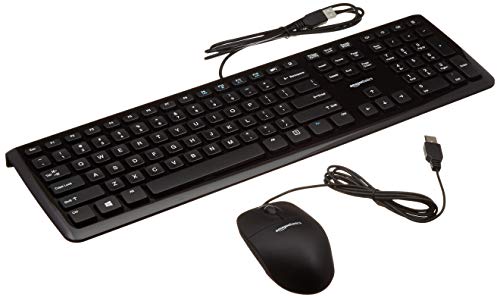
The wired Macally combo plugs in through USB-A, with 78 keys, 13 shortcut keys and a mouse with a DPI switch covering 800, 1200, 1600 and 2400.
- Connection
- USB-A
This silver Macally combo connects through USB-A and works with Mac and Windows PC. The compact keyboard has 78 low profile scissor-switch keys, 13 shortcut keys for one-touch commands, and LED indicators. The optical mouse has 3 buttons and a scroll wheel, with silent click technology and a DPI switch covering 800, 1200, 1600 and 2400. The mouse has an ambidextrous design. Plug the set into any computer with a USB-A port and begin. The set includes a 2 year warranty. The small size saves desk space beside a MacBook Pro.
Choose it if
- You work at a desk with a free USB-A port for a wired set
- You want a compact keyboard with 78 keys and 13 shortcut keys
Consider another if
- You need Bluetooth pairing with 3 devices at once
- You need a rechargeable battery instead of a USB-A cable
Wireless Keyboard and Mouse Compatible
score
The DC set connects by Bluetooth and USB and switches between devices for MacBook Air, Pro and iMac use.
- Wireless
- Yes
- Connection
- Bluetooth and USB
This DC set connects through Bluetooth and USB, with plug-and-play connectivity for MacBook Air, MacBook Pro and iMac. The set switches between devices and works with Windows and Android besides Apple devices. The keyboard and mouse carry a Mac-focused design with a sleek look. The set includes a 1 Year warranty. The set suits a buyer who wants two connection types in one box and does not need the Macally key counts. The set works with iPad as well as MacBook and iMac.
Choose it if
- You want both Bluetooth and USB connections in one set
- You use a MacBook Pro, iMac or iPad with one keyboard and mouse
Consider another if
- You need 110 keys and 20 shortcut keys on the keyboard
- You need a mouse with named DPI modes for cursor sensitivity
Make the choice for your setup
Bluetooth pairing across 3 devices
The two Macally Bluetooth sets pair with 3 devices and switch between them, so one keyboard and mouse serve a MacBook Pro, a phone and a tablet. The DC set also pairs by Bluetooth and adds a USB connection, which covers a desk where Bluetooth is not wanted for every device. The wired Macally combo connects through USB-A instead, so it suits a desk with a free USB-A port and no pairing step. Count the devices you type on before you choose: 3-device switching helps only when you move between devices during the day, and a single-device desk gains nothing from it.
Key counts and shortcut keys
The two Macally Bluetooth sets carry 110 scissor switch keys and 20 shortcut keys. The wired Macally combo carries 78 low profile scissor-switch keys and 13 shortcut keys for one-touch commands, in a compact small size. The DC set competes on connections instead, with Bluetooth and USB and plug-and-play setup for MacBook Air, MacBook Pro and iMac. A 110-key board with 20 shortcut keys suits a buyer who reaches for shortcuts through the day, while the compact 78-key board suits a small desk where space matters more than a full key set. Match the key count to the shortcuts you use, and the board size to the desk space you have. The Bluetooth sets give 20 shortcut keys against the wired set's 13. A related shortlist covers the Best Wireless Keyboard and Mouse with Light.
Batteries, charging and warranty
The two Macally Bluetooth sets run on built-in rechargeable batteries, with 800mAh in the keyboard and 300mAh in the mouse, and a charging cable is included. The wired Macally combo draws power through its USB-A cable, so it never needs a charge. The DC set rests its case on Bluetooth and USB connections with plug-and-play setup, and it includes a 1 Year warranty. The Macally Bluetooth sets carry a warranty of up to 2 years, and the wired Macally combo includes a 2 year warranty. Weigh the warranty term with the connection type when the choice is close, and the battery against the cable on your desk. The wired combo includes a 2 year warranty, while the Bluetooth sets carry a warranty of up to 2 years.
Comparing more options? See Best Wired Keyboard and Mouse Combo.
FAQ: Keyboard and Mouse Combo for MacBook Pro
Which set pairs with 3 devices at once?
The two Macally Bluetooth sets pair with 3 devices and switch between them, and both work with iOS, PC and Android besides Mac. The DC set also switches between devices over Bluetooth, and adds a USB connection. The wired Macally combo connects through USB-A instead of pairing.
How many keys do the Macally keyboards have?
The two Macally Bluetooth keyboards have 110 scissor switch keys and 20 shortcut keys. The wired Macally keyboard has 78 low profile scissor-switch keys and 13 shortcut keys. The DC set competes on its Bluetooth and USB connections with plug-and-play setup, rather than on a stated key count.
What warranty terms do these sets carry?
The two Macally Bluetooth sets carry a warranty of up to 2 years. The wired Macally combo includes a 2 year warranty. The DC set includes a 1 Year warranty. Check the warranty term with the connection type and key count before you choose.