Best Headset with Microphone Audio Jack (2026): 5 Picks Compared
 By Theo LangUpdated
The MAIRDI Telephone Headset with Microphone Noise Canceling suits office and call-center callers who switch between a desk phone and a computer, with an RJ9 jack and a 3.5mm jack in one headset. Its binaural design, noise-canceling microphone, and 0.31 lb weight cover long call days, while the Jabra Evolve 30 II adds USB connectivity and a 2-year warranty for single-ear wearers. The guide below compares the five headsets on connection, fit, and microphone control.
Your shortlist at a glance
PCKitHQ scores range from 9.2 to 9.8. See how we pick.
| Product and key specifications | Score and retailer |
|---|---|
01 Best Overall MAIRDI Telephone Headset | 9.8PCKitHQ scoreView on Amazon |
02 Second Pick Jabra Evolve 30 II Wired Single-Ear Headset | 9.7PCKitHQ scoreView on Amazon |
03 Also Consider MAIRDI Telephone Headset | 9.5PCKitHQ scoreView on Amazon |
04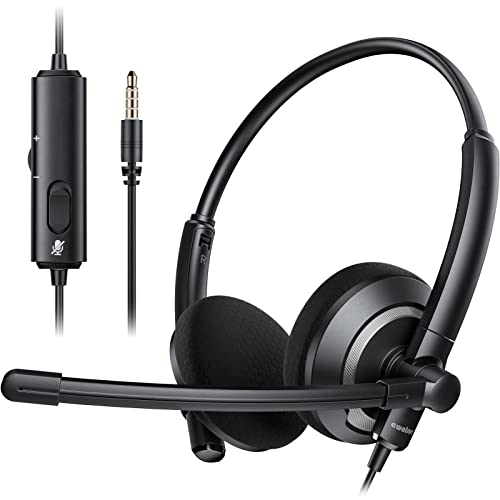 Also Consider awatrue Wired Headset | 9.3PCKitHQ scoreView on Amazon |
05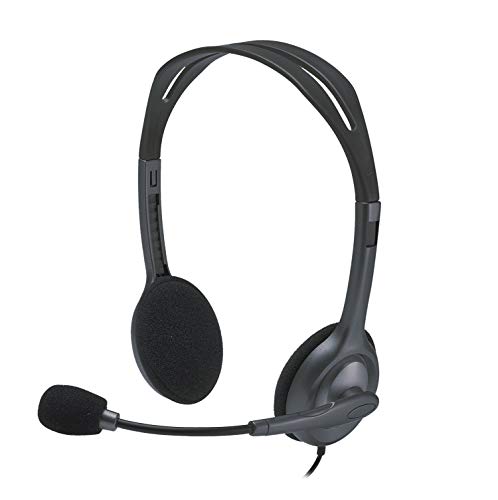 Also Consider Logitech H111 Stereo Headset | 9.2PCKitHQ scoreView on Amazon |
A closer look at each configuration
MAIRDI Telephone Headset
score
The RJ9 and 3.5mm jacks, binaural ear cushions, and noise-canceling microphone make this MAIRDI the call-center headset to start with.
- Microphone
- Yes
- Connection
- RJ9 jack and 3.5mm jack
- Weight
- 0.31 lb
This MAIRDI headset connects through an RJ9 jack and a 3.5mm jack, so one headset serves a landline desk phone, a cell phone, and a PC laptop. The quick disconnect plug lets you step away from the desk while on a call. It works with Cisco IP phones including the 7941, 7965, 6941, 7861, 8811, and 8961. The binaural design uses large soft leatherette ear cushions, an adjustable headband, and a 330° rotatable microphone boom. The stainless headband and reinforced Kevlar cord stand up to office chair wheels and daily use. Hearing technology removes sudden loud sounds before they reach your ears.
Choose it if
- You take calls on a Cisco desk phone and a PC laptop
- You want binaural ear cushions and a 330° rotatable microphone boom
Consider another if
- You need the USB connection of the Jabra Evolve 30 II
- You need the 0.16 lb weight of the Logitech H111
Jabra Evolve 30 II Wired Single-Ear Headset
score
The USB and 3.5mm connections, single-ear fit, and 2-year warranty suit callers who move between laptop and mobile.
- Microphone
- Yes
- Connection
- USB or 3.5mm jack
- Weight
- 0.24 lb
- Warranty
- 2 Year
This Jabra headset is a wired single-ear model with a noise-canceling microphone and Microsoft Teams certification. It connects through USB or a 3.5mm jack, so you can switch between a laptop and a mobile device. The in-line call controller has large buttons and LED indicators for managing calls and music. Its lightweight build and soft leatherette ear cushions support all-day single-ear wear. It works with leading online meeting platforms.
Choose it if
- You want a single-ear headset for all-day wear
- You need USB-A and USB-C connections plus a 3.5mm jack
Consider another if
- You need the RJ9 jack of the MAIRDI headsets
- You need binaural ear cushions for both ears
MAIRDI Telephone Headset
score
The RJ9 and 3.5mm jacks with a lighter 0.23 lb build suit Polycom, Avaya, and Nortel desk-phone users.
- Microphone
- Yes
- Connection
- RJ9 jack and 3.5mm jack
- Weight
- 0.23 lb
This MAIRDI headset shares its name with the first pick but is a different model, M510SQD002007, built for Polycom, Avaya, and Nortel desk phones. It also carries an RJ9 jack and a 3.5mm jack with a quick disconnect plug for switching between landline phones, cell phones, and PC laptops. It has the same binaural layout with soft leatherette ear cushions, an adjustable headband, and a 330° rotatable microphone boom. The stainless steel headband and reinforced Kevlar cord handle office chair wheels, sharp objects, and daily use.
Choose it if
- You take calls on Polycom, Avaya, or Nortel desk phones
- You want binaural cushions at a 0.23 lb weight
Consider another if
- You need the 2-year warranty of the Jabra Evolve 30 II
- You need the in-line call controller of the Jabra Evolve 30 II
awatrue Wired Headset
score
The 3.5mm jack, 270° rotating microphone pole, and in-line controls suit PC and laptop callers on a simple wired setup.
- Microphone
- Yes
This awatrue headset connects through a 3.5mm jack and weighs 4 oz, with an adjustable head beam and soft protein skin sponge cushions for long wear. The microphone pole rotates 270 degrees and adjusts for left or right wearing, and the headset rotates 180 degrees to fit the contour of the ear. In-line controls adjust the volume and silence the microphone separately. It suits Windows systems and smartphones, computers, tablets, and laptops with 3.5mm connectors. On some PCs with separate 3.5mm speaker and headphone ports, only the speaker function is supported unless you add a headphone splitter.
Choose it if
- You want a 4 oz headset for long calls on a PC
- You want separate microphone mute and volume controls
Consider another if
- You need USB connectivity for your laptop calls
- You need the Microsoft Teams certification of the Jabra Evolve 30 II
Logitech H111 Stereo Headset
score
The 3.5mm jack, 0.16 lb weight, and 180° rotating microphone suit students and callers who need a light stereo headset.
- Microphone
- Yes
- Connection
- 3.5 mm
- Weight
- 0.16 lb
- Warranty
- 1 Year
This Logitech headset connects through a universal 3.5mm jack that fits standard audio jacks on Chromebooks, Windows laptops and PCs, iPads, and MacBook Neo laptops, and it is a certified Works With Chromebooks product. At 0.16 lb it pairs an adjustable headband with soft leatherette ear cushions and a long cord for moving and stretching during wear. The 180° rotating microphone positions the boom on the left or right for voice capture and background noise reduction. The 1-year limited hardware warranty covers the headset.
Choose it if
- You want a 0.16 lb headset for all-day wear
- You use Chromebooks, Windows laptops, iPads, or MacBook Neo laptops
Consider another if
- You need a USB connection for laptop calls
- You need the quick disconnect plug of the MAIRDI headsets
Make the choice for your setup
Match the jack to your phone and computer
The MAIRDI headsets carry both an RJ9 jack and a 3.5mm jack, so one headset moves between a landline desk phone, a cell phone, and a PC laptop. The Jabra Evolve 30 II connects through USB or a 3.5mm jack for switching between a laptop and a mobile device. The awatrue headset and the Logitech H111 connect through a 3.5mm jack only. Check your desk phone first: the first MAIRDI works with Cisco IP phones, while the second MAIRDI is built for Polycom, Avaya, and Nortel phones. On some PCs with separate 3.5mm speaker and headphone ports, the awatrue headset supports only the speaker function unless you add a headphone splitter.
Choose single-ear or binaural fit
The two MAIRDI headsets are binaural, with large soft leatherette ear cushions, adjustable headbands, and 330° rotatable microphone booms. The Jabra Evolve 30 II is a single-ear headset with a lightweight build and soft leatherette ear cushions for all-day wear. The awatrue headset uses soft protein skin sponge cushions and an adjustable head beam, while the Logitech H111 is a stereo headset with an adjustable headband and soft leatherette ear cushions. Weights run from 0.16 lb on the Logitech H111 to 0.31 lb on the first MAIRDI headset, with the Jabra at 0.24 lb, the second MAIRDI at 0.23 lb, and the awatrue at 4 oz. Shoppers with a related need can compare our guide to the Best Headset for Recording Audio.
Microphone control and call handling
Every headset here has a noise-canceling microphone. The MAIRDI headsets use a 330° rotatable microphone boom, the awatrue microphone pole rotates 270 degrees for left or right wearing, and the Logitech microphone rotates 180° to sit on the left or right. The Jabra Evolve 30 II manages calls and music through an in-line call controller with large buttons and LED indicators, and it is certified for Microsoft Teams. The awatrue headset controls volume and microphone mute separately through in-line controls. The MAIRDI headsets add a quick disconnect plug so you can step away from the desk while on a call.
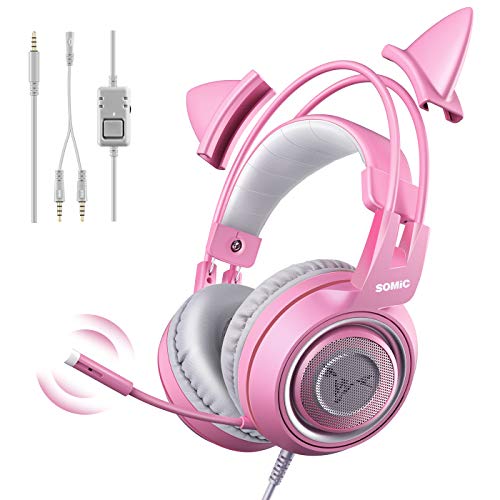
Before you decide, also read Best Headset with Microphone Cat Ears.
FAQ: Headset with Microphone Audio Jack
Which headsets connect to a landline desk phone?
The two MAIRDI headsets connect through an RJ9 jack and a 3.5mm jack. The first works with Cisco IP phones, and the second is built for Polycom, Avaya, and Nortel phones. The Jabra, awatrue, and Logitech headsets connect through USB or 3.5mm only, without an RJ9 jack.
What warranty does each headset carry?
The Jabra Evolve 30 II has a 2-year manufacturer warranty, and the Logitech H111 has a 1-year limited hardware warranty. The awatrue listing gives two different terms, 24 months in one place and 1 year in another, so no single term is stated. Check the warranty terms on the MAIRDI listings before buying.
Do these headsets work with a PC laptop?
All five connect to a PC laptop through a 3.5mm jack, and the Jabra also connects through USB. The MAIRDI headsets add an RJ9 jack for desk phones. On some PCs with separate 3.5mm speaker and headphone ports, the awatrue headset supports only the speaker function unless you add a headphone splitter.