Best Gaming Notebook 5070 (2026): Our 7 Picks Ranked
 By Theo LangUpdated
Choose the Alienware 16 Aurora Gaming Laptop if you want a 16-inch gaming notebook with an RTX 5070, an Intel Core 9 270H, 32GB DDR5 RAM, and a 1TB SSD. Its 2560x1600 display runs at 120Hz with 300 nits brightness, and it includes Wi-Fi 7 and 1Gb Ethernet on Windows 11 Home. The remaining six configurations trade screen size, refresh rate, storage, or weight against that combination.
Your shortlist at a glance
PCKitHQ scores range from 9.2 to 9.8. See how we pick.
| Product and key specifications | Score and retailer |
|---|---|
01 | 9.8PCKitHQ scoreView on Amazon |
02 | 9.7PCKitHQ scoreView on Amazon |
03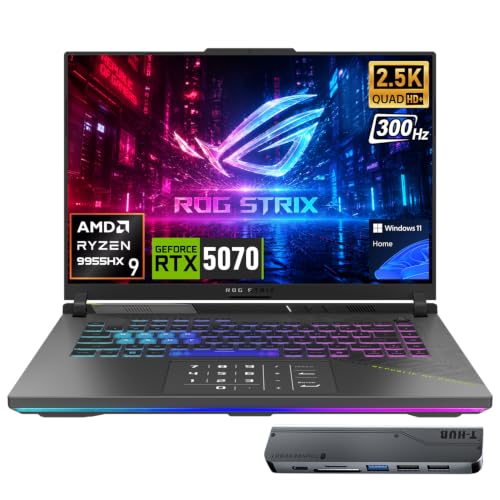 | 9.6PCKitHQ scoreView on Amazon |
04 | 9.5PCKitHQ scoreView on Amazon |
05 | 9.4PCKitHQ scoreView on Amazon |
06 Also Consider MSI Cyborg 15.6-inch RTX 5070 Gaming Laptop | 9.3PCKitHQ scoreView on Amazon |
07 Also Consider ASUS ROG Strix G18 Gaming Laptop | 9.2PCKitHQ scoreView on Amazon |
A closer look at each configuration
Alienware 16 Aurora Gaming Laptop
score
The 16-inch 2560x1600 display at 120Hz, 32GB DDR5 RAM, and 1TB SSD define this Alienware 16 Aurora configuration.
- Installed memory
- 32 GB
- Installed storage
- 1TB
- Processor
- Intel Core 9 270H
- Operating system
- Windows 11 Home
- Resolution
- 2560x1600
- Wi-Fi
- Yes
- Ethernet
- Yes
- Weight
- 5.49 lb
- Warranty
- 1 Year Basic Onsite Service
This Alienware 16 Aurora configuration pairs an Intel Core 9 270H with an NVIDIA GeForce RTX 5070 and 32GB DDR5 RAM. Its 16-inch WQXGA display measures 2560x1600, runs at 120Hz, and is rated at 300 nits brightness. The installed storage is a 1TB SSD. Windows 11 Home is the operating system, and connectivity includes Wi-Fi 7 and 1Gb Ethernet. The Cryo-Chamber structure focuses airflow to the core components. It weighs 5.49 lb, and the warranty is 1 Year Basic Onsite Service.
Choose it if
- You want a 16-inch 2560x1600 display at 120Hz
- Your files fit within the installed 1TB SSD
Consider another if
- You need the 300Hz refresh rate of the 18-inch Area-51
- You need the 2TB SSD of the ROG Strix G16
Alienware 18 Area-51 Gaming Laptop
score
The 18-inch WQXGA display at 300Hz and the Intel Core Ultra 9-275HX define this Alienware 18 Area-51 configuration.
- Installed memory
- 32 GB
- Installed storage
- 1TB
- Processor
- Intel Core Ultra 9-275HX
- Graphics
- NVIDIA GeForce RTX 5070
- Operating system
- Windows 11 Home
- Resolution
- WQXGA
- Weight
- 9.07 lb
- Warranty
- 1-Year Basic Onsite Service
This Alienware 18 Area-51 configuration pairs an Intel Core Ultra 9-275HX with an NVIDIA GeForce RTX 5070 and 32GB DDR5 RAM. Its 18-inch WQXGA display runs at 300Hz. The installed storage is a 1TB SSD, and the operating system is Windows 11 Home. The processor integrates CPU, built-in GPU, and NPU in a single package designed for AI acceleration. The Cryo-Chamber structure sits at the bottom of the laptop and focuses air to the core components. It weighs 9.07 lb, and the warranty is 1-Year Basic Onsite Service.
Choose it if
- You want an 18-inch WQXGA display at 300Hz
- You want the Intel Core Ultra 9-275HX processor
Consider another if
- You need the 5.49 lb weight of the Alienware 16 Aurora
- You need the 2TB SSD of the ROG Strix G16
ASUS ROG Strix G16 5070 Gaming Laptop
score
The 16-inch 2560x1600 display at 300Hz, 32GB DDR5 RAM, and 2TB SSD define this ROG Strix G16 configuration.
- Installed memory
- 32 GB
- Installed storage
- 2TB
- Processor
- AMD Ryzen 9 9955HX
- Graphics
- GeForce RTX 5070
- Operating system
- Windows 11 Home
- Resolution
- 2560x1600
- HDMI
- Yes
- Wi-Fi
- Yes
- Ethernet
- Yes
- Weight
- 5.51 lb
- Warranty
- 1 Year Limited Warranty
This ASUS ROG Strix G16 configuration pairs an AMD Ryzen 9 9955HX with a GeForce RTX 5070 8GB GDDR7 GPU and 32GB DDR5 RAM. The processor has 16 cores and 32 threads, with a base frequency of 2.2 GHz and a maximum turbo frequency of up to 5.4 GHz. Its 16-inch QHD+ IPS display measures 2560x1600 and runs at 300Hz. The installed storage is a 2TB SSD. Connectivity includes HDMI, Wi-Fi 6E, and a Type-C USB 4 port with DisplayPort and power delivery support. The battery is 90Wh, the adapter is 280W, and it weighs 5.51 lb.
Choose it if
- You want a 16-inch 2560x1600 IPS display at 300Hz
- Your local files call for the installed 2TB SSD
Consider another if
- You need the 18-inch display of the Alienware Area-51
- You need the 240Hz 18-inch display of the Crosshair
MSI Crosshair 18 HX 18-inch Display Gaming Laptop
score
The 18-inch 2560x1600 display at 240Hz, 32GB DDR5 RAM, and 1TB NVMe SSD define this msi Crosshair configuration.
- Installed memory
- 32 GB
- Installed storage
- 1TB
- Processor
- Intel Core Ultra 9 275HX
- Graphics
- NVIDIA GeForce RTX 5070
- Operating system
- Windows 11 Home
- Resolution
- 2560x1600
- USB-C
- Yes
- HDMI
- Yes
- Wi-Fi
- Yes
- Ethernet
- Yes
- Weight
- 6.83 lb
- Warranty
- 1 Limited Warranty
This msi Crosshair 18 HX AI configuration pairs an Intel Core Ultra 9 275HX with an NVIDIA GeForce RTX 5070 with 8GB GDDR7 memory and 32GB DDR5 5600MHz RAM. The processor has 24 cores and turbo boosts from 2.1 to 5.4 GHz. Its 18-inch QHD+ IPS display measures 2560x1600, runs at 240Hz, and has a 100% DCI-P3 color gamut. The installed storage is a 1TB NVMe SSD. Connectivity includes HDMI 2.1, USB-C Thunderbolt 4, RJ45 Ethernet, and Wi-Fi 6E. The SteelSeries keyboard has 24-zone RGB backlighting, and it weighs 6.83 lb.
Choose it if
- You want an 18-inch 2560x1600 IPS display at 240Hz
- You want the 100% DCI-P3 color gamut of this display
Consider another if
- You need the 300Hz refresh rate of the ROG Strix G16
- You need the 2TB SSD of the ROG Strix G16
Lenovo Legion 5i 15.3-inch WQXGA Gaming Notebook
score
The 15.3-inch OLED WQXGA display at 165Hz and the Intel Core Ultra 7 251HX define this Lenovo Legion 5i configuration.
- Installed memory
- 16 GB
- Installed storage
- 1TB
- Processor
- Intel Core Ultra 7 251HX
- Graphics
- NVIDIA GeForce RTX 5070
- Resolution
- WQXGA
This Lenovo Legion 5i configuration pairs an Intel Core Ultra 7 251HX with an NVIDIA GeForce RTX 5070 and 16GB RAM. The processor has 18 cores and 18 threads. Its 15.3-inch OLED display is WQXGA and runs at 165Hz. The installed storage is a 1TB SSD. The color is Eclipse Black and the model is 83VK0009US. Its 16GB installed memory matches the msi Cyborg configuration.
Choose it if
- You want a 15.3-inch OLED WQXGA display at 165Hz
- You want the Intel Core Ultra 7 251HX processor
Consider another if
- You need the 32GB RAM of the Alienware 16 Aurora
- You need the 300Hz refresh rate of the Area-51
MSI Cyborg 15.6-inch RTX 5070 Gaming Laptop
score
The 15.6-inch FHD display at 144Hz, 16GB DDR5 RAM, and 1TB SSD define this msi Cyborg configuration.
- Processor
- Intel Core 7-240H
- Graphics
- NVIDIA GeForce RTX 5070
- Operating system
- Win 11 Home
- Resolution
- FHD
- USB-C
- Yes
- HDMI
- Yes
- Wi-Fi
- Yes
- Ethernet
- Yes
- Warranty
- 1 Year Manufacturear
This msi Cyborg configuration pairs an Intel Core 7-240H with an NVIDIA GeForce RTX 5070 and 16GB DDR5 memory. The processor has 10 cores, with 6 performance cores and 4 efficient cores, 16 threads, and a maximum turbo frequency of up to 5.2 GHz. Its 15.6-inch FHD IPS display runs at 144Hz. The installed storage is a 1TB SSD, and it also comes with a separate 1TB portable external drive.
Choose it if
- You want a 15.6-inch FHD IPS display at 144Hz
- You want a 4.29 lb notebook for carrying
Consider another if
- You need the 2560x1600 resolution of the Alienware 16 Aurora
- You need the 32GB RAM of the Alienware 16 Aurora
ASUS ROG Strix G18 Gaming Laptop
score
The 18-inch FHD+ display at 144Hz, 32GB DDR5-5600 memory, and 1TB SSD define this ROG Strix G18 configuration.
- Processor
- Intel Core i9 Processor 14900HX
- Graphics
- NVIDIA GeForce RTX 5070
- Operating system
- Windows 11 Home
- Resolution
- FHD+
- Wi-Fi
- Yes
- Weight
- 10 lb
- Warranty
- 1 Year
This ASUS ROG Strix G18 configuration pairs an Intel Core i9 14900HX with an NVIDIA GeForce RTX 5070 Laptop GPU and 32GB DDR5-5600MHz memory. Its 18-inch FHD+ display runs at 144Hz with a 3ms response time and uses an ACR film that enhances contrast and reduces glare. The installed storage is a 1TB PCIe Gen 4 SSD. The operating system is Windows 11 Home, connectivity includes Wi-Fi 7, and it weighs 10 lb. Cooling uses an end-to-end vapor chamber, tri-fan technology, and liquid metal on the chipset.
Choose it if
- You want an 18-inch FHD+ display at 144Hz
- You want the Intel Core i9 14900HX processor
Consider another if
- You need the 2560x1600 resolution of the Crosshair 18
- You need the 5.49 lb weight of the Alienware 16 Aurora
Make the choice for your setup
Match the display to your games
Three configurations use a 2560x1600 display: the Alienware 16 Aurora at 120Hz, the ASUS ROG Strix G16 at 300Hz, and the msi Crosshair 18 HX AI at 240Hz. The Alienware 18 Area-51 uses an 18-inch WQXGA display at 300Hz. The Lenovo Legion 5i uses a 15.3-inch OLED WQXGA display at 165Hz. The msi Cyborg uses a 15.6-inch FHD IPS display at 144Hz, and the ASUS ROG Strix G18 uses an 18-inch FHD+ display at 144Hz. The Crosshair has a 100% DCI-P3 color gamut, and the Aurora has 300 nits brightness. Compare resolution, refresh rate, and panel size together, since a higher refresh rate on a smaller panel is a different trade from a larger panel at the same resolution.
Weigh memory and storage
Five configurations carry 32GB of installed memory: the Alienware 16 Aurora, the Alienware 18 Area-51, the ASUS ROG Strix G16, the msi Crosshair 18 HX AI, and the ASUS ROG Strix G18. The Lenovo Legion 5i and the msi Cyborg each carry 16GB. For storage, the ROG Strix G16 is the only configuration with an installed 2TB SSD. The other six configurations each have a 1TB SSD, and the Cyborg also comes with a separate 1TB portable external drive that is not installed storage. Compare the installed memory and the installed drive against the files and applications you keep on the machine itself. If that fits your setup better, see our guide to the Best Gaming Laptop with 5070ti.
Check weight and connectivity
Weights run from 4.29 lb for the msi Cyborg to 10 lb for the ASUS ROG Strix G18. Between them sit the Alienware 16 Aurora at 5.49 lb, the ASUS ROG Strix G16 at 5.51 lb, the msi Crosshair 18 HX AI at 6.83 lb, and the Alienware 18 Area-51 at 9.07 lb. For connections, the Aurora has Wi-Fi 7 and 1Gb Ethernet, the ROG Strix G18 has Wi-Fi 7, and the Crosshair has HDMI 2.1, USB-C Thunderbolt 4, RJ45 Ethernet, and Intel Wi-Fi 6E. The Cyborg has Wi-Fi 6E, RJ45, HDMI, and USB Type-C, while the ROG Strix G16 has HDMI and Wi-Fi 6E.
Before you decide, also read Best Gaming Laptop.
FAQ: Gaming Notebook 5070
Which configuration has 2TB of installed storage?
The ASUS ROG Strix G16 has an installed 2TB SSD. The other six configurations each have an installed 1TB SSD. The msi Cyborg also comes with a separate 1TB portable external drive, which is not installed storage.
Which configurations have a 300Hz display?
The Alienware 18 Area-51 has an 18-inch WQXGA display at 300Hz, and the ASUS ROG Strix G16 has a 16-inch 2560x1600 display at 300Hz. The msi Crosshair 18 HX AI runs at 240Hz, the Lenovo Legion 5i at 165Hz, and the msi Cyborg and ASUS ROG Strix G18 at 144Hz.
How much do these gaming notebooks weigh?
The msi Cyborg weighs 4.29 lb, the Alienware 16 Aurora 5.49 lb, the ASUS ROG Strix G16 5.51 lb, the msi Crosshair 18 HX AI 6.83 lb, the Alienware 18 Area-51 9.07 lb, and the ASUS ROG Strix G18 10 lb. These are the weights for the six configurations that document one.