
Best Gaming Monitor for Graphic Design (2026): 5 Picks Compared
 By Theo LangUpdated
Choose the ASUS TUF Gaming 24 Inch 1080p 180Hz Curved FreeSync Gaming if you want a 23.6-inch Full HD curved screen at 180Hz with 90% DCI-P3 coverage for gaming and design. Its 1ms response time and FreeSync keep motion smooth, while the 1500R curve and DisplayPort and HDMI ports cover a setup. The 27-inch ASUS has built-in speakers, and the 4K Raywego and Acer picks trade refresh for 3840 x 2160 resolution.
Your shortlist at a glance
PCKitHQ scores range from 9.2 to 9.8. See how we pick.
| Product and key specifications | Score and retailer |
|---|---|
01 | 9.8PCKitHQ scoreView on Amazon |
02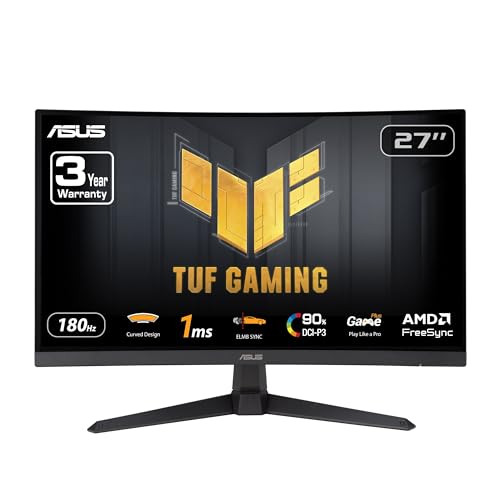 | 9.7PCKitHQ scoreView on Amazon |
03 | 9.5PCKitHQ scoreView on Amazon |
04 | 9.3PCKitHQ scoreView on Amazon |
05 | 9.2PCKitHQ scoreView on Amazon |
A closer look at each configuration
ASUS TUF Gaming 24-inch Curved FreeSync Gaming Monitor
score
A 23.6-inch Full HD curved screen at 180Hz with 1ms response, FreeSync, 90% DCI-P3 and a 3-year warranty.
- Resolution
- Full HD
- Native refresh rate
- 180 Hz
- Curved screen
- Yes
- HDMI
- Yes
- DisplayPort
- Yes
- Weight
- 7.1 lb
- Warranty
- 3 years warranty
The ASUS TUF Gaming 24-inch monitor has a 23.6-inch Full HD panel with a 1500R curve and a 180Hz refresh rate. Its 1ms MPRT response time pairs with ELMB Sync, and FreeSync enables variable refresh rate by default. Shadow Boost brightens details in dark areas, and the panel covers 90% of the DCI-P3 color gamut. DisplayPort 1.2 and 2 x HDMI 2.0 ports cover the connections, and the box includes a DisplayPort cable, power cord and adapter, an L-shaped screwdriver, a quick start guide and a warranty card. It weighs 7.1 lb and carries a 3-year warranty, and the purchase includes a 3-month Adobe Creative Cloud subscription.
Choose it if
- You want a 23.6-inch curved screen at 180Hz
- You want 90% DCI-P3 coverage and a 3-year warranty
Consider another if
- You need a 27-inch or larger screen
- You need 2560 x 1440 resolution or higher
ASUS TUF Gaming VG27VQ3B 27-inch HDR Curved Gaming Monitor
score
A 27-inch Full HD curved screen at 180Hz with 1ms response, FreeSync Premium, 90% DCI-P3 and built-in speakers.
- Resolution
- 1920 x 1080
- Native refresh rate
- 180 Hz
- Screen size
- 27 in
- Curved screen
- Yes
- DisplayPort
- Yes
- Weight
- 13.9 lb
- Warranty
- 3 Year Warranty
The ASUS TUF Gaming VG27VQ3B has a 27-inch Full HD panel with a 1500R curve and a 180Hz refresh rate. Its 1ms GTG response time pairs with ELMB Sync, and FreeSync Premium enables variable refresh rate by default. Shadow Boost brightens details in dark areas, and the panel covers 90% of the DCI-P3 color space. The monitor has built-in speakers, and the box includes a DisplayPort cable, an L-shaped screwdriver, a power cord, a quick start guide and a warranty card. It weighs 13.9 lb and carries a 3-year warranty with Advanced Replacement and Repair service, and the purchase includes a 3-month Adobe Creative Cloud subscription.
Choose it if
- You want a 27-inch curved screen at 180Hz
- You want built-in speakers and a 3-year warranty
Consider another if
- You need 2560 x 1440 resolution or higher
- You need a screen under 13.9 lb
SANSUI Gaming Monitor 27-inch WQHD
score
A 27-inch WQHD IPS panel at 200Hz with 95% DCI-P3, HDR and a height-adjustable stand that pivots and rotates.
- Resolution
- 2560 x 1440
- Screen size
- 27 in
- Panel
- IPS
- HDMI
- Yes
- Weight
- 11.16 lb
The SANSUI monitor has a 27-inch WQHD IPS panel at 2560 x 1440 with a 200Hz refresh rate and a 1ms OD response time. Its 10-bit panel covers 95% of the DCI-P3 color space and 130% of sRGB, with HDR and a 178-degree viewing angle. DisplayPort 1.4 reaches up to 200Hz and HDMI 2.0 reaches up to 144Hz, and a 3.5mm earphone jack sits on the monitor. The ergonomic stand pivots, swivels, adjusts height to 130mm and tilts from minus 5 degrees to 20 degrees, with VESA mounting at 100 x 100mm. It weighs 11.16 lb, and the box includes a DisplayPort cable, a stand, an adapter, a power cable and a quick installation guide.
Choose it if
- You want a 27-inch 2560 x 1440 IPS panel
- You want a stand that pivots, swivels and adjusts height
Consider another if
- You need 3840 x 2160 resolution
- You need a 32-inch screen for your desk
Raywego 32-inch 4K Gaming Computer Monitor UHD
score
A 32-inch 4K IPS panel with 97% sRGB, 1.07 billion colors, HDR10 and a 60Hz refresh rate.
- Resolution
- 3840x2160
- Native refresh rate
- 60 Hz
- Screen size
- 32 in
- Panel
- IPS
- HDMI
- Yes
- DisplayPort
- Yes
- Weight
- 10 lb
- Warranty
- 2 Years
The Raywego monitor has a 32-inch 4K IPS panel at 3840 x 2160 with a 60Hz refresh rate. Its 97% sRGB coverage pairs with 1.07 billion colors and a 4000:1 contrast ratio, with HDR10 and FreeSync. The monitor has a frameless design, and HDMI and DisplayPort cover the connections. The panel is a stated fit for graphic design, photo editing and CAD work, with a wide viewing angle from the IPS panel. It weighs 10 lb and carries a 2-year warranty.
Choose it if
- You want a 32-inch 4K screen for design work
- You want 97% sRGB coverage and HDR10
Consider another if
- You need a 180Hz refresh rate
- You need a screen under 10 lb
Acer Nitro VG270K V2biip 27-inch 4K UHD Gaming Monitor
score
The Acer Nitro VG270K V2biip is a 27-inch 4K IPS panel at 144Hz with sRGB 99%, HDR 10, FreeSync Premium and a 3-year parts and labor warranty.
- Resolution
- 3840 x 2160
- Panel
- IPS
- HDMI
- Yes
- Weight
- 10.08 lb
- Warranty
- 3 year parts and labor
The Acer Nitro VG270K has a 27-inch 4K IPS panel at 3840 x 2160 with a 144Hz refresh rate at UHD and 288Hz at 1080p with DFR. The zero-frame design suits multi-monitor setups, and 2 x HDMI 2.1 ports cover the connections. VESA mounting measures 100 x 100mm, and the tilt range runs from minus 5 degrees to 25 degrees. It weighs 10.08 lb and carries a 3-year parts and labor warranty.
Choose it if
- You want a 27-inch 4K screen at 144Hz
- You want sRGB 99% coverage for color-critical work
Consider another if
- You need a 32-inch screen for your desk
- You need a 180Hz refresh rate at 4K
Make the choice for your setup
Resolution sets the design detail
Resolution decides how much detail you see. The Raywego and Acer panels show 3840 x 2160, the SANSUI shows 2560 x 1440, and the ASUS monitors show Full HD at 1920 x 1080. The Acer puts 3840 x 2160 on a 27-inch screen and the Raywego puts it on a 32-inch screen, so the same resolution reads larger on the Raywego. The SANSUI sits between the 4K panels and the ASUS monitors at 2560 x 1440. Match the resolution to the work: fine lines and small text stay legible at 3840 x 2160, and a larger screen keeps palettes and timelines in view beside the canvas.
Refresh rate and color coverage
Refresh rate decides how smooth motion looks: the ASUS monitors run at 180Hz, the SANSUI reaches up to 200Hz at 2560 x 1440 and up to 144Hz over HDMI, the Acer runs at 144Hz at 4K and 288Hz at 1080p with DFR, and the Raywego runs at 60Hz. Color coverage decides how much of a color space the panel shows: the SANSUI covers 95% of DCI-P3, the ASUS monitors cover 90%, the Acer covers sRGB 99%, and the Raywego covers sRGB 97%. A higher refresh rate suits fast games, while wider color coverage suits design work, so weigh them against what you do most. If that fits your setup better, see our guide to the Best Gaming Monitor for Steam Machine.
Ports, stands and warranties
Ports decide what plugs in: the ASUS 24-inch has DisplayPort 1.2 and 2 x HDMI 2.0, the ASUS 27-inch has DisplayPort, the SANSUI has 2 x DisplayPort 1.4 and 2 x HDMI 2.0 with a 3.5mm earphone jack, the Raywego has HDMI and DisplayPort. The Acer has 2 x HDMI 2.1 ports. Stands differ too: the SANSUI stand pivots, swivels, adjusts height to 130mm and tilts, the Acer tilts from minus 5 degrees to 25 degrees, and VESA mounting at 100 x 100mm is stated for the SANSUI and Acer. Warranties run 3 years on the ASUS monitors and the Acer, and 2 years on the Raywego.
For a wider shortlist, start with Best Gaming Monitor.
FAQ: Gaming Monitor for Graphic Design
Which monitor suits graphic design here?
The Acer covers sRGB 99% and the Raywego covers sRGB 97%, and each shows 3840 x 2160. The Acer adds 144Hz at 4K, while the Raywego runs at 60Hz. Pick the Acer for color-critical work at 144Hz, and the Raywego for a larger 32-inch 4K screen.
What refresh rates do these monitors run at?
The ASUS monitors run at 180Hz, the SANSUI reaches up to 200Hz at 2560 x 1440 and up to 144Hz over HDMI, the Acer runs at 144Hz at 4K and 288Hz at 1080p with DFR, and the Raywego runs at 60Hz.
Do any of these monitors have a curved screen?
Yes. The ASUS 24-inch and the ASUS 27-inch have 1500R curved screens. The ASUS 24-inch panel measures 23.6 inches and the ASUS 27-inch panel measures 27 inches, each with a 1500R curve and a 180Hz refresh rate.


