Best Gaming Keyboard with Volume Control (2026): 8 Picks Compared
 By Theo LangUpdated
Buy the Redragon K521-E Gaming Keyboard with Knob if you want volume at your fingertips: its dedicated knob adjusts volume, mutes with one press, and switches lighting modes on a long press, beside 12 multimedia keys. The 104-key wired board pairs that control with 26-key anti-ghosting and RGB backlighting.
Your shortlist at a glance
PCKitHQ scores range from 9.2 to 9.8. See how we pick.
| Product and key specifications | Score and retailer |
|---|---|
01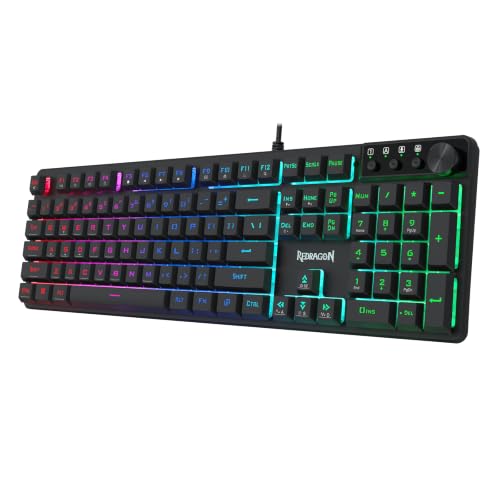 Best Overall Redragon K521-E Gaming KeyboardSwitch type: Mechanical Feeling, Layout: 104 Keys, Backlight: Yes | 9.8PCKitHQ scoreView on Amazon |
02 | 9.7PCKitHQ scoreView on Amazon |
03 | 9.6PCKitHQ scoreView on Amazon |
04 Also Consider CORSAIR K55 CORE TKL RGB Gaming KeyboardSwitch type: Quiet Membrane Keys, Layout: Tenkeyless, Backlight: Yes | 9.5PCKitHQ scoreView on Amazon |
05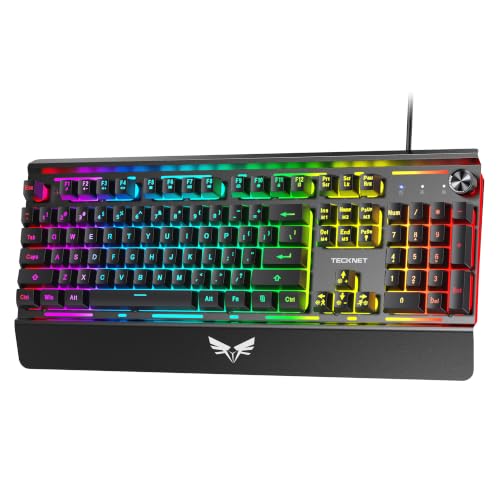 | 9.5PCKitHQ scoreView on Amazon |
06 | 9.4PCKitHQ scoreView on Amazon |
07 Also Consider Hofotek 96% Wired Gaming KeyboardSwitch type: Membrane, Backlight: Yes, Connection: USB-A to Type-C | 9.3PCKitHQ scoreView on Amazon |
08 Also Consider TMKB T81E Mechanical Gaming KeyboardSwitch type: Mechanical, Layout: 75%, Backlight: Yes | 9.2PCKitHQ scoreView on Amazon |
A closer look at each configuration
Redragon K521-E Gaming Keyboard
score
The Redragon K521-E pairs a dedicated volume knob with 12 multimedia keys, 26-key anti-ghosting and RGB backlighting.
- Switch type
- Mechanical Feeling
- Layout
- 104 Keys
- Backlight
- Yes
- Connection
- Wired
This Redragon uses a wired connection and 104 keys with a mechanical feeling. The volume knob adjusts volume, mutes with a single press, and switches lighting modes when held, while 12 multimedia keys cover media control. RGB backlighting runs through 8 modes and multiple monochrome modes with 5 brightness levels. Software supports key mapping, macro editing and RGB effects. The board works with Windows XP through Windows 11, PS4, PS5 and Xbox.
Choose it if
- You want a volume knob with one-press mute
- You want 104 keys with 26-key anti-ghosting
Consider another if
- You need a wireless connection like the RM104
- You need a tenkeyless layout like the K55
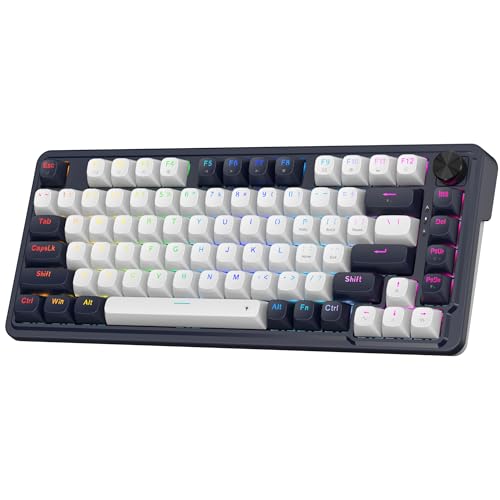
Redragon RM104 Wireless Gaming Keyboard
score
The Redragon RM104 adds a multifunction knob to tri-mode wireless, a 4000mAh battery and RGB backlighting.
- Wireless
- Yes
- Backlight
- Yes
This Redragon connects over Bluetooth, 2.4GHz wireless or wired USB-C, and its knob rotates for volume, presses for mute and holds to cycle RGB modes. A 4000mAh battery powers wireless use, and the board works with Windows, macOS and major gaming consoles. Companion software assigns macros, remaps commands and builds profiles for games or apps. RGB backlighting adjusts through keyboard shortcuts, the knob or software. The knob turns smoothly.
Choose it if
- You want Bluetooth, 2.4GHz and wired USB-C
- You want a 4000mAh battery for wireless use
Consider another if
- You want a wired-only board with no battery to charge
- You need a 2000mAh battery like the ONIKUMA
Tri-Mode Wireless Keyboard
score
The ONIKUMA G80 pairs a silent membrane layout with a display screen, a multifunction knob and tri-mode wireless.
- Switch type
- Silent Membrane
- Wireless
- Yes
- Backlight
- Yes
- Weight
- 2 lb
- Warranty
- 24months warranty
This ONIKUMA uses silent membrane keys in a 94-key compact layout with PBT keycaps, and it weighs 2 lb. The built-in screen shows battery level, connection mode and lighting status. One knob controls volume, RGB brightness and lighting effects with a twist. Bluetooth 5.0, 2.4G wireless and wired USB-C cover connections, and a 2000mAh battery powers wireless use. The ergonomic angle suits long sessions, and the board carries a 24-month warranty.
Choose it if
- You want quiet keys for late-night gaming
- You want a screen showing battery and connection
Consider another if
- You need 104 keys like the K521-E
- You need a mechanical switch like the TMKB
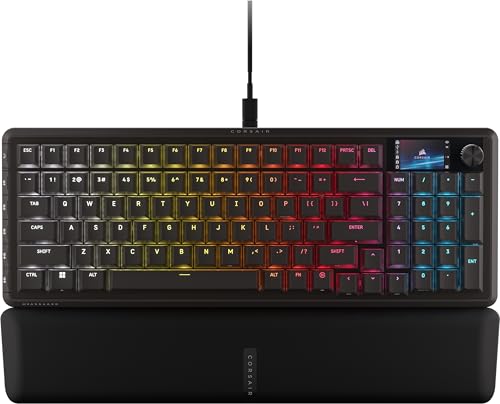
CORSAIR K55 CORE TKL RGB Gaming Keyboard
score
The CORSAIR K55 CORE TKL pairs four dedicated media buttons with 8-zone RGB, quiet membrane keys and 1000Hz polling.
- Switch type
- Quiet Membrane Keys
- Layout
- Tenkeyless
- Backlight
- Yes
- Weight
- 1.36 lb
- Warranty
- 2 Year Manufacturer
This CORSAIR is a tenkeyless board with quiet membrane keys and 8-zone RGB backlighting,. Four dedicated media buttons control volume, playback, Win lock and brightness. The board resists spills up to 300ml. 12-key rollover with 1000Hz polling covers keypress detection. The compact layout leaves more room for sweeping mouse movements. Its tenkeyless size suits smaller desks and keeps the mouse hand clear. The board carries a 2-year manufacturer warranty.
Choose it if
- You want a tenkeyless layout for mouse room
- You want spill resistance up to 300ml
Consider another if
- You need a volume knob like the K521-E
- You need 104 keys like the K521-E
TECKNET Wired Gaming Keyboard
score
The TECKNET pairs a smart volume knob with 15-zone RGB, double-shot keycaps and a metal panel.
- Backlight
- Yes
- Connection
- Wired
- Warranty
- 2 Years
This TECKNET is a wired keyboard with a metal panel and double-shot keycaps, and its volume knob dials volume with tactile feedback and mutes with one press. 15-zone RGB illumination runs through 11 modes with 4 brightness levels. The board covers 25 anti-ghosting keys and 12 multimedia keys, and its keycaps withstand 50 million keystrokes. A 2-stage kickstand sets 3-degree and 7-degree typing angles, and an integrated wrist rest supports the hands.
Choose it if
- You want a volume knob with one-press mute
- You want a wrist rest with adjustable typing angles
Consider another if
- You need wireless like the RM104
- You need a 4000mAh battery like the RM104
MageGee GK960 Wireless Keyboard
score
The MageGee GK960 pairs a dual-function knob with tri-mode wireless, a 4000mAh battery and 98 keys.
- Switch type
- Membrane
- Wireless
- Yes
- Warranty
- 1 year warranty
This MageGee is a 98-key membrane keyboard with a number pad, connecting over wired USB-C, 2.4G wireless or Bluetooth and pairing with up to 5 devices. Its dual-function knob twists for volume, presses to mute, and switches to lighting control with a long press of FN plus the knob. A 4000mAh battery powers wireless use, and the USB-C cable supports wired play while charging. The board carries a 1-year warranty.
Choose it if
- You want a knob for volume and lighting
- You want to pair up to 5 devices
Consider another if
- You need a 94-key layout like the ONIKUMA
- You need hot-swappable switches like the TMKB
Hofotek 96% Wired Gaming Keyboard
score
The Hofotek pairs a volume control knob with 98 keys, a number pad, rainbow backlighting and quiet membrane keys.
- Switch type
- Membrane
- Backlight
- Yes
- Connection
- USB-A to Type-C
- Weight
- 1.21 lb
- Warranty
- 1 year warranty
This Hofotek is a wired 98-key membrane keyboard with a number pad, 12 shortcut keys and 26 anti-ghosting keys, and it weighs 1.21 lb. The volume control knob adjusts volume during games, and the rainbow backlighting has two modes, including highlight mode. Two-stage adjustable anti-slip stands set the typing height. A 1.5m USB cable with USB-A to Type-C separation supports plug-and-play use on Windows and Mac OS. The board carries a 1-year warranty.
Choose it if
- You want a volume knob on a 98-key board
- You want quiet membrane keys for office use
Consider another if
- You need wireless like the RM104
- You need hot-swappable switches like the TMKB
TMKB T81E Mechanical Gaming Keyboard
score
The TMKB T81E pairs an aluminum volume knob with hot-swappable mechanical switches, gasket mounting and RGB backlighting.
- Switch type
- Mechanical
- Layout
- 75%
- Backlight
- Yes
- Hot-swappable
- Yes
- Connection
- Wired
- Warranty
- 1 Year
This TMKB is a 75 percent mechanical keyboard with 82 keys, a gasket mount and 5-layer sound dampening for soft, cushioned keystrokes. The precision metal knob adjusts volume, mutes audio and controls media playback. Its hot-swap PCB takes most 3-pin and 5-pin MX-style mechanical switches with no soldering. RGB backlighting offers 20 presets, 9 color themes and side edge lighting, with on-board memory for saved settings. The board carries a 1-year warranty.
Choose it if
- You want hot-swappable 3-pin and 5-pin switches
- You want a 75 percent layout with a knob
Consider another if
- You need a number pad like the Hofotek
- You need wireless like the RM104
Make the choice for your setup
Knob or media buttons
Seven keyboards control volume with a knob, and the CORSAIR K55 CORE TKL uses four dedicated media buttons instead. On the Redragon K521-E, the knob adjusts volume, mutes with one press and switches lighting modes. The Redragon RM104, the TECKNET and the MageGee GK960 add one-press mute, and the MageGee knob also switches to lighting control. The ONIKUMA G80 knob covers volume, RGB brightness and lighting effects. The Hofotek knob adjusts volume during games, and the TMKB T81E knob adds media playback control. The CORSAIR buttons cover volume, playback, Win lock and brightness. A knob suits one-hand changes mid-game; buttons suit a fixed layout.
Wired, wireless or both
The Redragon K521-E, the TECKNET, the Hofotek and the TMKB T81E are wired boards, while the Redragon RM104, the ONIKUMA G80 and the MageGee GK960 offer tri-mode Bluetooth, 2.4GHz and wired USB-C. The CORSAIR K55 CORE TKL lists 1000Hz polling with 12-key rollover. Batteries run 4000mAh on the Redragon RM104 and the MageGee GK960, and 2000mAh on the ONIKUMA G80. The ONIKUMA screen shows battery level and connection mode. The MageGee pairs with up to 5 devices. Wired boards need no charging; tri-mode boards switch between desk and couch setups without a cable swap. The CORSAIR polling rate suits fast keypress detection. Shoppers with a related need can compare our guide to the Best Gaming Keyboard Under $100.
Layout, keys and lighting
Layouts run from 104 keys on the Redragon K521-E to 82 keys on the TMKB T81E, with 94 keys on the ONIKUMA G80 and 98 keys on the MageGee GK960 and the Hofotek. The CORSAIR K55 CORE TKL is tenkeyless. Anti-ghosting runs 26 keys on the Redragon K521-E, the MageGee GK960 and the Hofotek, and 25 keys on the TECKNET, while the CORSAIR lists 12-key rollover. RGB backlighting appears on the Redragon K521-E with 8 modes, the TECKNET with 15 zones and the TMKB T81E with 20 presets, while the CORSAIR uses 8-zone RGB. The ONIKUMA, MageGee and Hofotek also carry RGB or rainbow backlighting.
For a wider shortlist, start with Mechanical vs Membrane Keyboard.
FAQ: Gaming Keyboard with Volume Control
Which keyboards here have a volume knob?
Seven do: the Redragon K521-E, the Redragon RM104, the ONIKUMA G80, the TECKNET, the MageGee GK960, the Hofotek and the TMKB T81E. The CORSAIR K55 CORE TKL controls volume with four dedicated media buttons instead of a knob.
Which keyboards work wirelessly?
The Redragon RM104, the ONIKUMA G80 and the MageGee GK960 offer Bluetooth, 2.4GHz wireless and wired USB-C. The Redragon RM104 and the MageGee GK960 carry 4000mAh batteries, and the ONIKUMA G80 carries a 2000mAh battery for wireless use.
Which keyboard is best for quiet typing?
The ONIKUMA G80 uses silent membrane keys, the CORSAIR K55 CORE TKL uses quiet membrane keys, and the Hofotek uses quiet membrane keys. The TECKNET keyboard has whisper-quiet keys. The ONIKUMA keys suit late-night gaming and shared spaces.