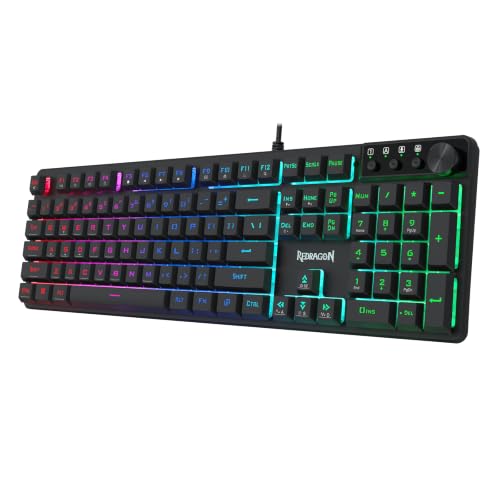
Best Gaming Keyboard with Clicky Switches (2026): 8 Picks Compared
 By Theo LangUpdated
You want clicky Green switches with tactile feedback on every keystroke, and the Razer BlackWidow V4 Pro Mechanical Gaming Keyboard gives you exactly that with its Green Mechanical Switches, a command dial, 8 dedicated macro keys, and a magnetic plush leatherette wrist rest. Its doubleshot ABS keycaps keep the labelling intact through long sessions, and per-key lighting with 3-side underglow rounds out the setup.
Your shortlist at a glance
PCKitHQ scores range from 9.2 to 9.8. See how we pick.
| Product and key specifications | Score and retailer |
|---|---|
01 Best Overall Razer BlackWidow V4 Pro Mechanical Gaming KeyboardSwitch type: Green Mechanical Switches | 9.8PCKitHQ scoreView on Amazon |
02 Second Pick Camiysn Typewriter Style Mechanical Gaming KeyboardSwitch type: blue switch, Layout: 104 Keys, Connection: USB | 9.7PCKitHQ scoreView on Amazon |
03 Also Consider YSCP Typewriter Style Mechanical Gaming Keyboard Rainbow Backlit WiredSwitch type: mechanical blue switches, Layout: 104 Keys, Backlight: Yes | 9.6PCKitHQ scoreView on Amazon |
04 Also Consider Razer BlackWidow V3 Mechanical Gaming KeyboardSwitch type: Green Mechanical Switches, Layout: Compact Form Factor, Backlight: Yes | 9.5PCKitHQ scoreView on Amazon |
05 Also Consider DIERYA 60% Mechanical KeyboardSwitch type: Mechanical Blue Switch, Layout: 60%, Connection: Wired | 9.5PCKitHQ scoreView on Amazon |
06 Also Consider Wireless Typewriter Style Mechanical KeyboardSwitch type: Clicky Blue Switch, Wireless: Yes, Connection: Bluetooth, 2.4GHz wireless, or a USB-C wired connection | 9.4PCKitHQ scoreView on Amazon |
07 Also Consider DIERYA 60% Mechanical Gaming KeyboardSwitch type: Clicky Blue Switch, Layout: 60%, Connection: USB-C | 9.3PCKitHQ scoreView on Amazon |
08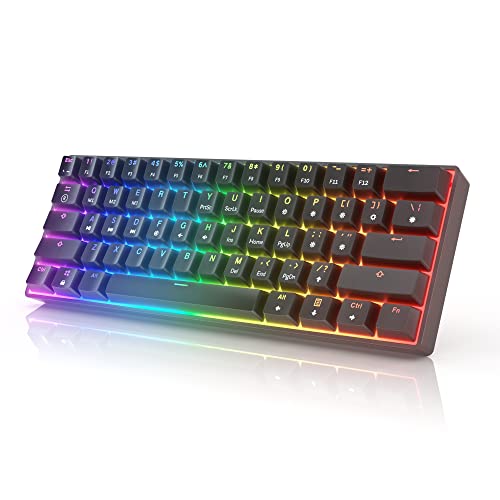 Also Consider HK Gaming GK61 Mechanical Gaming KeyboardSwitch type: Gateron Optical Blue, Layout: 61 Keys, Connection: Type-C to Type-A USB | 9.2PCKitHQ scoreView on Amazon |
A closer look at each configuration
Razer BlackWidow V4 Pro Mechanical Gaming Keyboard
score
The Green Mechanical Switches, command dial, and 8 dedicated macro keys give this keyboard its clicky, customizable setup for gaming.
- Switch type
- Green Mechanical Switches
- Weight
- 3.61 lb
- Warranty
- 2 year manufacturer
The Razer BlackWidow V4 Pro uses Green Mechanical Switches for tactile feedback and a satisfying click. The command dial takes a custom function, and 8 dedicated macro keys hold essential keybinds. Per-key lighting and 3-side underglow pair with the wrist rest, and the magnetic plush leatherette wrist rest gives secure support for long hours of play. Doubleshot ABS keycaps keep the labelling intact, and the keyboard carries a 2 year manufacturer warranty.
Choose it if
- You want Green switches with tactile feedback and an audible click
- You want a command dial and 8 dedicated macro keys
Consider another if
- You need a compact form factor for a smaller desk
- You want a keyboard lighter than 3.61 lb
Camiysn Typewriter Style Mechanical Gaming Keyboard
score
Blue switches with an audible click, round keycaps, and white backlighting give this 104-key keyboard a typewriter look.
- Switch type
- blue switch
- Layout
- 104 Keys
- Connection
- USB
- Weight
- 2.12 lb
The Camiysn Typewriter Style Mechanical Gaming Keyboard uses blue switches with medium resistance, an audible click sound, and tactile feedback. Its 104-key layout has round keycaps made with a two-color injection molding process. The white backlight offers multiple modes controlled with Fn plus Ins, with brightness and speed adjusted through Fn key combinations. The wired USB connection works with Windows, Linux, and Mac, and the keyboard has 26 anti-ghosting keys and adjustable rear feet.
Choose it if
- You want a 104-key layout with blue switches
- You want round keycaps and white backlit modes
Consider another if
- You need RGB backlighting with multiple colors
- You want a wireless connection instead of USB
YSCP Typewriter Style Mechanical Gaming Keyboard Rainbow Backlit Wired
score
Mechanical blue switches, rainbow backlighting, and a 104-key layout bring the typewriter style with RGB lighting.
- Switch type
- mechanical blue switches
- Layout
- 104 Keys
- Backlight
- Yes
- Connection
- USB
- Weight
- 1.1 lb
- Warranty
- 1year
The YSCP Typewriter Style Mechanical Gaming Keyboard uses mechanical blue switches with medium resistance, clear click sounds, and tactile feedback. Its 104-key layout has round keycaps made with durable dual-color injection molding, and the keycaps can be swapped between vintage typewriter and standard styles. The multi RGB colors backlight offers modes with brightness and speed customization, plus adjustable sidelights. The keyboard is plug-and-play through a USB port and weighs 1.1 lb.
Choose it if
- You want mechanical blue switches with a clear click
- You want RGB backlighting with adjustable sidelights
Consider another if
- You need a keyboard lighter than 1.1 lb
- You want a compact layout under 104 keys
Razer BlackWidow V3 Mechanical Gaming Keyboard
score
Green Mechanical Switches with an 80 million keystroke lifespan define this compact-form-factor Razer keyboard.
- Switch type
- Green Mechanical Switches
- Layout
- Compact Form Factor
- Backlight
- Yes
- Weight
- 2.83 lb
- Warranty
- 2 year manufacturer
The Razer BlackWidow V3 Mechanical Gaming Keyboard uses Green Mechanical Switches with a clicky, tactile feel and optimized actuation and reset points. Its transparent switch housing shows Razer Chroma RGB lighting, and the UV-coated ABS keycaps resist wearing down to a shiny finish. The multi-function digital roller and media key pause, play, and skip media and adjust brightness and volume. The keyboard is rated for an 80 million keystroke lifespan and carries a 2 year manufacturer warranty.
Choose it if
- You want a compact form factor with Green switches
- You want a multi-function digital roller and media key
Consider another if
- You need a full 104-key layout
- You want a keyboard lighter than 2.83 lb
DIERYA 60% Mechanical Keyboard
score
A 61-key layout with blue switches and 19 backlight modes packs clicky feedback into a compact wired keyboard.
- Switch type
- Mechanical Blue Switch
- Layout
- 60%
- Connection
- Wired
- Warranty
- 1 Year
The DIERYA DK61se is a 61-key mechanical gaming keyboard with all functions implemented through the Fn key combination. Its blue switches are tactile and clicky, with extra resistance that kicks in right before complete activation, giving typists a tactile bump and an audible click. The LED backlight has 19 built-in modes, with brightness and speed adjusted through shortcut keys. Full anti-ghosting supports simultaneous pressing of all keys without conflicts.
Choose it if
- You want a 61-key layout that frees desk space
- You want blue switches with a tactile bump
Consider another if
- You need a full 104-key layout with a number pad
- You want a wireless connection instead of wired
Wireless Typewriter Style Mechanical Keyboard
score
Tri-mode connectivity for up to 5 devices and a 5000mAh battery make this wireless typewriter-style keyboard flexible.
- Switch type
- Clicky Blue Switch
- Wireless
- Yes
- Connection
- Bluetooth, 2.4GHz wireless, or a USB-C wired connection
- Warranty
- 2 Year
The SEUNKWANG Wireless Typewriter Style Mechanical Keyboard uses clicky blue switches with a crisp, tactile response and a satisfying acoustic sound. Tri-mode connectivity pairs through Bluetooth, 2.4GHz wireless, or a USB-C wired connection, and the keyboard switches between up to 5 devices, including Mac OS, PC, tablet, and smartphone. The 5000mAh rechargeable battery charges through USB-C. The white backlight cycles through 18 dynamic lighting modes with FN plus INS.
Choose it if
- You want Bluetooth, 2.4GHz wireless, or USB-C wired connections
- You want to switch between up to 5 devices
Consider another if
- You need RGB backlighting with multiple colors
- You want a keyboard with no built-in battery to charge
DIERYA 60% Mechanical Gaming Keyboard
score
A 68-key layout with separate arrow keys and a detachable USB-C cable adds function keys to a compact board.
- Switch type
- Clicky Blue Switch
- Layout
- 60%
- Connection
- USB-C
The DIERYA T68SE is a 68-key mechanical keyboard with separate arrow keys and Del keys, saving space while keeping the functions of a normal keyboard. Its clicky blue switches have a distinct tactile bump paired with a loud, crisp clicking sound on actuation. Full anti-ghosting lets all 68 keys trigger at the same time, and the Fn key adds full-size keyboard functions. The blue LED backlight offers 19 built-in modes with brightness and speed adjusted through dedicated keys.
Choose it if
- You want a 68-key layout with separate arrow keys
- You want clicky blue switches with a loud click
Consider another if
- You need a full 104-key layout
- You want a wireless connection instead of USB-C
HK Gaming GK61 Mechanical Gaming Keyboard
score
Gateron Optical Blue switches, a 1kHz polling rate, and 16.8 million RGB colors define this 61-key board.
- Switch type
- Gateron Optical Blue
- Layout
- 61 Keys
- Connection
- Type-C to Type-A USB
- Weight
- 1.18 lb
The HK Gaming GK61 is a 61-key mechanical gaming keyboard with Gateron Optical Blue switches for rapid and tactile typing. Its RGB lighting offers 16.8 million colors with twenty adjustable backlight patterns through the included software, which also handles macros, key rebinding, and lighting personalization. The keyboard has a fast 1kHz polling rate for a 1ms response time and pre-lubricated stabilizers. A removable 5FT, 1.5M Type-C to Type-A USB cable detaches for convenience.
Choose it if
- You want Gateron Optical Blue switches for rapid typing
- You want RGB lighting with 16.8 million colors
Consider another if
- You need a full 104-key layout
- You want a keyboard heavier than 1.18 lb
Make the choice for your setup
Match the switch to the click you want
Every keyboard in this guide uses clicky switches, but the switch name and feel differ. The Razer BlackWidow V4 Pro and the Razer BlackWidow V3 use Green Mechanical Switches with tactile feedback and a satisfying click. The Camiysn, YSCP, DIERYA DK61se, DIERYA T68SE, and SEUNKWANG keyboards use blue switches with tactile feedback and an audible click. The HK Gaming GK61 uses Gateron Optical Blue switches for rapid and tactile typing. Compare the switch descriptions in each product before choosing, since the click sound and resistance on every keystroke come from the switch itself rather than the keyboard's size, layout, or lighting.
Choose the layout that fits your desk
Layout is the clearest difference between these keyboards. The Camiysn and YSCP keyboards have 104-key layouts with round typewriter-style keycaps. The Razer BlackWidow V4 Pro adds a command dial and 8 dedicated macro keys, while the Razer BlackWidow V3 has a compact form factor. The DIERYA DK61se has 61 keys, the HK Gaming GK61 has 61 keys, and the DIERYA T68SE has 68 keys with separate arrow keys and Del keys. The SEUNKWANG keyboard has a typewriter style with retro round keycaps. Measure the space on your desk and count the keys you need before choosing between a full layout and a compact one. Shoppers with a related need can compare our guide to the Best Small Gaming Keyboard.
Compare connection and lighting options
Connection and lighting vary across this guide. The Camiysn and YSCP keyboards connect through USB and work with Windows, Mac, and Linux systems. The DIERYA DK61se and DIERYA T68SE are wired, with the T68SE using a detachable USB-C cable. The HK Gaming GK61 uses a removable Type-C to Type-A USB cable. The SEUNKWANG keyboard connects through Bluetooth, 2.4GHz wireless, or a USB-C wired connection and switches between up to 5 devices. For lighting, the Razer keyboards use Chroma RGB, the YSCP and HK Gaming keyboards use RGB backlighting, the Camiysn and SEUNKWANG keyboards use white backlighting, and the DIERYA keyboards use LED backlighting with 19 built-in modes.
Before you decide, also read Mechanical vs Membrane Keyboard.
FAQ: Gaming Keyboard with Clicky Switches
Which keyboard in this guide has a command dial?
The Razer BlackWidow V4 Pro Mechanical Gaming Keyboard has a command dial and 8 dedicated macro keys. The command dial takes a custom function, and the macro keys hold essential keybinds. The keyboard also has per-key lighting and a magnetic plush leatherette wrist rest.
Which keyboards in this guide use blue switches?
The Camiysn, YSCP, DIERYA DK61se, DIERYA T68SE, and SEUNKWANG keyboards use blue switches with tactile feedback and an audible click. The HK Gaming GK61 uses Gateron Optical Blue switches instead. The two Razer keyboards use Green Mechanical Switches.
Which keyboard in this guide connects wirelessly?
The SEUNKWANG Wireless Typewriter Style Mechanical Keyboard connects through Bluetooth, 2.4GHz wireless, or a USB-C wired connection. It switches between up to 5 devices and has a 5000mAh rechargeable battery. Its white backlight cycles through 18 dynamic lighting modes with FN plus INS.