
Best Gaming Keyboard Portable (2026): 7 Picks Compared
 By Theo LangUpdated
Pick the Razer Huntsman Mini 60% Gaming Keyboard if you want a compact 60% board with linear optical switches, an aluminum top frame, and oil-resistant doubleshot PBT keycaps at 1.1 lb. The Redragon Wireless Gaming Keyboard answers with a 75% layout, Bluetooth 5.0, 2.4G wireless and USB-C wired connections, and a 4000mAh battery. The HyperX Alloy Origins 60 brings switches rated for 80 million keypresses.
Your shortlist at a glance
PCKitHQ scores range from 9.2 to 9.8. See how we pick.
| Product and key specifications | Score and retailer |
|---|---|
01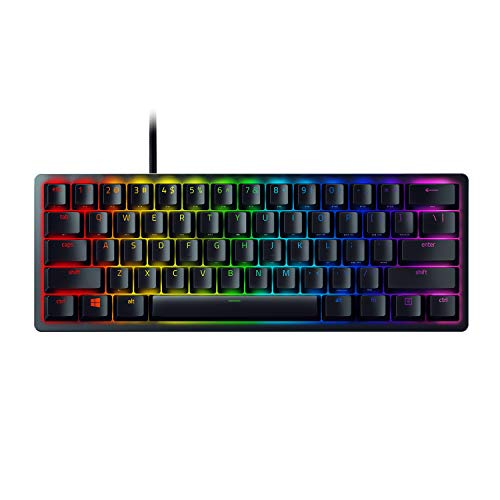 Best Overall Razer Huntsman Mini 60% Gaming KeyboardSwitch type: Linear Optical Switches, Layout: 60%, Backlight: Yes | 9.8PCKitHQ scoreView on Amazon |
02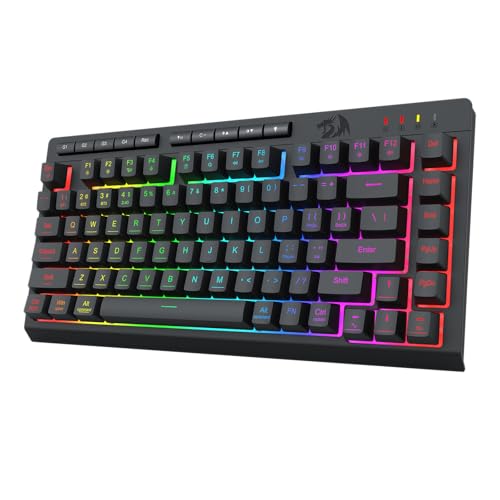 | 9.7PCKitHQ scoreView on Amazon |
03 Also Consider HyperX Alloy Origins 60Switch type: Linear HyperX Red Switch, Layout: 60%, Backlight: Yes | 9.6PCKitHQ scoreView on Amazon |
04 Also Consider Redragon Wireless Gaming Keyboard and Mouse ComboSwitch type: Membrane, Layout: 60%, Wireless: Yes | 9.5PCKitHQ scoreView on Amazon |
05 Also Consider Guiheng Wired Portable 60% Mechanical Feeling Gaming KeyboardSwitch type: Red Switch, Layout: 60%, Backlight: Yes | 9.4PCKitHQ scoreView on Amazon |
06 Also Consider abucow 60% Percent Gaming Keyboard Minimalist Portable Wired Ultra-Compact Mini Imitation 61 Keys RGB Backlit Keyboard (White-Black)Layout: 60%, Backlight: Yes, Connection: USB-C | 9.3PCKitHQ scoreView on Amazon |
07 Also Consider Razer Joro Wireless Gaming KeyboardSwitch type: Ultra Low Profile Switches, Layout: 75%, Wireless: Yes | 9.2PCKitHQ scoreView on Amazon |
A closer look at each configuration
Razer Huntsman Mini 60% Gaming Keyboard
score
The Razer Huntsman Mini 60% Gaming Keyboard pairs linear optical switches with an aluminum top frame and oil-resistant doubleshot PBT keycaps.
- Switch type
- Linear Optical Switches
- Layout
- 60%
- Backlight
- Yes
- Weight
- 1.1 lb
- Warranty
- 2 year
The Razer Huntsman Mini 60% Gaming Keyboard uses Razer linear optical switches with a 1.0 mm actuation distance. Its matte aluminum top frame covers a 60% layout with Chroma RGB lighting across 16.8 million colors. Razer Hypershift remaps all keys and keypress combinations to run macros. Snap Tap prioritizes the newest input between a pair of assigned keys through Razer Synapse 4. The keyboard weighs 1.1 lb.
Choose it if
- You want a 60% board with optical switches
- You want a 1.1 lb keyboard to carry
Consider another if
- You need a keyboard under 1.1 lb
- You need a 75% layout with arrow keys
Redragon Wireless Gaming Keyboard
score
The Redragon Wireless Gaming Keyboard pairs a 75% membrane layout with Bluetooth 5.0, 2.4G wireless, and USB-C wired connections.
- Switch type
- Membrane
- Layout
- 75%
- Wireless
- Yes
- Backlight
- Yes
- Connection
- Bluetooth 5.0, 2.4G wireless and USB-C wired
- Weight
- 1.13 lb
The Redragon Wireless Gaming Keyboard connects over Bluetooth 5.0, 2.4G wireless, and USB-C wired. Its 75% tenkeyless design removes the numpad. A 4000mAh rechargeable battery powers the keyboard, and Redragon rates it at up to 50 hours with RGB lighting on and up to 300 hours with the lights off. The membrane keys carry 16.8 million RGB colors and 26-key anti-ghosting. The keyboard weighs 1.13 lb.
Choose it if
- You want Bluetooth 5.0 and 2.4G wireless for several devices
- You want a 75% board with a 4000mAh battery
Consider another if
- You need linear optical switches here
- You need a keyboard under 1.13 lb
HyperX Alloy Origins 60
score
The HyperX Alloy Origins 60 pairs a 60% aluminum body with linear HyperX Red switches and a detachable USB-C cable.
- Switch type
- Linear HyperX Red Switch
- Layout
- 60%
- Backlight
- Yes
- Connection
- USB-C
- Weight
- 2.14 lb
- Warranty
- 2 year
The HyperX Alloy Origins 60 uses linear HyperX Red switches in a 60% form factor with an aircraft-grade aluminum body. Double shot PBT keycaps carry side printing for secondary functions. The switches are rated for 80 million keypresses. HyperX NGENUITY software handles Game Mode, macros, and per-key lighting. Two-step keyboard feet set 3 tilt angles, and the USB-C cable detaches for packing. The keyboard weighs 2.14 lb.
Choose it if
- You want a 60% board with an aluminum body
- You want switches rated for 80 million keypresses
Consider another if
- You need Bluetooth 5.0 for wireless play
- You need a 75% layout with arrow keys
Redragon Wireless Gaming Keyboard and Mouse Combo
score
The Redragon Wireless Gaming Keyboard and Mouse Combo pairs a 60% membrane keyboard with a 12800 DPI mouse in one wireless set.
- Switch type
- Membrane
- Layout
- 60%
- Wireless
- Yes
- Backlight
- Yes
- Connection
- Bluetooth 5.0, 2.4G wireless and USB-C wired
- Weight
- 1.13 lb
The Redragon Wireless Gaming Keyboard and Mouse Combo pairs a 60% membrane keyboard with a mouse. Both connect over Bluetooth 5.0, 2.4G wireless, and USB-C wired. The keyboard runs on a 4000mAh battery and the mouse on a 700mAh battery, and Redragon rates the keyboard at up to 50 hours with RGB lighting on. The mouse offers 5 default DPI levels from 400 to 3200 and a driver range from 100 to 12800 DPI.
Choose it if
- You want a keyboard and mouse set
- You want a 60% board with Bluetooth 5.0 and 2.4G wireless
Consider another if
- You need linear optical switches here
- You need a keyboard under 1.13 lb
Guiheng Wired Portable 60% Mechanical Feeling Gaming Keyboard
score
The Guiheng Wired Portable 60% Mechanical Feeling Gaming Keyboard packs 68 keys with red switches into a wired 60% layout.
- Switch type
- Red Switch
- Layout
- 60%
- Backlight
- Yes
- Connection
- USB
The Guiheng Wired Portable 60% Mechanical Feeling Gaming Keyboard is a wired 60% board with 68 keys and red switches. It connects over USB with plug and play, and all 68 keys are conflict-free for simultaneous presses. The compact size saves desk space. The board has rainbow backlighting, dust-proof and splash-proof designs, and double-shot injection keycaps. Ten multimedia keys sit on the board, and firm kickstand feet adjust the typing angle.
Choose it if
- You want a wired 60% board with 68 keys
- You want red switches with 10 multimedia keys
Consider another if
- You need Bluetooth 5.0 for wireless play
- You need more than 68 keys
abucow 60% Percent Gaming Keyboard Minimalist Portable Wired Ultra-Compact Mini Imitation 61 Keys RGB Backlit Keyboard (White-Black)
score
The abucow 60% Percent Gaming Keyboard pairs a 61-key layout with a detachable USB-C cable and 6 backlight effects.
- Layout
- 60%
- Backlight
- Yes
- Connection
- USB-C
- Weight
- 1.32 lb
- Warranty
- 1-year
The abucow 60% Percent Gaming Keyboard is a wired 61-key board in a 60% layout with a detachable USB-C cable. Its compact size saves desk space. RGB backlighting offers 6 backlight effects and 8 backlight color options, with colors set per key or in patterns and gradients. Anti-ghosting covers the full key set for fluid simultaneous presses. The keyboard works with Windows, Linux, Mac, PS5, and Xbox. It weighs 1.32 lb.
Choose it if
- You want a 61-key board at 1.32 lb
- You want a 61-key board with RGB lighting
Consider another if
- You need a keyboard under 1.32 lb
- You need a 4000mAh battery for wireless play
Razer Joro Wireless Gaming Keyboard
score
The Razer Joro Wireless Gaming Keyboard pairs ultra low profile switches with Bluetooth 5.0 for three devices in a 374 g frame.
- Switch type
- Ultra Low Profile Switches
- Layout
- 75%
- Wireless
- Yes
- Backlight
- Yes
- Warranty
- 2 Year
The Razer Joro Wireless Gaming Keyboard is a portable compact 75% board with ultra low profile switches and a function row plus full-sized arrow keys. It is 16.5 mm thin and weighs 374 g. Bluetooth 5.0 pairs up to three devices across Windows, Mac, handhelds, and mobile devices. Snap Tap prioritizes inputs between two keys through Razer Synapse 4. The keyboard carries a 2 Year Manufacturer warranty.
Choose it if
- You want a 75% board with a function row
- You want Bluetooth for up to three devices
Consider another if
- You need a 60% board with optical switches
- You need a keyboard under 374 g
Make the choice for your setup
Layout size and portability
Five of the seven picks use a 60% layout, and two use 75%. The Razer Huntsman Mini, the HyperX Alloy Origins 60, the Redragon combo, the Guiheng, and the abucow all drop the numpad for a compact board. The Redragon Wireless Gaming Keyboard and the Razer Joro keep a 75% layout, and the Joro adds a function row with full-sized arrow keys. The Razer Huntsman Mini weighs 1.1 lb, the HyperX Alloy Origins 60 weighs 2.14 lb, and the Razer Joro weighs 374 g. The HyperX and the abucow use a detachable USB-C cable, which helps when you pack the board. The Razer Huntsman Mini measures 11.56 by 4.07 by 1.45 inches.
Switches and keycaps
Switch type shapes how each board feels and what it is rated for. The Razer Huntsman Mini uses linear optical switches with a 1.0 mm actuation distance, and the HyperX Alloy Origins 60 uses linear HyperX Red switches rated for 80 million keypresses. The Guiheng uses red switches across 68 keys, and the Razer Joro uses ultra low profile switches. The two Redragon picks use membrane switches and 26-key anti-ghosting. The Razer Huntsman Mini and the HyperX Alloy Origins 60 both use doubleshot PBT keycaps, and the Razer caps are oil-resistant while the HyperX caps carry side printing for secondary functions. A related shortlist covers the Best Gaming Keyboard with Programmable Keys.
Wireless, battery, and software
Connection and power split the lineup into wireless and wired boards. The two Redragon picks connect over Bluetooth 5.0, 2.4G wireless, and USB-C wired, and the Razer Joro pairs over Bluetooth 5.0 with up to three devices. Both Redragon keyboards carry a 4000mAh battery, and Redragon rates them at up to 50 hours with RGB lighting on and up to 300 hours with the lights off. The HyperX Alloy Origins 60, the Guiheng, and the abucow use wired connections, with the HyperX and the abucow using detachable USB-C cables. Razer Hypershift remaps keys on the Huntsman Mini, and HyperX NGENUITY handles macros and per-key lighting on the Alloy Origins 60.
For a wider shortlist, start with Mechanical vs Membrane Keyboard.
FAQ: Gaming Keyboard Portable
Which keyboards here connect over Bluetooth?
The Redragon Wireless Gaming Keyboard, the Redragon combo, and the Razer Joro connect over Bluetooth 5.0. The Redragon picks also offer 2.4G wireless and USB-C wired, and the Joro pairs with up to three devices. The HyperX, Guiheng, and abucow connect over USB or USB-C.
How long do the Redragon batteries last?
Redragon rates both keyboards at up to 50 hours with RGB lighting on and up to 300 hours with the lights off. Both carry a 4000mAh battery, and an auto-sleep function starts after 2 minutes of inactivity. The combo adds a 700mAh mouse battery.
Which keyboards here have a 2 year warranty?
The Razer Huntsman Mini, the HyperX Alloy Origins 60, and the Razer Joro each carry a 2 year warranty, while the abucow carries a 1-year warranty. The Huntsman Mini and the Joro warranties are manufacturer warranties, and the Alloy Origins 60 warranty covers 2 years.


