Best External Drive Desktop (2026): Our 6 Picks Ranked
 By Theo LangUpdated
The Western Digital 14TB Elements Desktop External Hard Drive is the pick for Windows PC owners who want 14TB of plug-and-play add-on storage. It pairs 14336 GB of installed storage with a USB 3.0 connection, fast data transfers, and a 2-year manufacturer's limited warranty. The Seagate Expansion Desktop holds 16384 GB, while the SanDisk Professional G-Drive adds USB-C at 10Gbps. Match capacity, connection, and warranty to the files you keep at your desk.
Your shortlist at a glance
PCKitHQ scores range from 9.2 to 9.8. See how we pick.
| Product and key specifications | Score and retailer |
|---|---|
01 | 9.8PCKitHQ scoreView on Amazon |
| 02 | 9.7PCKitHQ scoreView on Amazon |
03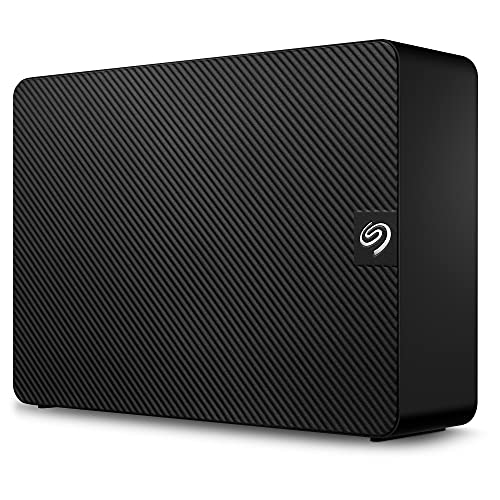 | 9.6PCKitHQ scoreView on Amazon |
04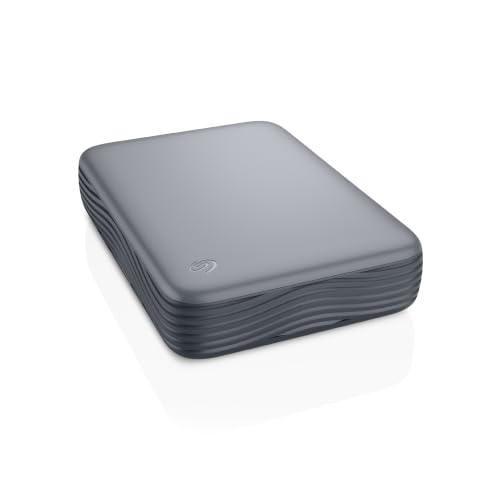 | 9.4PCKitHQ scoreView on Amazon |
05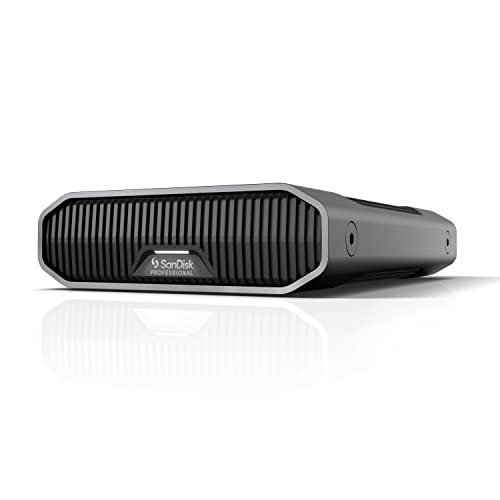 | 9.3PCKitHQ scoreView on Amazon |
06 | 9.2PCKitHQ scoreView on Amazon |
A closer look at each configuration
Western Digital
score
The 14TB capacity, USB 3.0 connection, and plug-and-play setup for Windows PCs define this Western Digital Elements drive.
- Installed storage
- 14TB
- Weight
- 2.7 lb
- Warranty
- 2-year manufacturer's limited warranty
This Western Digital Elements drive has 14336 GB of installed storage and a USB 3.0 connection for plug-and-play use with Windows PCs. It is high-capacity add-on storage for personal use with fast data transfers. The drive weighs 2.7 lb and carries a 2-year manufacturer's limited warranty. The 14TB capacity holds more than the 10TB Elements drive in this guide. Compare the installed capacity with the files you plan to store on the drive.
Choose it if
- You want 14TB of add-on storage for a Windows PC
- Your files fit within the 14336 GB installed capacity
Consider another if
- You need the 16384 GB capacity of the Seagate Expansion
- You need the USB-C connection of the SanDisk G-Drive
Western Digital WDBWLG0100HBK-NESN
score
The 10TB capacity and USB 3.0 connection suit Windows PC owners who want a smaller Elements drive with the same plug-and-play setup.
- Installed storage
- 10TB
- Weight
- 2.09 lb
- Warranty
- 2-year limited
This Western Digital Elements drive has 10240 GB of installed storage and a USB 3.0 connection for plug-and-play use with Windows PCs. It is high-capacity add-on storage for personal use with fast data transfers. The drive weighs 2.09 lb and carries a 2-year limited warranty. It needs to be reformatted prior to working with Mac, and it ships as Windows compatible. Compare the installed capacity with the files you plan to store.
Choose it if
- You want 10TB of add-on storage for a Windows PC
- Your files fit within the 10240 GB installed capacity
Consider another if
- You need the 14336 GB capacity of the larger Elements drive
- You need the USB-C connection of the Seagate 8TB Expansion
Seagate Expansion Desktop
score
The 16384 GB capacity and USB 3.0 connection define this Seagate Expansion Desktop drive.
- Installed storage
- 16TB
- Weight
- 2.59 lb
- Warranty
- limited warranty
This Seagate Expansion Desktop drive has 16384 GB of installed storage and a USB 3.0 connection with fast file transfers. Setup means plugging in the power adapter and USB cable, and drag-and-drop file saving works right out of the box. The drive weighs 2.59 lb and carries a limited warranty. It has automatic recognition of Windows and Mac computers for simple setup, and reformatting is required for use with Time Machine.
Choose it if
- You want 16384 GB of desktop storage
- You use Windows or Mac computers for file saving
Consider another if
- You need the USB-C connection of the SanDisk G-Drive
- You need the 5-year limited warranty of the LaCie d2
Seagate 8TB Expansion Desktop Hard Drive
score
The USB-C connection and 8192 GB capacity suit desk setups that use USB-C and need a smaller Seagate Expansion drive.
- Installed storage
- 8TB
- USB-C
- Yes
- Weight
- 2.59 lb
- Warranty
- 1 Year Limited
This Seagate Expansion drive has 8192 GB of installed storage and a USB-C connection. It holds massive storage up to 8TB for growing digital lives, with backup, archive, and media libraries kept in one place. The drive weighs 2.59 lb and carries a 1 Year Limited warranty. It includes Rescue Data Recovery Services for added protection. The drive is Windows and macOS compatible, and USB-C connectivity keeps the setup simple.
Choose it if
- You want USB-C connectivity for your desk setup
- Your files fit within the 8192 GB installed capacity
Consider another if
- You need the 16384 GB capacity of the Seagate Expansion
- You need the 3 year limited manufacturer warranty of the SanDisk G-Drive
SanDisk Professional
score
The USB-C connection at 10Gbps and rates up to 260MB/s read and write set this 8TB G-Drive apart.
- Installed storage
- 8TB
- USB-C
- Yes
- Weight
- 4.25 lb
- Warranty
- 3 year limited manufacturer warranty
This SanDisk Professional G-Drive has 8192 GB of installed storage and a USB-C connection at 10Gbps for backup with rates up to 260MB/s read and 260MB/s write. It holds a high-capacity, enterprise-class Ultrastar 7200RPM drive inside. The drive weighs 4.25 lb and carries a 3 year limited manufacturer warranty. It is Mac Ready and Apple Time Machine compatible, and it is easily reformatted for Windows. Its stackable, anodized aluminum enclosure has three modes of brightness to adjust the LED lights.
Choose it if
- You want a Mac Ready drive with Time Machine compatibility
- You want USB-C at 10Gbps for backup
Consider another if
- You need the 16384 GB capacity of the Seagate Expansion
- You need the 5-year limited warranty of the LaCie d2
LaCie d2 Professional
score
The 10TB capacity, USB-C connection, and 5-year limited warranty define this LaCie d2 Professional drive.
- Installed storage
- 10TB
- USB-C
- Yes
- Weight
- 3.97 lb
- Warranty
- 5-year limited warranty
This LaCie d2 Professional drive has 10240 GB of installed storage and a USB-C connection for use with USB-C and Thunderbolt 3 computers. It holds 10TB of capacity with speeds of up to 240MB/s for editing and archiving projects. The drive weighs 3.97 lb and carries a 5-year limited warranty with a recovery service. It is equipped with a BarraCuda Pro enterprise class drive inside an aluminum form factor. The 10TB capacity matches the Western Digital 10TB Elements drive in this guide.
Choose it if
- You want a USB-C drive for a computer with Thunderbolt 3
- You want the 5-year limited warranty on this drive
Consider another if
- You need the 16384 GB capacity of the Seagate Expansion
- You need USB-C at 10Gbps from the SanDisk G-Drive
Make the choice for your setup
Match installed capacity to your files
The drives in this guide hold 8192 GB, 10240 GB, 14336 GB, or 16384 GB of installed storage. The Seagate Expansion Desktop holds 16384 GB, while the Western Digital 14TB Elements holds 14336 GB of installed storage. The Western Digital 10TB Elements and the LaCie d2 Professional each hold 10240 GB, and the Seagate 8TB Expansion and the SanDisk Professional G-Drive each hold 8192 GB. Compare each installed capacity figure with the files you plan to keep on the drive, and keep installed capacity separate from any expansion figure. A larger installed capacity holds more files on the drive itself without expansion.
Choose the connection for your computer
Four drives in this guide use USB 3.0: the Western Digital 14TB Elements, the Western Digital 10TB Elements, the Seagate Expansion Desktop, and the LaCie d2 Professional. Three use USB-C: the Seagate 8TB Expansion, the SanDisk Professional G-Drive, and the LaCie d2 Professional. The SanDisk Professional G-Drive names USB-C at 10Gbps. The LaCie d2 Professional connects to USB-C and Thunderbolt 3 computers. The Western Digital drives are plug-and-play ready for Windows PCs, while the Seagate 8TB Expansion is Windows and macOS compatible. The Seagate Expansion Desktop has automatic recognition of Windows and Mac computers, and the SanDisk Professional G-Drive is Mac Ready and Apple Time Machine compatible. Match the connection on the drive to the ports on your computer. Shoppers with a related need can compare our guide to the Best Desktop Computers for Business.
Compare warranty terms before you buy
Warranty terms differ across the six drives. The LaCie d2 Professional carries a 5-year limited warranty with a recovery service, and the SanDisk Professional G-Drive carries a 3 year limited manufacturer warranty. The Western Digital 14TB Elements carries a 2-year manufacturer's limited warranty, and the Western Digital 10TB Elements carries a 2-year limited warranty. The Seagate 8TB Expansion carries a 1 Year Limited warranty and includes Rescue Data Recovery Services, while the Seagate Expansion Desktop carries a limited warranty. Read each warranty term as whole-device coverage and keep the named term with the drive that states it. The LaCie warranty is the longest term in this guide.
Before you decide, also read Best Desktop Computer with Cd Drive.
FAQ: External Drive Desktop
Which drive holds the most installed storage?
The Seagate Expansion Desktop holds 16384 GB of installed storage. The Western Digital 14TB Elements holds 14336 GB of installed storage, and the Western Digital 10TB Elements and the LaCie d2 Professional each hold 10240 GB of installed storage.
Which drives use a USB-C connection?
The Seagate 8TB Expansion, the SanDisk Professional G-Drive, and the LaCie d2 Professional each use a USB-C connection. The SanDisk Professional G-Drive names USB-C at 10Gbps. The LaCie d2 Professional connects to USB-C and Thunderbolt 3 computers.
Which drive carries the longest warranty term?
The LaCie d2 Professional carries a 5-year limited warranty with a recovery service. The SanDisk Professional G-Drive carries a 3 year limited manufacturer warranty, and the Western Digital drives carry 2-year limited warranties. The Seagate 8TB Expansion carries a 1 Year Limited warranty.