Best Ergonomic Mouse with Cord (2026): Top 5 by the Specs
 By Theo LangUpdated
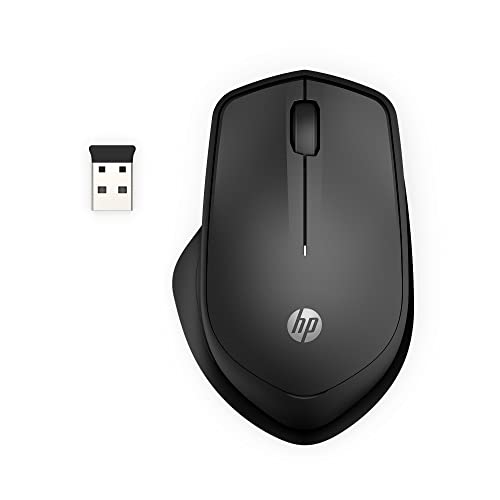
You spend long hours at a desk with a laptop or Chromebook, and the TeckNet 6-Button Ergonomic USB Wired Optical Mouse for Laptop Computer suits that setup with a USB wired connection, four DPI levels from 1000 to 6400, and six buttons including Back and Forward. Its 5-foot cable plugs in without software, and its soft rubber grips fit a compact shape you can carry between home and office.
Your shortlist at a glance
PCKitHQ scores range from 9.2 to 9.8. See how we pick.
| Product and key specifications | Score and retailer |
|---|---|
01 | 9.8PCKitHQ scoreView on Amazon |
02 Second Pick Nulea Ergonomic Vertical Mouse Wired | 9.7PCKitHQ scoreView on Amazon |
03 Also Consider Nulea M504 Wired Vertical Mouse | 9.5PCKitHQ scoreView on Amazon |
04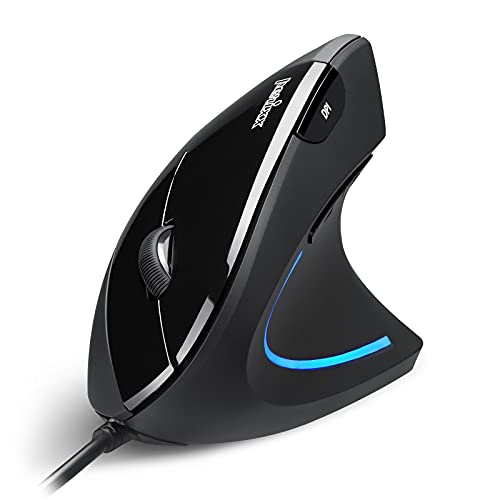 Also Consider Perixx PERIMICE-513 Wired Ergonomic Vertical Mouse | 9.3PCKitHQ scoreView on Amazon |
05 Also Consider Perixx PERIMICE-519 Wired Ergonomic Vertical Mouse | 9.2PCKitHQ scoreView on Amazon |
A closer look at each configuration
TeckNet 6-Button Ergonomic USB Wired Optical Mouse for Laptop Chromebook
score
The TeckNet pairs a USB wired connection with four DPI levels from 1000 to 6400 and six buttons for daily laptop and Chromebook work.
- Connection
- USB
- Weight
- 0.24 lb
- Warranty
- 36
The TeckNet connects through a 5-foot USB cable and needs no software or downloads, so it runs on Windows 2000 through Windows 11 and Chromebook, with Mac support except for the side buttons. Its four DPI levels run from 1000 to 6400, and its six buttons include large Back and Forward buttons for moving between documents and web pages. The shaped design uses soft rubber grips, and the compact size fits a bag for use at home, at work, or anywhere else. TECKNET covers it with a 36-month warranty when registered, and the mouse weighs 0.24 lb.
Choose it if
- You work on a laptop or Chromebook with a USB port
- You want four DPI levels from 1000 to 6400
Consider another if
- You need a vertical mouse shape for your hand
- You need a cable longer than 5 feet
Nulea Ergonomic Vertical Mouse Wired
score
The Nulea vertical mouse pairs a 57-degree grip with DPI levels from 800 to 3200 and 11 RGB lighting modes.
- Backlight
- Yes
- Connection
- USB
- Weight
- 0.4 lb
- Warranty
- 2
The Nulea uses a 57-degree natural grip and a vertical shape, and the maker notes it may take a few days to get used to. Its four DPI levels run from 800 to 3200, and its 11 RGB lighting modes illuminate the outline of the mouse with an adjustable underglow. The 5.9-foot cable uses a USB 2.0 interface and needs no drivers, and the metal non-slip scroll wheel sits beside Forward and Backward buttons that are not compatible with Mac and are not programmable. It is sized for medium hands, weighs 0.4 lb, and carries a 2-year warranty.
Choose it if
- You want a 57-degree vertical grip for your hand
- You want 11 RGB lighting modes around the mouse outline
Consider another if
- You need a warranty longer than 2 years
- You need a mouse whose side buttons work on Mac
Nulea M504 Wired Vertical Mouse
score
The pink Nulea M504 pairs a 57-degree vertical grip with DPI levels from 800 to 3200 and 11 RGB lighting modes.
- Backlight
- Yes
- Connection
- USB
- Warranty
- 2
The Nulea M504 in pink uses a 57-degree natural grip and a vertical shape, and the maker notes it may take a few days to get used to. Its four DPI levels run from 800 to 3200, and its 11 RGB lighting modes illuminate the outline of the mouse with an adjustable underglow. The 1.8-metre cable uses a USB 2.0 interface and needs no drivers, and the metal non-slip scroll wheel sits beside Forward and Backward buttons that are not compatible with Mac and are not programmable. It is sized for medium hands and carries a 2-year warranty.
Choose it if
- You want the 57-degree vertical grip in pink
- You want a 1.8-metre cable for your desk setup
Consider another if
- You need a cable longer than 1.8 metres
- You need a mouse whose side buttons work on Mac
Perixx PERIMICE-513 Wired Ergonomic Vertical Mouse
score
The Perixx PERIMICE-513 pairs a vertical right-handed shape with silent left and right clicks and a 5.9-foot USB cable.
- Connection
- USB
- Weight
- 0.35 lb
- Warranty
- 12
The Perixx PERIMICE-513 keeps your wrist in a neutral, upright position with a vertical shape made for right-handed use, and the maker suggests allowing 1 to 2 weeks to adapt to the shape. Its silent left and right buttons keep clicks quiet, while the scroll wheel and back and forward buttons are not silent. Its DPI settings run at 1000 and 1600, and its buttons are not programmable, with back and forward buttons not supported on macOS. The soft rubber-coated surface measures 4.92 by 2.44 by 3.03 inches, the mouse weighs 0.35 lb, and the 5.9-foot USB-A cable needs no drivers. It works with Windows 7, 8, 10, and 11 and carries a 12-month limited warranty.
Choose it if
- You want silent left and right clicks for quiet work
- You want a vertical mouse for right-handed use
Consider another if
- You need DPI levels above 1600
- You need a warranty longer than 12 months
Perixx PERIMICE-519 Wired Ergonomic Vertical Mouse
score
The Perixx PERIMICE-519 pairs a portable small vertical design with DPI settings of 800 and 1600 and silent clicks.
- Connection
- USB
- Weight
- 0.24 lb
- Warranty
- 1
The Perixx PERIMICE-519 measures 4.13 by 2.64 by 2.28 inches, or 105 by 67 by 58 mm, and its portable size needs little space when you carry it while travelling. Its vertical shape positions the wrist and forearm for long working hours, and its 6-button layout includes a built-in DPI switch button with settings of 800 and 1600. Side buttons work as shortcuts for moving forwards and backwards through browsing history. Its optical tracking sensor works on any type of surface, and the 5.9-foot USB wired cable gives a stable connection with no drivers needed. It works with Windows 7, 8, and 10, with all features working on Mac, and carries a 1-year limited warranty.
Choose it if
- You want a small portable mouse for travel
- You want six buttons with a built-in DPI switch
Consider another if
- You need DPI levels above 1600 in this mouse
- You need a warranty longer than 1 year
Make the choice for your setup
Match the grip shape to your hand
The TeckNet uses a shaped design with soft rubber grips and a compact size, while the two Nulea mice use a 57-degree vertical grip and the two Perixx mice use a vertical shape. The Perixx PERIMICE-513 is made for right-handed use and measures 4.92 by 2.44 by 3.03 inches, while the Perixx PERIMICE-519 measures 4.13 by 2.64 by 2.28 inches and is described as portable for travel. The Nulea mice are sized for medium hands. The Perixx PERIMICE-513 maker suggests allowing 1 to 2 weeks to adapt to the vertical shape, and the Nulea maker notes it may take a few days to get used to. Compare the documented dimensions and grip angles before choosing.
Compare DPI levels and buttons
The TeckNet offers four DPI levels from 1000 to 6400 with six buttons including large Back and Forward buttons. The Nulea mice offer four DPI levels from 800 to 3200 with Forward and Backward buttons that are not compatible with Mac and are not programmable. The Perixx PERIMICE-513 offers DPI settings of 1000 and 1600 with back and forward buttons that are not supported on macOS and buttons that are not programmable. The Perixx PERIMICE-519 offers DPI settings of 800 and 1600 with a built-in DPI switch button and side buttons mapped as shortcuts for moving forwards and backwards through browsing history. Match the DPI range and the button layout to the work you do each day. A related shortlist covers the Best Gaming Mouse with Macros.
Check cable, system support, and warranty
Every mouse here connects through a USB cable and needs no drivers. The TeckNet has a 5-foot cable and works with Windows 2000 through Windows 11 and Chromebook, with Mac support except for the side buttons. The grey Nulea has a 5.9-foot cable with a USB 2.0 interface, and the pink Nulea M504 has a 1.8-metre cable with a USB 2.0 interface. The Perixx PERIMICE-513 has a 5.9-foot USB-A cable and works with Windows 7, 8, 10, and 11. The Perixx PERIMICE-519 has a 5.9-foot cable and works with Windows 7, 8, and 10, with all features working on Mac. Warranties run from 1 year on the Perixx PERIMICE-519 to 36 months on the registered TeckNet.
For a wider shortlist, start with Best Mouse.
FAQ: Ergonomic Mouse with Cord
Which mouse has the longest warranty in this guide?
The TeckNet carries a 36-month warranty when registered. The Nulea mice carry a 2-year warranty, the Perixx PERIMICE-513 carries a 12-month limited warranty, and the Perixx PERIMICE-519 carries a 1-year limited warranty. Check the registration condition on the TeckNet before you buy.
Which of these mice have RGB backlighting?
The two Nulea mice have 11 RGB lighting modes that illuminate the outline of the mouse with an adjustable underglow, and that lighting is the documented difference between the Nulea pair and the other three mice.
Which mouse is made for travel?
The Perixx PERIMICE-519 measures 4.13 by 2.64 by 2.28 inches, or 105 by 67 by 58 mm, and its portable size needs little space when you carry it while travelling. The TeckNet is also described as compact, while the Perixx PERIMICE-513 measures 4.92 by 2.44 by 3.03 inches.