
Best Ergonomic Keyboard with Quiet Keys (2026): 8 Picks Compared
 By Theo LangUpdated
Choose the Faadar Wireless Keyboard and Mouse Combo first if quiet keys and a curved ergonomic layout matter most: its soft membrane keys use a silent structure, and its curved design supports a natural typing position for long workdays. Four adjustable leg rests offer three tilt positions, the included mouse is quiet with no clicking sound, and a 12-month warranty covers the combo.
Your shortlist at a glance
PCKitHQ scores range from 9.2 to 9.8. See how we pick.
| Product and key specifications | Score and retailer |
|---|---|
01 Best Overall Wireless Keyboard and Mouse ComboSwitch type: membrane, Wireless: Yes, Connection: 2.4GHz | 9.8PCKitHQ scoreView on Amazon |
02 | 9.7PCKitHQ scoreView on Amazon |
03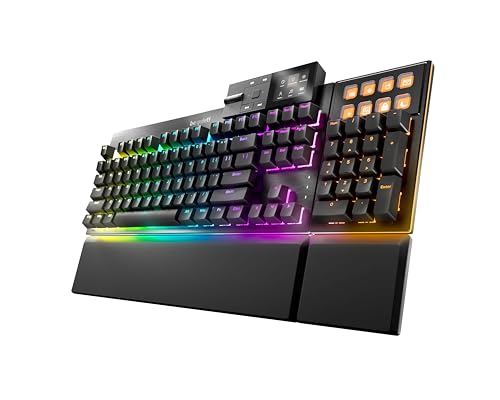 Also Consider be quiet! Dark Mount TactileSwitch type: silent tactile black switches, Hot-swappable: Yes, Connection: USB-A-to-C | 9.6PCKitHQ scoreView on Amazon |
04 Also Consider Ergonomic Wireless Keyboard and Mouse ComboLayout: Full Size, Wireless: Yes, Connection: 2.4GHz | 9.5PCKitHQ scoreView on Amazon |
05 Also Consider Kensington Pro Fit Ergonomic Wireless KeyboardWireless: Yes, Connection: 2 4 GHz and Bluetooth 4 0 LE | 9.5PCKitHQ scoreView on Amazon |
06 | 9.4PCKitHQ scoreView on Amazon |
07 | 9.3PCKitHQ scoreView on Amazon |
08 Also Consider Perixx PERIDUO-606II 2-in-1 Wireless Compact Ergonomic KeyboardSwitch type: X-type scissor keys, Layout: compact, Wireless: Yes | 9.2PCKitHQ scoreView on Amazon |
A closer look at each configuration
Wireless Keyboard and Mouse Combo
score
Soft membrane keys, a curved ergonomic design, and a silent mouse define this combo for quiet everyday typing.
- Switch type
- membrane
- Wireless
- Yes
- Connection
- 2.4GHz
- Warranty
- 12-month
This Faadar combo pairs soft membrane keys with a silent structure and a curved design that supports a natural typing position. Four adjustable leg rests give three tilt positions. Eight multimedia and shortcut keys control back, forward, refresh, volume, mute, home, and search, and FN combinations adjust screen brightness. The mouse offers 800, 1200, and 1600 DPI and suits left-handed and right-handed users. The keyboard sleeps after 5 seconds of inactivity and the mouse after 15 minutes. A 12-month warranty covers the combo.
Choose it if
- You type for long workdays and want a curved ergonomic layout
- You share a room and need quiet keys and a silent mouse
Consider another if
- You need Bluetooth instead of the 2.4GHz wireless connection
- You need mouse sensitivity above 1600 DPI
Wireless Keyboard and Mouse Combo
score
The same Faadar combo in avocado green adds a full-size layout and a 1.8 lb weight to the quiet membrane keys.
- Switch type
- membrane
- Layout
- Full Size
- Wireless
- Yes
- Connection
- 2.4GHz
- Weight
- 1.8 lb
- Warranty
- 12-month
This avocado green Faadar combo is the full-size version of the same CK30Pro model, with soft membrane keys in a silent structure and a curved design for a natural typing position. Four adjustable leg rests give three tilt positions. Eight multimedia and shortcut keys control back, forward, refresh, volume, mute, home, and search. The mouse offers 800, 1200, and 1600 DPI and suits left-handed and right-handed users. The keyboard sleeps after 5 seconds of inactivity. The combo weighs 1.8 lb and carries a 12-month warranty.
Choose it if
- You want a full-size keyboard with quiet membrane keys
- You want a 1.8 lb combo for a fixed desk setup
Consider another if
- You need Bluetooth instead of the 2.4GHz wireless connection
- You need mouse sensitivity above 1600 DPI
be quiet! Dark Mount Tactile
score
Silent tactile black switches, three sound-absorbing layers, and a hot-swappable numpad define this wired mechanical keyboard.
- Switch type
- silent tactile black switches
- Hot-swappable
- Yes
- Connection
- USB-A-to-C
The Dark Mount Tactile uses silent tactile black switches, with a PA66 nylon housing and a POM stem, plus three sound-absorbing layers: foam between the switches and the PCB, foam under the PCB, and silicone padding in the bottom housing. The numpad attaches to the left or right side or can be left off. Eight 115x115 display keys accept custom macros and images. PBT double-shot keycaps sit on a black brushed aluminum plate, and stackable magnetic feet give 3, 6, or 9 degree angles.
Choose it if
- You want silent tactile mechanical switches with a hot-swappable numpad
- You want 8 display keys and a media dock for custom controls
Consider another if
- You need a wireless connection instead of the USB-A-to-C cable
- You need a fixed numpad that stays attached to the keyboard
Ergonomic Wireless Keyboard and Mouse Combo
score
A wave design, a leather wrist rest, and 30dB quiet typing define this full-size wireless combo.
- Layout
- Full Size
- Wireless
- Yes
- Connection
- 2.4GHz
- Weight
- 2.3 lb
The SABLUTE combo uses a wave design with two adjustable tilt angles and a cushioned leather wrist rest that supports the wrists during long typing sessions. Typing and mouse clicks are rated at 30dB. Twelve productivity shortcuts give access to screenshots, media controls, calculator, AI tools, and screen lock. A single 2.4GHz receiver connects both devices and works up to 33ft. The combo weighs 2.3 lb.
Choose it if
- You want a cushioned leather wrist rest for long typing sessions
- You want quiet typing rated at 30dB for shared offices
Consider another if
- You need Bluetooth instead of the 2.4GHz wireless connection
- You need a combo lighter than 2.3 lb
Kensington Pro Fit Ergonomic Wireless Keyboard
score
A split and sloped layout with dual wireless defines this Kensington wireless keyboard.
- Wireless
- Yes
- Connection
- 2 4 GHz and Bluetooth 4 0 LE
- Weight
- 2.2 lb
- Warranty
- 3 Year
The Kensington Pro Fit Ergonomic Wireless Keyboard has a split and sloped layout with adjustable reverse tilt that positions hands, wrists, and forearms for comfort and neutral alignment. Dual wireless with 128-bit AES encryption gives two connection options. Quiet keys keep typing smooth and non-disruptive. Spill-proof keys meet MIL-STD-810H Method 504.3 for resistance to cleaning solvents. A three-mode power-saving switch toggles between wireless modes and off.
Choose it if
- You want a split keyboard with adjustable reverse tilt positions
- You want dual wireless for flexible desk connections
Consider another if
- You need a keyboard lighter than 2.2 lb
- You need a wired USB connection instead of wireless
KINESIS mWave Quiet Ergonomic Keyboard for PC (Black)
score
Quiet low-profile mechanical switches, a wave layout, and Bluetooth pairing define this KINESIS keyboard.
- Layout
- wave
- Warranty
- 2 Year
The KINESIS mWave uses low-profile silent mechanical switches in a wave layout with a thick padded palm support that positions hands and arms in a neutral posture. It connects through the included USB cable or pairs with two Bluetooth devices and switches between them with no dongle. Any key can be re-programmed with Kinesis Clique, with 350 or more USB actions, mouse clicks, basic macros, tap-and-hold, and up to 8 layers. The keyboard lights its upper key legends when connected through USB. Three magnetic feet allow negative tilting, and a 2 Year warranty covers the keyboard.
Choose it if
- You want a wave layout with a thick padded palm support
- You want programmable keys with up to 8 layers
Consider another if
- You need 2.4GHz wireless instead of Bluetooth or a USB cable
- You need dedicated macOS modifiers instead of Windows modifiers
Perixx Periduo-614US
score
X-type scissor keys, a vertical mouse, and a rechargeable battery define this full-size Perixx combo.
- Switch type
- X Type Scissor Keys
- Layout
- full-size
- Wireless
- Yes
- Connection
- 2.4 GHz
- Weight
- 0.77 lb
- Warranty
- 12-month
The Perixx Periduo-614US pairs a full-size wireless keyboard measuring 18.23 by 8.94 by 2.60 inches with a vertical mouse. X-type scissor keys sit under a soft cushioned palm support and curved wrist rest, with a detachable tilt base for adjustable front height. A metal control knob adjusts volume and mutes audio with a press, and a long press switches to task management. The vertical mouse offers 1000, 1600, 2400, and 3200 DPI with back and forward buttons. Built-in rechargeable batteries charge through USB-C and last up to 1 month with 6 to 8 hours of daily use.
Choose it if
- You want a full-size keyboard with X-type scissor keys
- You want a vertical mouse with DPI up to 3200
Consider another if
- You need Bluetooth instead of the 2.4GHz wireless connection
- You need mouse sensitivity above 3200 DPI
Perixx PERIDUO-606II 2-in-1 Wireless Compact Ergonomic Keyboard
score
A compact layout, quiet X-type scissor keys, and a portable vertical mouse define this Perixx combo.
- Switch type
- X-type scissor keys
- Layout
- compact
- Wireless
- Yes
- Connection
- 2.4 GHz
- Weight
- 1.69 lb
- Warranty
- 12-month
The Perixx PERIDUO-606II is a compact wireless combo with a keyboard measuring 13.58 by 8.58 by 1.46 inches. Low-profile X-type scissor keys give a laptop-style typing feel with minimal noise, and the mouse buttons are silent. A soft cushioned palm support and curved wrist rest sit beside built-in front and rear tilt feet for adjustable typing angles. Twelve multimedia function keys work through Fn plus F1 to F12. The vertical mouse offers 800, 1200, 1600, and 2400 DPI with back and forward buttons. Built-in rechargeable batteries charge through USB-C.
Choose it if
- You want a compact keyboard that fits a small desk
- You want a vertical mouse with DPI up to 2400
Consider another if
- You need a full-size layout with a numeric keypad
- You need Bluetooth instead of the 2.4GHz wireless connection
Make the choice for your setup
Match quiet keys to your workspace
Start with the switch type behind the quiet claim. The Faadar combos use soft membrane keys in a silent structure, the SABLUTE combo rates its typing at 30dB, the Dark Mount uses silent tactile black switches with three sound-absorbing layers, the Kensington lists quiet keys, the KINESIS mWave uses low-profile silent mechanical switches, and the Perixx combos use X-type scissor keys. A membrane or scissor key keeps the feel soft and low-profile, while a silent mechanical switch keeps the tactile feel of a mechanical board with less noise. Compare the documented switch type and the dampening layers rather than the word quiet alone.
Choose the ergonomic shape first
Ergonomic shape decides comfort more than any single feature. The Faadar combos use a curved key layout with four adjustable leg rests and three tilt positions. The SABLUTE combo uses a wave design with two tilt angles and a leather wrist rest. The Kensington uses a split and sloped layout with adjustable reverse tilt. The KINESIS mWave uses a wave layout with a thick padded palm support and three magnetic feet for negative tilting. The Perixx combos pair a cushioned wrist rest with a vertical mouse: the 614US uses a detachable tilt base for adjustable front height, and the 606II uses built-in front and rear tilt feet for adjustable typing angles. A split layout suits typists who want their hands apart, a wave layout suits a gentle curve, and a vertical mouse suits a neutral wrist. For a closely related choice, read our guide to the Best Compact Wireless Keyboard.
Check the connection and power
Connection and power decide how the keyboard fits the desk. The Faadar, SABLUTE, and Perixx combos connect through 2.4GHz with a USB receiver, and the Perixx combos recharge through USB-C with batteries that last up to 1 month at 6 to 8 hours of daily use. The Faadar combos run on one AA battery each in the keyboard and mouse, batteries not included, while the SABLUTE combo uses two AAA batteries in the keyboard and one AA battery in the mouse, not included. The Kensington adds Bluetooth 4.0 LE beside 2.4GHz, while the KINESIS mWave pairs with two Bluetooth devices or uses the included USB cable. The Dark Mount connects through a 2m USB-A-to-C cable. A 2.4GHz receiver suits a single computer, Bluetooth suits switching between two devices, and a wired cable suits a fixed desk.
Comparing more options? See Mechanical vs Membrane Keyboard.
FAQ: Ergonomic Keyboard with Quiet Keys
Which keyboard is the top pick for quiet ergonomic typing?
The Faadar Wireless Keyboard and Mouse Combo is the top pick. Its soft membrane keys use a silent structure, its curved design supports a natural typing position, and its included mouse is quiet with no clicking sound.
What makes the Dark Mount keyboard different?
It uses silent tactile black switches with three sound-absorbing layers and a hot-swappable numpad that attaches to either side. Eight display keys and a media dock add custom controls, and it connects through a USB-A-to-C cable.
Which combos include a vertical mouse?
The Perixx Periduo-614US and the Perixx PERIDUO-606II include a vertical mouse. The 614US mouse offers 1000, 1600, 2400, and 3200 DPI, while the 606II mouse offers 800, 1200, 1600, and 2400 DPI. Both combos recharge through USB-C.


