Best Desktop for Quickbooks (2026): 4 Picks Compared
 By Theo LangUpdated
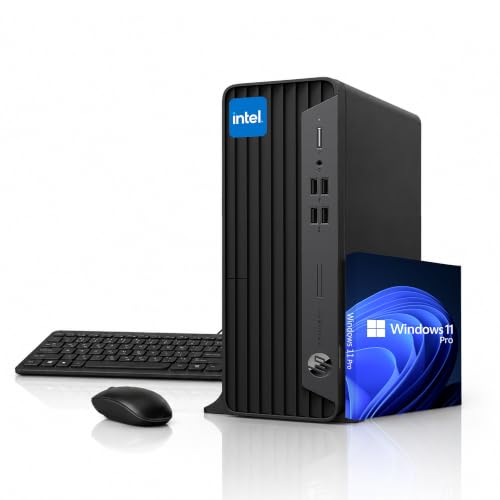
You need a desktop that handles office applications and daily business work, and the HP ProDesk SFF Business Desktop Computer fits that brief with 32GB of installed RAM, a 1TB SSD, and Windows 11 Pro. Its Intel Celeron G6900 processor runs up to 3.4GHz, and its HDMI and DisplayPort outputs support dual-display setups. The other three desktops pair different memory, storage, and processors with the same office workload.
Your shortlist at a glance
PCKitHQ scores range from 9.2 to 9.8. See how we pick.
| Product and key specifications | Score and retailer |
|---|---|
01 | 9.8PCKitHQ scoreView on Amazon |
| 02 | 9.6PCKitHQ scoreView on Amazon |
03 | 9.4PCKitHQ scoreView on Amazon |
04 | 9.2PCKitHQ scoreView on Amazon |
A closer look at each configuration
HP ProDesk SFF PC 32GB
score
The HP ProDesk SFF pairs 32GB of installed RAM with a 1TB SSD and Windows 11 Pro for office work.
- Installed memory
- 32 GB
- Installed storage
- 1TB
- Graphics
- Intel UHD Graphics
- Operating system
- Windows 11 Pro
- USB-C
- Yes
- HDMI
- Yes
- Wi-Fi
- Yes
- Ethernet
- Yes
- Warranty
- 1 Year Warranty
This HP ProDesk SFF configuration has 32GB of installed RAM and a 1TB SSD. Its Intel Celeron G6900 processor runs up to 3.4GHz, and integrated Intel UHD Graphics provides clear visuals for presentations and everyday display needs. Up to 64GB of RAM and up to 2TB of SSD storage appear as available configurations; those figures are support limits, not the installed hardware in this configuration. USB Type-C, multiple USB Type-A ports, HDMI 1.4, DisplayPort 1.4, and Gigabit Ethernet cover monitors and peripherals, and the small form factor chassis saves desk space. Windows 11 Pro comes pre-installed, and the package includes a keyboard and mouse.
Choose it if
- You want 32GB of installed RAM for multitasking
- You need dual-display support through HDMI and DisplayPort
Consider another if
- You need 64GB of installed RAM in the box
- You need the 12-core Intel Core i7-12700K of the Dell
HP ProDesk SFF PC 8GB
score
This HP ProDesk SFF configuration pairs 8GB of installed RAM with a 512GB SSD and Windows 11 Pro.
- Installed memory
- 8 GB
- Installed storage
- 512GB
- Graphics
- Intel UHD Graphics
- Operating system
- Windows 11 Pro
- USB-C
- Yes
- HDMI
- Yes
- Wi-Fi
- Yes
- Ethernet
- Yes
- Warranty
- 1 Year Warranty
This HP ProDesk SFF configuration has 8GB of installed RAM and a 512GB SSD. Its Intel Celeron G6900 processor runs up to 3.4GHz, and integrated Intel UHD Graphics provides clear visuals for presentations and everyday display needs. Up to 64GB of RAM and up to 2TB of SSD storage appear as available configurations; those figures are support limits, not the installed hardware in this configuration. USB Type-C, multiple USB Type-A ports, HDMI 1.4, DisplayPort 1.4, and Gigabit Ethernet cover monitors and peripherals. Windows 11 Pro comes pre-installed, and the package includes a keyboard and mouse.
Choose it if
- You want a small form factor chassis that saves desk space
- Your local files fit within the 512GB SSD
Consider another if
- You need 32GB of installed RAM for heavier multitasking
- You need a 1TB SSD for larger local file storage
Acer Aspire PC
score
The Acer Aspire pairs 16GB of DDR5 memory with a 256GB PCIe SSD and Windows 11 Home.
- Installed memory
- 16 GB
- Processor
- Intel Processor N150
- Graphics
- Intel Graphics
- Operating system
- Windows 11 Home
- USB-C
- Yes
- HDMI
- Yes
- Wi-Fi
- Yes
- Ethernet
- Yes
This Acer Aspire has an Intel Processor N150 and 16GB of DDR5 memory. Its 256GB M.2 2280 PCIe SSD provides quick boot times and rapid file access. The 8-liter chassis fits on a desk or floor and leaves room for future upgrades to storage or memory. A front USB Type-C port, multiple USB ports, HDMI and DisplayPort outputs, Wi-Fi 6, and Bluetooth 5.2 cover monitors and wireless devices. Windows 11 Home comes pre-installed, and the package includes a wired keyboard and mouse.
Choose it if
- You want 16GB of DDR5 memory for everyday multitasking
- You need Wi-Fi 6 and Bluetooth 5.2 wireless connections
Consider another if
- You need Windows 11 Pro rather than Windows 11 Home
- You need a 1TB SSD for larger local storage
Dell Desktop Tower
score
The Dell Desktop Tower pairs a 12-core Intel Core i7-12700K with 32GB of DDR5 and a 1TB SSD.
- Installed memory
- 32 GB
- Installed storage
- 1TB
- Processor
- Intel Core i7-12700K
- Operating system
- Windows 11 Pro
- USB-C
- Yes
- HDMI
- Yes
- Wi-Fi
- Yes
- Ethernet
- Yes
- Warranty
- 1 Year seller Warranty
This Dell Desktop Tower has an Intel Core i7-12700K processor with 12 cores and 20 threads, running at speeds up to 5.0GHz. It pairs 32GB of DDR5 memory with a 1TB PCIe SSD. Up to 64GB of DDR5 memory and up to a 4TB PCIe SSD appear as configuration options; those figures are not the installed hardware in this configuration. Windows 11 Pro comes pre-installed, and the package includes a wired keyboard and mouse.
Choose it if
- You want the 12-core Intel Core i7-12700K processor
- You need Windows 11 Pro with a 1TB PCIe SSD
Consider another if
- You want the small form factor chassis of the HP desktops
- You need a 4TB SSD installed rather than a 1TB drive
Make the choice for your setup
Compare installed memory and storage
The two HP ProDesk SFF configurations differ in installed memory and storage: the first has 32GB of RAM and a 1TB SSD, while the second has 8GB of RAM and a 512GB SSD. Both offer up to 64GB of RAM and up to 2TB of SSD storage as available configurations, so read those figures as support limits rather than installed hardware. The Acer Aspire sits between them on memory with 16GB of DDR5, while its 256GB PCIe SSD is below both HP drives. The Dell Desktop Tower matches the first HP configuration with 32GB of DDR5 memory and a 1TB PCIe SSD, and it offers up to 64GB of DDR5 memory and up to a 4TB PCIe SSD as configuration options. Match the installed figures to your local files and the applications you keep open.
Check the processor for each configuration
The first HP ProDesk SFF configuration and the second use the same Intel Celeron G6900 processor, which runs up to 3.4GHz. The Acer Aspire uses an Intel Processor N150 with 16GB of DDR5 memory. The Dell Desktop Tower uses an Intel Core i7-12700K processor with 12 cores and 20 threads, running at speeds up to 5.0GHz. Processor labels alone do not establish measured application speed, so compare them against the office applications and business workloads in each configuration. The HP configurations pair the Celeron G6900 with Intel UHD Graphics, the Acer pairs the N150 with Intel Graphics, and the Dell pairs the i7-12700K with 32GB of DDR5 memory and a 1TB PCIe SSD. Each configuration keeps its own processor and memory combination, so compare the parts rather than the brand alone. If that fits your setup better, see our guide to the Best Desktop Computer with Windows 11.
Match ports and displays to your desk
All four desktops carry USB-C, HDMI, Wi-Fi, and Ethernet connections. The HP ProDesk SFF configurations add DisplayPort 1.4 alongside HDMI 1.4, and both support dual 4K displays. The Acer Aspire adds a front USB Type-C port with HDMI and DisplayPort outputs, plus Wi-Fi 6 and Bluetooth 5.2. The Dell Desktop Tower carries HDMI-in 1.4, HDMI-out 2.1, and Ethernet (RJ45), with one USB-C port among its USB ports. The HP configurations also carry Gigabit Ethernet, and the Acer carries RJ45 Ethernet. Count the monitors you plan to connect and match them against the ports on the configuration you choose. The Dell carries HDMI-in 1.4 and HDMI-out 2.1. The HP configurations carry HDMI 1.4 and DisplayPort 1.4.
Comparing more options? See Best Desktop Computers for Business.
FAQ: Desktop Computer for Quickbooks
Which configurations have 32GB of installed RAM?
The first HP ProDesk SFF configuration and the Dell Desktop Tower each have 32GB of installed RAM. The Acer Aspire has 16GB of DDR5 memory, and the second HP ProDesk SFF configuration has 8GB of installed RAM. The figures of up to 64GB describe support limits, not installed hardware.
What storage does each configuration include?
The first HP ProDesk SFF configuration and the Dell Desktop Tower each have a 1TB SSD. The second HP ProDesk SFF configuration has a 512GB SSD, and the Acer Aspire has a 256GB PCIe SSD. Up to 2TB and up to 4TB figures describe configuration options, not the installed drive in each configuration.
Which desktops run Windows 11 Pro?
The two HP ProDesk SFF configurations and the Dell Desktop Tower run Windows 11 Pro. The Acer Aspire runs Windows 11 Home instead. The HP configurations pair Windows 11 Pro with the Intel Celeron G6900 processor, while the Dell pairs it with the Intel Core i7-12700K processor.