
Best Curved Monitor with High Refresh Rate (2026): 5 Picks Compared
 By Theo LangUpdated
The KTC 32 Inch 280Hz 240Hz Curved Gaming Monitor suits fast-paced competitive play, with a native 240Hz refresh rate that overclocks to 280Hz through DisplayPort and a 31.5-inch 1500R HVA curved panel. Its Adaptive-Sync support, 128% sRGB color gamut and 3500:1 contrast cover smooth motion and vivid color in one screen. The other four monitors trade refresh rate, size or resolution for different desk setups.
Your shortlist at a glance
PCKitHQ scores range from 9.2 to 9.8. See how we pick.
| Product and key specifications | Score and retailer |
|---|---|
01 | 9.8PCKitHQ scoreView on Amazon |
02 | 9.7PCKitHQ scoreView on Amazon |
03 | 9.5PCKitHQ scoreView on Amazon |
04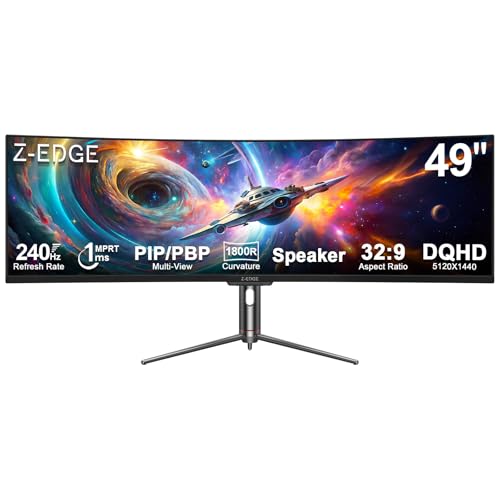 | 9.3PCKitHQ scoreView on Amazon |
05 | 9.2PCKitHQ scoreView on Amazon |
A closer look at each configuration
KTC 32-inch Curved Gaming Monitor H32C5
score
The native 240Hz refresh rate, overclockable to 280Hz through DisplayPort, pairs with a 31.5-inch 1500R HVA curved panel for fast-paced play.
- Resolution
- FHD (1920×1080P)
- Native refresh rate
- 240 Hz
- Screen size
- 31.5 in
- Panel
- HVA
- Curved screen
- Yes
- HDMI
- Yes
- Weight
- 12.35 lb
- Warranty
- 3 Year Manufacturer
This KTC monitor has a 31.5-inch HVA panel with FHD 1920x1080 resolution and a 1500R curve. Its native refresh rate is 240Hz, and DisplayPort 1.4 supports an overclocked 280Hz mode, while the two HDMI 2.0 interfaces run at 240Hz. Adaptive-Sync addresses screen tearing and motion blur, and the panel has a 128% sRGB color gamut with 3500:1 contrast and HDR10. Tilt adjusts from -5 degrees to 15 degrees, and the 100x100mm VESA mount fits a wall mount or arm. The monitor weighs 12.35 lb and carries a 3-year manufacturer warranty.
Choose it if
- You play fast-paced competitive games at 240Hz or higher
- You want a 31.5-inch 1500R curved screen for your desk
Consider another if
- You need a 4K resolution panel rather than FHD 1920x1080
- You need a screen larger than 31.5 inches for your setup
KTC 32-inch Curved Gaming Monitor H32S17F
score
The 240Hz refresh rate and 31.5-inch 1500R HVA curved panel pair with FreeSync and G-Sync compatibility for smooth competitive play.
- Resolution
- FHD 1920x1080
- Native refresh rate
- 240 Hz
- Panel
- HVA
- Curved screen
- Yes
- HDMI
- Yes
- Weight
- 18.08 lb
- Warranty
- 3 Year
This KTC monitor has a 31.5-inch HVA panel with FHD 1920x1080 resolution, a 1500R curve and a native 240Hz refresh rate. FreeSync and G-Sync compatibility address motion blur and ghosting, and the panel has a 125% sRGB color gamut with 3500:1 contrast and HDR. Two HDMI 2.0 interfaces and one DisplayPort 1.4 interface connect consoles and PCs, with an earphone port for audio. Tilt adjusts from -5 degrees to 15 degrees, and the 100x100mm VESA mount fits a stand or arm. The monitor weighs 18.08 lb and carries a 3-year warranty.
Choose it if
- You want a 240Hz curved screen with FreeSync and G-Sync support
- You want a 31.5-inch FHD screen with a 125% sRGB gamut
Consider another if
- You need the 280Hz overclocked mode of the top KTC monitor
- You need a 4K ultrawide panel rather than FHD 1920x1080
Samsung 40-inch Odyssey G7 (G75F) WUHD Curved Gaming Monitor
score
The 40-inch 1000R curved Ultrawide 4K panel at 180Hz pairs with DisplayHDR 600 and FreeSync Premium Pro for wide-screen play.
- Resolution
- Ultrawide 4K
- Native refresh rate
- 180 Hz
- Curved screen
- Yes
- Ultrawide screen
- Yes
- Weight
- 24.9 lb
- Warranty
- 1 Year Manufacturer
This Samsung monitor has a 40-inch curved display with a 21:9 screen, Ultrawide 4K resolution and a 1000R curve. Its native refresh rate is 180Hz with a 1ms response time (GtG), and VESA DisplayHDR 600 covers contrast in dark scenes. AMD FreeSync Premium Pro supports tear-free play. The monitor weighs 24.9 lb and carries a 1-year manufacturer warranty. The 2025 model suits a wide desk, since the 40-inch panel and 1000R curve take more space than a smaller screen.
Choose it if
- You want a 40-inch 21:9 ultrawide screen for your games
- You want Ultrawide 4K resolution with a 180Hz refresh rate
Consider another if
- You need a 240Hz refresh rate rather than 180Hz
- You need a 32-inch screen that fits a smaller desk
Z-Edge 5K 49-inch Curved Gaming Monitor UG49P
score
The 49-inch DQHD 5120x1440 ultrawide panel at 240Hz pairs with USB-C, PIP/PBP and built-in speakers for a wide workspace.
- Native refresh rate
- 240 Hz
- Screen size
- 49 in
- Curved screen
- Yes
- Ultrawide screen
- Yes
- USB-C
- Yes
- HDMI
- Yes
- Warranty
- 2 Year Manufacturer
This Z-Edge monitor has a 49-inch curved ultrawide display with DQHD 5120x1440 resolution, an 1800R curve and a native 240Hz refresh rate with 1ms MPRT response. FreeSync is included, and the panel has 99% sRGB color gamut with 3000:1 contrast and a ΔE under 2. PIP overlays a second screen, and PBP splits the display into two independent full-resolution screens. It has built-in speakers and height adjustment, and it carries a 2-year manufacturer warranty.
Choose it if
- You want a 49-inch ultrawide screen with 5120x1440 resolution
- You want USB-C video and PIP/PBP split-screen functions
Consider another if
- You need a 32-inch screen for a compact desk setup
- You need a 1500R curve rather than the 1800R curve
Westinghouse 32-inch Curved Gaming Monitor
score
The 32-inch 1500R curved FHD panel at 240Hz pairs with built-in speakers, AMD FreeSync and dedicated game modes.
- Resolution
- FHD 1080P
- Native refresh rate
- 240 Hz
- Screen size
- 32 in
- Curved screen
- Yes
- Ultrawide screen
- Yes
- HDMI
- Yes
- DisplayPort
- Yes
- Weight
- 20.33 lb
- Warranty
- 1 Year Warranty
This Westinghouse monitor has a 32-inch curved screen with FHD 1080P resolution, a 1500R curve and a native 240Hz refresh rate with 1ms response time. AMD FreeSync supports tear-free play, and the panel has a 3000:1 contrast ratio with 118% sRGB color gamut and support for 16.7 million colors. Dedicated game modes adjust visibility in dark scenes, and EyeRest Technology has flicker-free and anti-glare features. HDMI and DisplayPort inputs connect work and gaming devices, and built-in speakers cover sound. A DisplayPort cable is included, and the monitor weighs 20.33 lb with a 1-year warranty.
Choose it if
- You want a 32-inch curved screen with built-in speakers
- You want dedicated game modes that adjust visibility in dark scenes
Consider another if
- You need a 49-inch screen for a two-window workspace
- You need a 280Hz overclocked mode through DisplayPort
Make the choice for your setup
Match the refresh rate to your games
Refresh rate is the native figure each monitor updates at, and the five monitors here have native rates from 180Hz to 240Hz. The KTC monitor with the 280Hz mode has a native 240Hz refresh rate with an overclocked 280Hz mode through DisplayPort 1.4, while its two HDMI 2.0 interfaces run at 240Hz. The other KTC monitor, the Z-Edge 49-inch monitor and the Westinghouse 32-inch monitor each have a native 240Hz refresh rate. The Samsung 40-inch monitor has a native 180Hz refresh rate with a 1ms response time (GtG). Keep the native figure separate from any overclocked mode, since only the KTC monitor with the 280Hz mode has that mode, and it runs through DisplayPort.
Compare size, curve and resolution
Screen size runs from 31.5 inches to 49 inches across the five monitors. The two KTC monitors and the Westinghouse monitor have 31.5-inch or 32-inch screens, the Samsung monitor has a 40-inch screen, and the Z-Edge monitor has a 49-inch screen. Curves differ too: the two KTC monitors and the Westinghouse monitor have a 1500R curve, the Samsung monitor has a 1000R curve, and the Z-Edge monitor has an 1800R curve. Resolution splits three ways, with FHD 1920x1080 on the two KTC monitors and FHD 1080P on the Westinghouse monitor, Ultrawide 4K with a 21:9 screen on the Samsung monitor, and DQHD 5120x1440 on the Z-Edge monitor. Color gamuts run from 99% sRGB on the Z-Edge monitor to 128% sRGB on the KTC monitor with the 280Hz mode. Shoppers with a related need can compare our guide to the Best Curved Monitor for Work.
Check ports, sync and mounting
Ports decide what connects without an adapter. The KTC monitor with the 280Hz mode has two HDMI 2.0 interfaces, one DisplayPort 1.4 interface and a headphone jack, and the other KTC monitor has two HDMI 2.0 interfaces, one DisplayPort 1.4 interface and an earphone port. The Z-Edge monitor has one HDMI 2.1 interface, two DisplayPort 1.4 interfaces, one USB-C interface and an audio output port. The Westinghouse monitor has HDMI and DisplayPort inputs with built-in speakers and an audio-out jack. Sync support differs by monitor: Adaptive-Sync on the KTC monitor with the 280Hz mode, FreeSync and G-Sync compatibility on the other KTC monitor, FreeSync Premium Pro on the Samsung monitor, FreeSync on the Z-Edge monitor, and AMD FreeSync on the Westinghouse monitor. Both KTC monitors have a 100x100mm VESA mount, and the Z-Edge monitor has height adjustment.
For a wider shortlist, start with 24 vs 27 Inch Monitor.
FAQ: Curved Monitor with High Refresh Rate
Which monitor has the highest refresh rate here?
The KTC 32 Inch 280Hz 240Hz Curved Gaming Monitor has a native 240Hz refresh rate with an overclocked 280Hz mode through DisplayPort 1.4. Its two HDMI 2.0 interfaces run at 240Hz. The other KTC monitor, the Z-Edge monitor and the Westinghouse monitor each have a native 240Hz refresh rate, while the Samsung monitor has 180Hz.
What resolutions do these curved monitors have?
The two KTC monitors have FHD 1920x1080, and the Westinghouse monitor has FHD 1080P. The Samsung monitor has Ultrawide 4K resolution with a 21:9 screen, and the Z-Edge monitor has DQHD 5120x1440 resolution. Screen sizes run from 31.5 inches on the KTC monitors to 49 inches on the Z-Edge monitor.
Which monitors in this guide have USB-C?
Only the Z-Edge 49-inch monitor has a USB-C interface, and it carries video over one cable. The two KTC monitors each have two HDMI 2.0 interfaces and one DisplayPort 1.4 interface. The Westinghouse monitor has HDMI and DisplayPort inputs with built-in speakers and an audio-out jack.


