Best Computer Mouse to Reduce Hand Strain (2026): 7 Picks Compared
 By Theo LangUpdated
Choose the ProtoArc EM02 Wireless Trackball Mouse if you want thumb-controlled cursor movement with a 0° or 15° tilt: its trackball stays in place while your thumb rolls it, and it connects by Bluetooth or 2.4GHz wireless to 3 devices. Four vertical mice hold the hand in a handshake position, the Evoluent upright and neutral; DPI runs 200 to 6400, weights 0.18 lb to 0.45 lb. The wired Censprin mouse suits a desk setup.
Your shortlist at a glance
PCKitHQ scores range from 9.2 to 9.8. See how we pick.
| Product and key specifications | Score and retailer |
|---|---|
01 Best Overall ProtoArc EM02 Wireless Trackball Mouse | 9.8PCKitHQ scoreView on Amazon |
02 Second Pick Censprin USB Computer Mouse Wired | 9.7PCKitHQ scoreView on Amazon |
03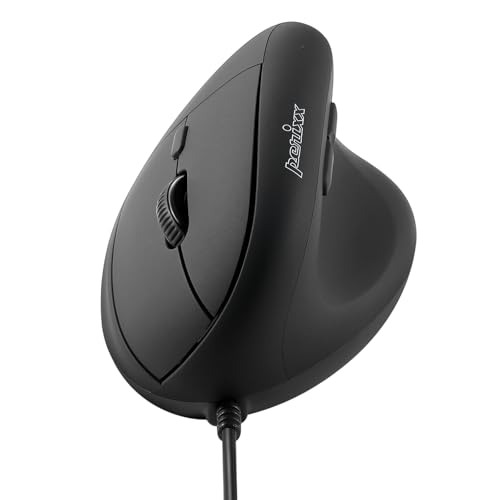 | 9.6PCKitHQ scoreView on Amazon |
04 Also Consider EVOLUENT Inventor of the Vertical Mouse | 9.5PCKitHQ scoreView on Amazon |
05 | 9.4PCKitHQ scoreView on Amazon |
06 Also Consider SANWA Wired Ergonomic Mouse | 9.3PCKitHQ scoreView on Amazon |
07 Also Consider SANWA 2.4G Wireless Ergonomic Mouse | 9.2PCKitHQ scoreView on Amazon |
A closer look at each configuration
ProtoArc EM02 Wireless Trackball Mouse
score
A thumb-controlled trackball with a 0° or 15° tilt, 3-device Bluetooth and 2.4GHz wireless, and USB-C charging.
- Wireless
- Yes
- Connection
- 2.4GHz wireless or Bluetooth
- Weight
- 0.26 lb
- Warranty
- 2 Year
The ProtoArc EM02 pairs a thumb-controlled trackball with a hinge that sets a flat 0° or a tilted 15° position. It connects by 2.4GHz wireless or Bluetooth and switches between 3 devices with one button. Five DPI settings run from 200 to 1600, and quiet-touch buttons suit late-night work. A USB-C port charges the mouse, with 90-day standby on a full charge. The mouse weighs 0.26 lb, and the warranty is 2 Year. Forward and backward buttons do not work on Mac OS.
Choose it if
- You want a trackball you control with your thumb
- You want a 0° or 15° tilt for your hand
Consider another if
- You need forward and back buttons that work on Mac OS
- You want a 6400 DPI top level like the Perixx
Censprin USB Computer Mouse Wired
score
A wired 3-button mouse with silent clicks, an ergonomic shape and plug-and-play USB at 0.21 lb.
- Connection
- USB
- Weight
- 0.21 lb
The Censprin mouse connects by USB with plug-and-play setup and no driver install. Its 3-button design uses near-silent clicks, and the ergonomic shape fits the palm with a wide tail and finger rests. The 3D grille rollers use non-slip rubber for light, smooth scrolling. It works with Windows 10, 8, 7, Vista and XP, plus Macs, iPad, PC and laptops. The mouse weighs 0.21 lb. It suits office and home use.
Choose it if
- You want silent clicks for shared rooms
- You want a wired mouse with no driver install
Consider another if
- You want a wireless connection to 3 devices
- You want adjustable DPI settings up to 6400
Perixx PERIMICE-508II Wired Vertical Ergonomic Mouse
score
A wired vertical mouse with a handshake shape, 6 buttons and DPI from 1000 to 6400.
- Sensor resolution
- 6400 DPI
- Connection
- Wired USB 2.0
- Weight
- 0.35 lb
- Warranty
- 1-year manufacturer warranty
The Perixx PERIMICE-508II uses a vertical shape that holds the hand in a handshake position. DPI switches between 1000, 1600, 3200 and 6400 with a dedicated button, and built-in memory keeps the setting after unplugging or restarting. Six buttons cover left and right click, scroll and forward/backward navigation. The wired USB 2.0 interface works with Windows 7 and above with no drivers. It is rated for 3 million clicks, weighs 0.35 lb, and suits small to medium hands. The warranty is a 1-year manufacturer warranty.
Choose it if
- You want a vertical shape for a handshake position
- You want DPI up to 6400 with a dedicated button
Consider another if
- You want a wireless connection for your laptop
- You want the 0.18 lb weight of the SANWA wireless mouse
EVOLUENT Inventor of the Vertical Mouse
score
A wireless vertical mouse with 4 pointer speeds, 6 customizable buttons and a broad bottom lip.
- Wireless
- Yes
- Connection
- Wireless USB
- Weight
- 0.45 lb
The Evoluent VM4RW holds the hand in an upright neutral position with a broad bottom lip for support. Six buttons customize through Evoluent Mouse Manager software in Windows. Pointer speed adjusts from low to high with controls on the side, without releasing the grip. The wireless USB connection works with Windows, Mac OS and Linux, and a wired connection is also available. The mouse weighs 0.45 lb in regular size for the right hand.
Choose it if
- You want a vertical mouse with an upright neutral position
- You want 6 buttons you can customize in Windows
Consider another if
- You want to pick an exact DPI number for your work
- You want a mouse that weighs 0.18 lb like the SANWA wireless
J-Tech Digital Vertical Mouse Wireless 2.4G+Bluetooth
score
A wireless vertical mouse with 2.4G and Bluetooth, 3 devices and DPI up to 4000.
- Sensor resolution
- 4000 DPI
- Wireless
- Yes
- Connection
- 2.4G Wireless and Bluetooth
- Weight
- 0.22 lb
- Warranty
- 1 Year Manufacturer
The J-Tech Digital vertical mouse connects by 2.4G wireless and Bluetooth across 3 devices with a toggle switch. Five DPI modes run from 800 to 4000 with a DPI indicator light. The vertical shape suits small to medium hands in a right-hand orientation. Three power saving modes run when the mouse is not in use. It works with Windows and Mac OS, uses 2 AAA batteries, and weighs 0.22 lb. The warranty is 1 Year Manufacturer with free lifetime technical support.
Choose it if
- You want 3-device switching by 2.4G and Bluetooth
- You want 5 DPI modes up to 4000
Consider another if
- You want a trackball that stays still on the desk
- You want a 0.26 lb trackball like the ProtoArc
SANWA Wired Ergonomic Mouse
score
A wired vertical mouse with DPI at 1000 or 1600, 5 buttons and plug-and-play USB.
- Connection
- USB
- Weight
- 0.23 lb
- Warranty
- 1 year
The SANWA wired mouse uses a vertical shape that places the hand in a handshake position. DPI switches between 1000 and 1600, and Blue LED tracking works on glass, wood, marble and leather surfaces. Five buttons include forward and backward controls near the thumb, though those two do not work on Mac. It works with Windows 11, 10, 8.1, 8, 7, XP and Vista, plus macOS 10.12 to 10.14 and Mac OS X 10.3 to 10.11. It connects by USB with no driver, and weighs 0.23 lb. The warranty is 1 year.
Choose it if
- You want a vertical mouse for small or medium hands
- You want plug-and-play USB with no driver
Consider another if
- You want a wireless connection to 3 devices
- You want forward and back buttons that work on Mac
SANWA 2.4G Wireless Ergonomic Mouse
score
A 2.4GHz wireless vertical mouse with DPI up to 1600 at 0.18 lb.
- Wireless
- Yes
- Connection
- 2.4G Wireless
- Weight
- 0.18 lb
The SANWA 2.4G wireless mouse uses a vertical shape that places the hand in a handshake position. DPI switches between 800, 1200 and 1600, and Blue LED tracking works on a wide range of surfaces. Five buttons include forward and backward controls near the thumb, though those two do not work on Mac. It works with Windows 10, 8.1, 8, 7, XP and Vista, plus macOS 10.12 to 10.14 and Mac OS X 10.3 to 10.11.
Choose it if
- You want the mouse that weighs the least here at 0.18 lb
- You want wireless use with no cable on the desk
Consider another if
- You want DPI up to 6400 like the Perixx
- You want forward and back buttons that work on Mac
Make the choice for your setup
Trackball or vertical shape
The ProtoArc EM02 is the only trackball here: its ball rolls under the thumb while the mouse stays in place, and a hinge sets a flat 0° or a tilted 15° position. Four of the other six mice use a vertical shape that holds the hand in a handshake position: the Perixx, J-Tech Digital and both SANWA mice. The Evoluent uses a vertical shape that holds the hand in an upright neutral position. The Censprin uses a flat ergonomic shape with a wide tail and finger rests instead. The trackball suits a tight desk, since the mouse itself does not move. The vertical mice suit buyers who want the upright shape with buttons under the fingers.
DPI settings and buttons
DPI settings run from 200 to 6400 across the picks. The ProtoArc EM02 offers 200, 400, 800, 1200 and 1600, the Perixx offers 1000, 1600, 3200 and 6400, and the J-Tech Digital offers 800, 1200, 1600, 2400 and 4000. The SANWA wired mouse offers 1000 and 1600, and the SANWA wireless mouse offers 800, 1200 and 1600. The Evoluent uses 4 speeds without stated values. Buttons run from 3 to 6: the Censprin has 3, the SANWA mice have 5 each, and the Perixx and Evoluent have 6 each. The Evoluent buttons customize through Evoluent Mouse Manager software in Windows for different programs. For a closely related choice, read our guide to the Best Wireless Mouse for Autocad.
Connection, weight and power
Connection types differ across the four wireless mice. The ProtoArc EM02 and the J-Tech Digital each connect by 2.4GHz and Bluetooth. The Evoluent connects by wireless USB, and the SANWA wireless mouse connects by 2.4GHz. The Censprin, Perixx and SANWA wired mice connect by USB cable with plug-and-play setup. Weights run from 0.18 lb to 0.45 lb: the SANWA wireless mouse weighs 0.18 lb, the Censprin 0.21 lb, the J-Tech Digital 0.22 lb, the SANWA wired mouse 0.23 lb, the ProtoArc EM02 0.26 lb, the Perixx 0.35 lb and the Evoluent 0.45 lb. The ProtoArc EM02 charges by USB-C with 90-day standby. The J-Tech Digital uses 2 AAA batteries.
For a wider shortlist, start with Best Mouse.
FAQ: Computer Mouse to Reduce Hand Strain
Which mouse here uses a trackball?
The ProtoArc EM02 is the only trackball here. Its ball rolls under the thumb while the mouse stays in place, and a hinge sets a flat 0° or a tilted 15° position. The other mice use a vertical or flat ergonomic shape.
Which mice here connect by Bluetooth?
The ProtoArc EM02 and the J-Tech Digital connect by Bluetooth as well as 2.4GHz wireless. The ProtoArc EM02 switches between 3 devices with one button, and the J-Tech Digital switches between 3 devices with a toggle switch. The Evoluent connects by wireless USB, and the SANWA wireless mouse connects by 2.4GHz.
Which mouse here weighs the least?
The SANWA 2.4G wireless mouse weighs 0.18 lb, the lowest weight here. The Censprin follows at 0.21 lb, the J-Tech Digital at 0.22 lb, the SANWA wired mouse at 0.23 lb, the ProtoArc EM02 at 0.26 lb, the Perixx at 0.35 lb and the Evoluent at 0.45 lb.