
Best Computer Mouse Ergonomic Wired Trackball (2026): 8 Picks Compared
 By Theo LangUpdated
If your desk is crowded and you want the cursor to move without moving the mouse, choose the PORLEI Wired Ergonomic Trackball Mouse: its 34mm thumb-controlled trackball stays in place, and its 5 DPI levels run 100 to 1200 DPI. The SANWA with the 44mm ball offers index-finger control with 600 to 1600 DPI, while the ELECOM DEFT PRO adds wired, wireless and Bluetooth connections. The eight mice below cover thumb, index-finger and handheld control.
Your shortlist at a glance
PCKitHQ scores range from 9.2 to 9.8. See how we pick.
| Product and key specifications | Score and retailer |
|---|---|
01 | 9.8PCKitHQ scoreView on Amazon |
02 | 9.7PCKitHQ scoreView on Amazon |
03 Also Consider ELECOM DEFT PRO Trackball Mouse M-DPT1MRXBK | 9.6PCKitHQ scoreView on Amazon |
04 Also Consider ELECOM Huge Trackball Mouse | 9.5PCKitHQ scoreView on Amazon |
05 Also Consider YUMQUA USB Wired Finger Mouse | 9.5PCKitHQ scoreView on Amazon |
06 | 9.4PCKitHQ scoreView on Amazon |
07 | 9.3PCKitHQ scoreView on Amazon |
08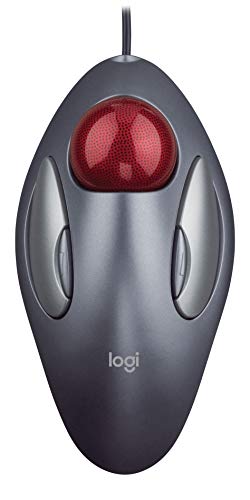 Also Consider Logitech Trackman Marble Trackball Mouse | 9.2PCKitHQ scoreView on Amazon |
A closer look at each configuration
PORLEI Wired Ergonomic Trackball Mouse
score
The 34mm thumb-controlled trackball, 5 DPI levels from 100 to 1200 DPI, and USB-C and USB-A wired connection define this PORLEI.
- Sensor resolution
- 1200 DPI
- Connection
- Wired
- Warranty
- 18-Month Limited Warranty
This PORLEI has a 34mm trackball controlled by the thumb and 5 adjustable DPI levels: 100, 200, 400, 800 and 1200 DPI. It connects by a 1.8m cable through USB-C or USB-A, with no drivers to download, and works with Windows and Mac. The trackball removes for cleaning with a soft cloth. Its buttons are non-programmable, and the Back/Forward buttons do not work with Mac OS. The warranty is an 18-month limited warranty.
Choose it if
- You work in a tight workspace and move the cursor with your thumb
- You want USB-C and USB-A plug-and-play on Windows or Mac
Consider another if
- You need a DPI setting above 1200 DPI
- You need programmable buttons or Mac-compatible Back/Forward buttons
SANWA Wired Trackball Mouse
score
The 44mm index-finger trackball, 4 DPI levels from 600 to 1600 DPI, and programmable buttons define this SANWA.
- Sensor resolution
- 1600 DPI
- Connection
- Wired
- Weight
- 0.47 lb
- Warranty
- 1-Year Worry-Free Manufacturer Warranty
This SANWA uses a 44mm trackball controlled by the index finger, with 4 DPI levels: 600, 800, 1200 and 1600 DPI. The DPI level is shown by the number of flashes when the count switch button is pressed. Its left and right clicks are noiseless, and the buttons are programmable through SANWA software, which does not work with Mac OS or Chrome OS. It weighs 0.47 lb.
Choose it if
- You steer with your index finger on a 44mm trackball
- You want silent clicks and programmable buttons
Consider another if
- You need a DPI setting above 1600 DPI
- You need button programming on Mac OS or Chrome OS
ELECOM DEFT PRO Trackball Mouse M-DPT1MRXBK
score
Wired, wireless and Bluetooth connections, 8 buttons and DPI levels of 500, 1000 and 1500 define this ELECOM DEFT PRO.
- Wireless
- Yes
- Connection
- wired / wireless / bluetooth
- Weight
- 0.36 lb
- Warranty
- 3 year manufacturer
This ELECOM DEFT PRO connects wired, wireless or by Bluetooth, switching between connection types with a single button. It has 8 physical buttons and a tilting scroll wheel, for 10 buttons customized through Mouse Assistant software. DPI switches between 500, 1000 and 1500. The large ball rolls on three small ruby ball bearings and pops out through the ball-remover hole for cleaning. It weighs 0.36 lb and measures 3.6 by 5.3 by 2.3 inches. The warranty is a 3-year manufacturer warranty.
Choose it if
- You want wired, wireless and Bluetooth connections in one mouse
- You want 8 buttons customized through Mouse Assistant software
Consider another if
- You need a DPI setting above 1500 DPI
- You need horizontal scrolling on Windows RT 8.1
ELECOM Huge Trackball Mouse
score
The 52mm finger-operated trackball, attached palm rest and 8 buttons define this ELECOM Huge.
- Connection
- Wired
- Warranty
- 1 year manufacturer
This ELECOM Huge has a 52mm trackball operated by the fingers and an attached palm rest with a low-resistance surface. It has 8 physical buttons, and the scroll wheel tilts for horizontal scrolling. DPI switches between 500, 1000 and 1500. The ball rolls on three 2.5mm artificial ruby ball bearings and pops out through the hole in the bottom for cleaning. It measures 4.5 by 7.2 by 2.3 inches and weighs 9.2 oz. The warranty is a 1-year manufacturer warranty.
Choose it if
- You steer with your fingers on a 52mm trackball
- You want an attached palm rest for long sessions
Consider another if
- You need a DPI setting above 1500 DPI
- You need a trackball smaller than 52mm
YUMQUA USB Wired Finger Mouse
score
The handheld ring design, thumb-controlled 4D scrolling and 6.6-foot USB cable define this YUMQUA.
- Connection
- Wired
- Warranty
- 6-month worry-free warranty
This YUMQUA is a handheld trackball mouse worn on a finger or cradled between the palms, controlled by the thumb with 4D scrolling. It has 3 buttons and an ambidextrous design for right-hand or left-hand use. It connects by a 6.6-foot USB 2.0 cable with plug-and-play setup and no batteries, and works with Windows, macOS, Linux and Chrome OS on desktops, laptops and tablet setups with a USB port.
Choose it if
- You want a handheld mouse that works off the desk
- You want left-hand or right-hand use with 3 buttons
Consider another if
- You need more than 3 buttons
- You need a mouse that sits on a desk
Perixx PERIMICE-522 Wired Trackball Mouse
score
The 1.58-inch index-finger trackball, DPI up to 2400 and programmable buttons without software define this Perixx.
- Sensor resolution
- 2400 DPI
- Connection
- Wired
- Warranty
- 12 Month Limited Warranty
This Perixx PERIMICE-522 has a 1.58-inch trackball, 40mm, controlled by the index and middle fingers, with DPI levels of 400, 800, 1200 and 2400. All 6 buttons use quiet-click technology, and button functions are customized through the Perixx website without installing software, on Windows, macOS and Linux. Docking slots on the bottom support compatible 3D-printed add-on modules, which are not included. It has a soft rubber-coated surface, a scroll wheel and a 5.9-foot cable. It measures 4.92 by 2.44 by 3.03 inches and weighs 0.35 lb. The warranty is a 12-month limited warranty.
Choose it if
- You steer with your index finger on a 40mm trackball
- You want quiet clicks across 6 buttons
Consider another if
- You need a DPI setting above 2400 DPI
- You need thumb control instead of index-finger control
SANWA Wired Trackball Mouse
score
The 34mm thumb-controlled trackball, USB-A and USB-C connection and 600 to 1600 DPI define this SANWA.
- Sensor resolution
- 1600 DPI
- Connection
- Wired
- Weight
- 0.36 lb
- Warranty
- 1 year
This SANWA has a 34mm trackball controlled by the thumb, with 4 DPI levels: 600, 800, 1200 and 1600 DPI, shown by LED flashes. Its left and right buttons are noiseless, and the buttons can be remapped through SANWA software. It connects by USB-A with a snap-on USB-C adapter, with no driver required, and works with Windows 11, 10, 8.1, 8 and 7 and macOS 10.13 to 10.15. It weighs 0.36 lb. The warranty is a 1-year warranty with lifetime technical support.
Choose it if
- You steer with your thumb on a 34mm trackball
- You want USB-A and USB-C plug-and-play
Consider another if
- You need a DPI setting above 1600 DPI
- You need full function support on macOS
Logitech Trackman Marble Trackball Mouse
score
The ambidextrous sculpted shape, 4 programmable buttons and wired USB or PS/2 connection define this Logitech.
- Connection
- Wired
- Weight
- 0.2 lb
This Logitech Trackman Marble has a sculpted ambidextrous shape that supports the right or left hand and stays in one place while the cursor moves. It has 4 programmable buttons, including large Back/Forward buttons, and connects by wired USB or PS/2 with no setup beyond plugging in the cable. The buttons can be configured to switch applications, open browser windows or jump to full screen while watching videos. It weighs 0.2 lb. System requirements name Windows Vista, 7, 8 and 10 and Mac OS X 10.4 or later.
Choose it if
- You want right-hand or left-hand use in one mouse
- You want Back/Forward buttons and programmable controls
Consider another if
- You need more than 4 programmable buttons
- You need a wireless connection instead of wired
Make the choice for your setup
Thumb control or index-finger control
The PORLEI and the red SANWA use 34mm thumb-controlled trackballs. The SANWA for large hands uses a 44mm index-finger trackball, the Perixx PERIMICE-522 uses a 1.58-inch index-finger trackball, and the ELECOM Huge uses a 52mm finger-operated trackball. The YUMQUA is a handheld ring mouse controlled by the thumb. Thumb control moves the cursor without moving the hand, and index-finger control moves the cursor with the index and middle fingers. Choose the control style that matches how you steer, and check the ball diameter against the size you want to roll. The ELECOM DEFT PRO uses a large ball, and the Logitech Trackman Marble uses a sculpted ambidextrous shape that supports either hand.
DPI levels and connection types
DPI levels run from 100 to 2400 across the eight mice. The PORLEI offers 100, 200, 400, 800 and 1200 DPI. Both SANWA mice offer 600, 800, 1200 and 1600 DPI. The ELECOM DEFT PRO and ELECOM Huge offer 500, 1000 and 1500 DPI. The Perixx PERIMICE-522 offers 400, 800, 1200 and 2400 DPI. The YUMQUA connects by a 6.6-foot USB cable, and the Logitech Trackman Marble connects by wired USB or PS/2. The SANWA for large hands, the ELECOM Huge and the Perixx connect wired. Match the DPI range and the connection to the computer and the tasks you have. If that fits your setup better, see our guide to the Best Vertical Trackball Mouse.
Buttons, software and warranty
Button counts run from 3 to 10 across the mice. The YUMQUA has 3 buttons, the Logitech has 4 programmable buttons, the PORLEI has Back/Forward buttons and a scroll wheel with non-programmable buttons, the SANWA mice have programmable buttons, the ELECOM DEFT PRO has 8 buttons and a tilting scroll wheel for 10 customized buttons, the ELECOM Huge has 8 buttons with a tilting scroll wheel, and the Perixx has 6 quiet-click buttons programmed through the Perixx website. Warranties run from 6 months to 3 years: the YUMQUA has a 6-month warranty, the SANWA mice and the ELECOM Huge have 1-year warranties, the Perixx has a 12-month limited warranty, the PORLEI has an 18-month limited warranty, and the ELECOM DEFT PRO has a 3-year manufacturer warranty.
For a wider shortlist, start with Best Trackball with Wire.
FAQ: Computer Mouse Ergonomic Wired Trackball
Which trackball mice here use thumb control?
The PORLEI uses a 34mm thumb-controlled trackball, the red SANWA uses a 34mm thumb-controlled trackball, and the YUMQUA is a handheld ring mouse controlled by the thumb. The SANWA for large hands, the Perixx PERIMICE-522 and the ELECOM Huge use index-finger or finger control.
Which mice connect without a cable?
Only the ELECOM DEFT PRO, which connects wired, wireless or by Bluetooth and switches between connection types with a single button. The other seven mice are wired, and the PORLEI and the red SANWA use USB-C and USB-A.
How long are the warranties on these mice?
The YUMQUA has a 6-month warranty, the SANWA mice and the ELECOM Huge have 1-year warranties, the Perixx has a 12-month limited warranty, the PORLEI has an 18-month limited warranty, and the ELECOM DEFT PRO has a 3-year manufacturer warranty.

