
Best Chromebook for Grade School Students (2026): 7 Picks Compared
 By Theo LangUpdated
The Acer Chromebook Plus 516-16" WUXGA Student Laptop suits grade school students who need a large 16-inch 1920 x 1200 screen for reading and document editing, with 8GB of memory and 128GB of storage. Its 6-core Intel Core i3-1315U processor runs Chrome OS with Google Docs, Sheets, Classroom, and Gemini AI tools. Acer lists up to 12.5 hours of battery life, with two USB-C ports, two USB-A ports, and HDMI for accessories.
Your shortlist at a glance
PCKitHQ scores range from 9.2 to 9.8. See how we pick.
| Product and key specifications | Score and retailer |
|---|---|
01 | 9.8PCKitHQ scoreView on Amazon |
02 | 9.7PCKitHQ scoreView on Amazon |
03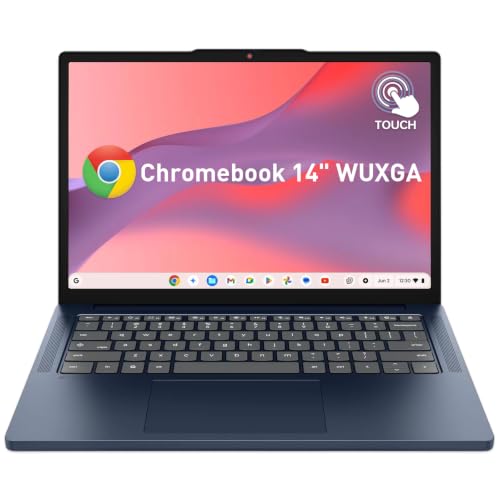 | 9.6PCKitHQ scoreView on Amazon |
04 | 9.5PCKitHQ scoreView on Amazon |
05 | 9.4PCKitHQ scoreView on Amazon |
06 | 9.3PCKitHQ scoreView on Amazon |
07 | 9.2PCKitHQ scoreView on Amazon |
A closer look at each configuration
Acer Chromebook Plus 516-16-inch Student Laptop
score
The 16-inch 1920 x 1200 screen, 8GB of memory, and Intel Core i3-1315U processor define this Acer configuration for schoolwork.
- Installed memory
- 8 GB
- Installed storage
- 128GB
- Processor
- Intel Core i3-1315U
- Operating system
- Chrome OS
- Screen size
- 16 in
- Resolution
- 1920 x 1200
- USB-C
- Yes
- HDMI
- Yes
- Wi-Fi
- Yes
- Warranty
- 1 Year Manufacturer
This Acer Chromebook Plus has a 16-inch WUXGA IPS display with a 1920 x 1200 resolution and a 16:10 aspect ratio for reading and document editing. The 6-core Intel Core i3-1315U processor reaches a boost speed of up to 4.5GHz, paired with 8GB LPDDR5 memory and 128GB UFS storage. Chrome OS includes Google Docs, Sheets, Classroom, and Gemini AI tools. Ports include two USB-C 3.2, two USB-A 3.2, and HDMI 1.4. Acer lists up to 12.5 hours of battery life.
Choose it if
- You want a 16-inch 1920 x 1200 screen for reading
- Your schoolwork runs in Google Docs and Classroom
Consider another if
- You need a screen smaller than 16 inches
- You need more than 128GB of installed storage
ASUS CX14 Chromebook Laptop for & Student
score
The 14-inch 1920 x 1080 IPS display and Intel Celeron N50 processor define this ASUS CX14 for daily schoolwork.
- Installed storage
- 64GB
- Processor
- Intel Celeron N50
- Graphics
- Intel UHD Graphics
- Operating system
- Chrome OS
- Resolution
- 1920 x 1080
- USB-C
- Yes
- HDMI
- Yes
- Wi-Fi
- Yes
- Warranty
- 1 YEAR
This ASUS CX14 has a 14-inch IPS LED display with a 1920 x 1080 resolution and 300-nit brightness. The Intel Celeron N50 processor has 2 cores and 2 threads, a maximum boost clock of up to 3.4GHz, and 6MB of cache, with Intel UHD Graphics. Installed memory is 4GB LPDDR5, and installed storage is a 64GB SSD. Ports include two USB-C 3.1, one USB-A 3.1, one HDMI, and a headphone and microphone combo jack. Wi-Fi 6 and Bluetooth are included.
Choose it if
- You want a 14-inch 1920 x 1080 screen
- You need two USB-C ports and an HDMI port
Consider another if
- You need 8GB of installed memory
- You need a 1920 x 1200 screen resolution
Lenovo Chromebook 14-inch Touchscreen Student Laptop w/ 8
score
The 14-inch WUXGA touchscreen, 8-core MediaTek Kompanio 540 processor, and privacy shutter define this Lenovo for interactive schoolwork.
- Installed memory
- 4 GB
- Installed storage
- 64GB
- Processor
- MediaTek Kompanio 540
- Operating system
- ChromeOS
- Screen size
- 14 in
- Resolution
- 1920x1200
- USB-C
- Yes
- HDMI
- Yes
- Touchscreen
- Yes
- Warranty
- 1 Year Limited Coverage
This Lenovo Chromebook has a 14-inch WUXGA touchscreen with a 1920 x 1200 resolution, a 400-nit anti-glare IPS display, and 10-point multi-touch. The 8-core MediaTek Kompanio 540 processor pairs with 4GB LPDDR5X RAM and 64GB of storage. The HD 720p webcam has a physical privacy shutter and dual-array microphones. Dual 2W stereo speakers use Smart AMP. The laptop weighs 2.99 lb, has a 50Wh battery, and charges through 65W USB-C charging. Ports include two USB-C, two USB-A, one HDMI 1.4b, and a 3.5mm audio jack.
Choose it if
- You want a 14-inch touchscreen for interactive lessons
- You need a webcam with a physical privacy shutter
Consider another if
- You need 8GB of installed memory
- You need a screen larger than 14 inches
HP Chromebook Thin Laptop Student
score
The 14-inch 1366 x 768 display and quad-core Intel Celeron N4120 processor define this HP Chromebook for basic schoolwork.
- Installed memory
- 4 GB
- Processor
- Intel Celeron N4120
- Operating system
- Chrome OS
- Screen size
- 14 in
- Resolution
- 1366 x 768
- USB-C
- Yes
- HDMI
- Yes
- Wi-Fi
- Yes
This HP Chromebook has a 14-inch HD display with a 1366 x 768 resolution and an anti-glare panel. The quad-core Intel Celeron N4120 processor has a 1.1 GHz base frequency and a burst frequency of up to 2.6 GHz, with 4MB of L2 cache. Installed memory is 4GB LPDDR4, and storage is 64GB eMMC. The HP True Vision 720p HD camera has an integrated digital microphone. Ports include two SuperSpeed USB Type-A, one SuperSpeed USB Type-C, one HDMI 1.4b, and a headphone and microphone combo jack. Wi-Fi and Bluetooth are included. The bundle adds a wireless earbud, mouse pad, HDMI cable, USB cable, and wireless mouse.
Choose it if
- You want a 14-inch screen for online classes
- You need an HDMI port and a USB-C port
Consider another if
- You need a 1920 x 1080 screen resolution
- You need 8GB of installed memory
HP Chromebook 14-inch & Student Laptop
score
The 14-inch 1366 x 768 display, Intel Celeron N4120 processor, and 64GB eMMC storage define this HP Chromebook for everyday schoolwork.
- Installed memory
- 4 GB
- Installed storage
- 64GB
- Processor
- Intel Celeron N4120
- Graphics
- Intel UHD Graphics 600
- Operating system
- Chrome OS
- Screen size
- 14 in
- Resolution
- 1366 x 768
- USB-C
- Yes
- HDMI
- Yes
- Wi-Fi
- Yes
- Warranty
- 1 YEAR
This HP Chromebook has a 14-inch display with a 1366 x 768 HD resolution. The Intel Celeron N4120 processor has 4 cores and 4 threads, a maximum boost clock of up to 2.60GHz, and 4MB of cache, with Intel UHD Graphics 600. Installed memory is 4GB, and installed storage is 64GB eMMC. The 720p front-facing camera has a built-in microphone, and HD Audio uses stereo speakers. Ports include one USB-C 3.1, two USB-A 3.0, one HDMI, and a headphone and microphone combo jack. Wi-Fi 5 and Bluetooth connect accessories and networks.
Choose it if
- You want a 14-inch screen for study and entertainment
- You need Wi-Fi 5 and Bluetooth for accessories
Consider another if
- You need a 1920 x 1080 screen resolution
- You need 8GB of installed memory
ASUS 14-inch Touchscreen Students Chromebook
score
The 14-inch FHD touchscreen, 8GB of memory, and Intel Celeron N4500 processor define this ASUS Chromebook for students.
- Installed memory
- 8 GB
- Processor
- Intel Celeron N4500
- Operating system
- Chrome OS
- Screen size
- 14 in
- Resolution
- 1920 × 1080p
- Wi-Fi
- Yes
- Touchscreen
- Yes
This ASUS Chromebook has a 14-inch Full HD anti-glare touchscreen with a 1920 x 1080 resolution for online classes, streaming, and creative projects. The Intel Celeron N4500 processor has 4MB of cache and a speed of up to 2.8 GHz. Installed memory is 8GB of RAM. Storage totals 192GB combined, made up of 128GB eMMC and a 64GB SD card. Chrome OS runs on the laptop. A 6-in-1 accessory kit adds a mousepad, 32GB USB drive, laptop sleeve, 3-in-1 data cable, cleaner kit, and hub.
Choose it if
- You want a 14-inch touchscreen for classes and projects
- You need 8GB of memory for multiple apps
Consider another if
- You need a screen larger than 14 inches
- You need more than 192GB of combined storage
Lenovo 14'' Touchscreen Slim 3 Chromebook Laptop Student
score
The 14-inch FHD touchscreen, 8-core MediaTek Kompanio 520 processor, and 2.86 lb weight define this Lenovo Slim 3 Chromebook.
- Installed memory
- 4 GB
- Installed storage
- 64GB
- Processor
- MediaTek Kompanio 520
- Operating system
- Chrome OS
- Resolution
- 1920 x 1080
- USB-C
- Yes
- Wi-Fi
- Yes
- Weight
- 2.86 lb
This Lenovo Slim 3 Chromebook has a 14-inch Full HD touchscreen with a 1920 x 1080 resolution. The MediaTek Kompanio 520 processor is an octa-core chip with four A73 cores at 2.0GHz and four A53 cores at 2.0GHz. Installed memory is 4GB of RAM, and installed storage is 64GB eMMC. The integrated 720p HD webcam has a privacy shutter and a dual-array microphone. Ports include one USB-A 3.2 Gen 1, one USB-C 3.2 Gen 1, one microSD card reader, and a headphone and microphone combo jack. Wi-Fi 6 and Bluetooth 5.1 are included. The laptop weighs 2.86 lb. A Marxsol bundle adds an HDMI cable, a USB extension cord, and a mouse pad.
Choose it if
- You want a 14-inch touchscreen for Chrome OS apps
- You need Wi-Fi 6 for school networks
Consider another if
- You need 8GB of installed memory
- You need a screen larger than 14 inches
Make the choice for your setup
Match the screen to the schoolwork
Start with screen size and resolution, because they decide how much reading and document work fits on screen at once. The Acer Chromebook Plus 516-16" WUXGA Student Laptop has a 16-inch 1920 x 1200 screen with a 16:10 aspect ratio, giving a larger picture for reading, research, and document editing than the 14-inch screens in this guide. The Lenovo 2026 Chromebook 14" WUXGA Touchscreen Student Laptop w/ 8-core has a 1920 x 1200 touchscreen, and the ASUS 14" FHD Touchscreen Students Chromebook has a 1920 x 1080 touchscreen, both suited to tapping and swiping through digital textbooks. The two HP Chromebooks use 1366 x 768 screens, which show less detail than the 1920-wide screens.
Weigh memory and storage together
Memory and storage decide how many tabs and apps run at once and how many files stay on the device. The Acer Chromebook Plus 516-16" WUXGA Student Laptop and the ASUS 14" FHD Touchscreen Students Chromebook each have 8GB of memory, while the other five Chromebooks in this guide have 4GB. Installed storage is 64GB on the ASUS CX14, the Lenovo 2026 Chromebook, both HP Chromebooks, and the Lenovo Slim 3, while the Acer has 128GB and the ASUS touchscreen model has 192GB combined. A 512GB docking set is bundled with the ASUS CX14, separate from its 64GB installed SSD. Compare the installed figures against the files the student keeps locally. Shoppers with a related need can compare our guide to the Best Chromebook Plus 2 in 1.
Check ports, camera, and carrying weight
Ports, cameras, and weight decide how the Chromebook fits into a classroom and a backpack. The Acer Chromebook Plus 516-16" WUXGA Student Laptop has two USB-C 3.2 ports, two USB-A 3.2 ports, and an HDMI 1.4 port, while the Lenovo 2026 Chromebook 14" WUXGA Touchscreen Student Laptop w/ 8-core adds two USB-C ports with Power Delivery and DisplayPort 1.4. The Lenovo 2026 Chromebook and the Lenovo Slim 3 both have a 720p webcam with a physical privacy shutter. The Lenovo 2026 Chromebook weighs 2.99 lb and the Lenovo Slim 3 weighs 2.86 lb. Match the port set to the accessories the student already uses.
Before you decide, also read Best Chromebook.
FAQ: Chromebook for Grade School Students
Which Chromebook has a 16-inch screen in this guide?
The Acer Chromebook Plus 516-16" WUXGA Student Laptop has a 16-inch 1920 x 1200 display. The other six Chromebooks in this guide have 14-inch screens. The 16-inch screen uses a 16:10 aspect ratio, so its picture is larger than the 14-inch screens, though it shows the same 1920 x 1200 content as the Lenovo 2026 Chromebook 14-inch screen.
Which Chromebooks in this guide have a touchscreen?
Three Chromebooks here have touchscreens: the Lenovo 2026 Chromebook 14" WUXGA Touchscreen Student Laptop w/ 8-core, the ASUS 14" FHD Touchscreen Students Chromebook, and the Lenovo 2023 14'' FHD Touchscreen Slim 3 Chromebook Laptop Business. All three have 14-inch screens with 1920 x 1080 or 1920 x 1200 resolution.
How much installed storage do these Chromebooks have?
Installed storage is 64GB on five Chromebooks: the ASUS CX14, the Lenovo 2026 Chromebook, both HP Chromebooks, and the Lenovo Slim 3. The Acer Chromebook Plus 516-16" WUXGA Student Laptop has 128GB UFS storage. The ASUS 14-inch Students Chromebook has 128GB eMMC installed storage, plus a 64GB SD card for expansion storage.


