
Best 4K Monitor Qd OLED (2026): 4 Picks Compared
 By Theo LangUpdated
Choose the Dell 32 Plus 4K QD-OLED Monitor S3225QC if you want a 31.6-inch 4K QD-OLED panel at 120Hz with built-in speakers for a desk where one monitor does everything. The Alienware AW2725Q and the ASUS ROG PG27UCDM move to 26.7-inch and 26.5-inch panels at 240Hz for faster motion, while the Samsung Odyssey OLED G8 keeps a 32-inch panel at 240Hz with a DisplayHDR True Black 500 rating.
Your shortlist at a glance
PCKitHQ scores range from 9.2 to 9.8. See how we pick.
| Product and key specifications | Score and retailer |
|---|---|
01 | 9.8PCKitHQ scoreView on Amazon |
02 | 9.6PCKitHQ scoreView on Amazon |
03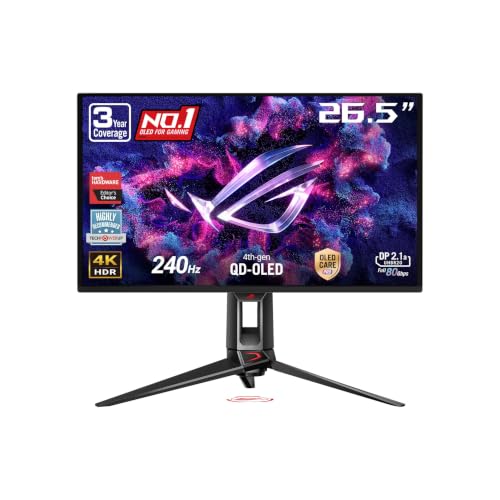 | 9.4PCKitHQ scoreView on Amazon |
04 | 9.2PCKitHQ scoreView on Amazon |
A closer look at each configuration
Dell 32 Plus 4K Monitor S3225QC
score
A 31.6-inch 4K QD-OLED panel at 120Hz with five built-in speakers and 90W USB-C charging.
- Resolution
- 3840 x 2160
- Native refresh rate
- 120 Hz
- Screen size
- 31.6 in
- Panel
- QD-OLED
- USB-C
- Yes
- Weight
- 22.05 lb
- Warranty
- 1-Year Advanced Exchange Service and Premium Panel Exchange
This Dell monitor has a 31.6-inch QD-OLED panel at 3840 x 2160 with a 120Hz refresh rate and a 0.03ms response time. Dolby Vision and VESA DisplayHDR True Black 400 sit beside a 99% DCI-P3 color gamut, and AMD FreeSync Premium Pro keeps motion free of tearing. Five 5W speakers play spatial audio with AI-driven head tracking. A single USB-C cable carries up to 90W of power delivery, and the stand adjusts for height, tilt, swivel and slant. The pop-out quick access ports include a USB-C port with up to 15W of power, and ComfortView Plus is built in and stays on. It weighs 22.05 lb.
Choose it if
- You want a 31.6-inch 4K QD-OLED screen
- You want five built-in speakers with spatial audio
Consider another if
- You need a 240Hz refresh rate like the Alienware
- You need the 3-year warranty of the ASUS monitor
Alienware AW2725Q 27-inch 4K Gaming Monitor
score
A 26.7-inch 4K QD-OLED panel at 240Hz with G-SYNC Compatible and FreeSync Premium Pro.
- Resolution
- 3840 x 2160
- Native refresh rate
- 240 Hz
- Panel
- QD-OLED
- USB-C
- Yes
- HDMI
- Yes
- DisplayPort
- Yes
- Weight
- 9.48 lb
- Warranty
- 90 days limited warranty
This Alienware monitor has a 26.7-inch QD-OLED panel at 3840 x 2160 with a 240Hz refresh rate, a 0.03ms GTG response time and 166 PPI. Its 99% DCI-P3 color gamut sits beside VESA DisplayHDR True Black 400 and Dolby Vision. NVIDIA G-SYNC Compatible, AMD FreeSync Premium Pro and VESA AdaptiveSync reduce screen tearing. DisplayPort 1.4, two HDMI ports, three USB Type-A ports and USB-C with up to 15W power delivery cover connections, and the stand adjusts for height, tilt, swivel and pivot. Three USB Type-A ports and a USB Type-B upstream port connect accessories and a computer. It weighs 9.48 lb, and the monitor carries a 90-day limited warranty.
Choose it if
- You want a 240Hz refresh rate at 4K resolution
- You want a 26.7-inch panel at 166 PPI
Consider another if
- You need a 31.6-inch screen like the Dell monitor
- You need a 3-year warranty like the ASUS monitor
ASUS ROG PG27UCDM 27-inch 4K Gaming Monitor
score
A 26.5-inch 4K QD-OLED panel at 240Hz with DisplayPort 2.1 and 90W USB-C charging.
- Resolution
- 3840 x 2160
- Native refresh rate
- 240 Hz
- Panel
- QD-OLED
- USB-C
- Yes
- HDMI
- Yes
- DisplayPort
- Yes
- Weight
- 16.8 lb
- Warranty
- 3 years warranty with ARR and burn-in coverage
This ASUS monitor has a 26.5-inch QD-OLED panel at 3840 x 2160 with a 240Hz refresh rate and a 0.03ms response time. Its 4th-gen QD-OLED panel sits beside OLED Anti-Flicker 2.0 and OLED Care Pro with a Neo Proximity Sensor that switches to a black screen when you step away. DisplayPort 2.1a UHBR20 carries 80Gbps of bandwidth, USB-C carries 90W of power delivery, and HDMI 2.1 covers consoles. It carries a 3-year warranty with ARR and burn-in coverage. OLED Anti-Flicker 2.0 uses a luminance compensation algorithm that reduces flicker by 20% compared with previous-gen panels. The 4th-gen QD-OLED technology delivers sharper imagery and clear text. It weighs 16.8 lb.
Choose it if
- You want DisplayPort 2.1a with 80Gbps bandwidth
- You want a 3-year warranty with burn-in coverage
Consider another if
- You need a 31.6-inch screen like the Dell monitor
- You need a 32-inch screen like the Samsung monitor
Samsung 32-inch Odyssey G8 (G80SH) Gaming Monitor
score
A 32-inch 4K QD-OLED panel at 240Hz with DisplayHDR True Black 500 and Glare Free.
- Resolution
- 3840 x 2160
- Native refresh rate
- 240 Hz
- Panel
- QD-OLED
- USB-C
- Yes
- Weight
- 23.9 lb
- Warranty
- 3 Year Manufacturer
This Samsung monitor has a 32-inch QD-OLED panel at 3840 x 2160 with a 240Hz refresh rate, a 0.03ms GtG response time and 140 PPI. VESA DisplayHDR True Black 500 sits beside a Pantone Validated screen, and AMD FreeSync Premium reduces choppiness, screen lag and image tearing. Glare Free keeps the screen clear of reflections, and OLED Safeguard+ helps prevent burn-in. It carries a 3-year warranty. It weighs 23.9 lb, and the height-adjustable ergonomic stand pivots, tilts and swivels. The panel shows 140 PPI for sharp detail at 32 inches.
Choose it if
- You want a 32-inch panel at 140 PPI
- You want DisplayHDR True Black 500 and Glare Free
Consider another if
- You need a 26.7-inch screen like the Alienware monitor
- You need a 166 PPI panel like the Alienware monitor
Make the choice for your setup
Compare screen size and refresh rate
Start with the size and refresh rate of each panel. The Dell monitor has a 31.6-inch panel at 120Hz, while the Alienware, ASUS and Samsung monitors have 240Hz panels. The Alienware panel measures 26.7 inches, the ASUS panel measures 26.5 inches, and the Samsung panel measures 32 inches. A larger panel suits a desk where one monitor holds several apps side by side, while a smaller panel suits a desk with less depth. Match the refresh rate to the motion you watch: the 240Hz panels list a higher refresh rate than the 120Hz panel. All four panels show 3840 x 2160 pixels, so the pixel count stays the same across sizes. The Alienware panel lists 166 PPI and the Samsung panel lists 140 PPI. The Dell monitor is the only 120Hz panel here.
Check HDR, color and panel care
Look at the HDR rating and the color gamut each monitor names. The Dell and Alienware monitors carry VESA DisplayHDR True Black 400, while the Samsung monitor carries VESA DisplayHDR True Black 500. The Dell and Alienware monitors name a 99% DCI-P3 color gamut, and the Samsung screen is Pantone Validated. The ASUS monitor adds OLED Care Pro with a Neo Proximity Sensor, and the Samsung monitor adds OLED Safeguard+ to help prevent burn-in. The ASUS and Samsung monitors carry a 3-year warranty, while the Dell monitor carries a 1-year warranty and the Alienware monitor carries a 90-day limited warranty. The Samsung monitor is the only pick with a DisplayHDR True Black 500 rating. A related shortlist covers the Best 4K Monitor Mini Led.
Count the ports and the charging
Count the ports on each monitor and the power each USB-C port delivers. The Dell monitor has a USB-C port with up to 90W of power delivery and a second USB-C port with up to 15W. The ASUS monitor has USB-C with 90W of power delivery, DisplayPort 2.1a and HDMI 2.1. The Alienware monitor has DisplayPort 1.4, two HDMI ports, three USB Type-A ports and USB-C with up to 15W of power delivery. The Samsung monitor has a USB-C port that powers the setup. The Alienware monitor adds a USB Type-B upstream port for the computer connection. The Dell monitor adds pop-out quick access ports for accessories. Check that the ports match the devices you plan to connect. The Dell and ASUS monitors each list 90W of USB-C power delivery.
For a wider shortlist, start with 24 vs 27 Inch Monitor.
FAQ: 4K Monitor Qd OLED
Which monitors here have a 240Hz refresh rate?
The Alienware AW2725Q, the ASUS ROG PG27UCDM and the Samsung Odyssey OLED G8 each have a 240Hz refresh rate. The Dell S3225QC has a 120Hz refresh rate, so check the refresh rate against the motion you watch before you choose.
What is the screen size of each monitor?
The Dell monitor measures 31.6 inches, the Samsung monitor measures 32 inches, the Alienware monitor measures 26.7 inches and the ASUS monitor measures 26.5 inches. All four show 3840 x 2160 pixels. Measure your desk depth before you choose a size. The 31.6-inch and 32-inch panels suit wider desks.
Which monitors have a 3-year warranty?
The ASUS ROG PG27UCDM carries a 3-year warranty with ARR and burn-in coverage, and the Samsung Odyssey OLED G8 carries a 3-year warranty. The Dell monitor carries a 1-year warranty, and the Alienware monitor carries a 90-day limited warranty.


