Best 27 IPS QHD Monitor (2026): 7 Picks Compared
 By Theo LangUpdated
Choose the Acer Nitro 27in QHD 2560x1440 IPS 275Hz Gaming Monitor KG271U if you want fast 275Hz play with AMD FreeSync Premium on a 27-inch QHD IPS panel. Its 0.5ms response time and 90% DCI-P3 color suit competitive games and color-critical projects, while 2xHDMI 2.1 and DisplayPort connect your PC and console. The other six cover 100Hz to 300Hz, so match the refresh rate and ports to your desk.
Your shortlist at a glance
PCKitHQ scores range from 9.2 to 9.8. See how we pick.
| Product and key specifications | Score and retailer |
|---|---|
01 | 9.8PCKitHQ scoreView on Amazon |
02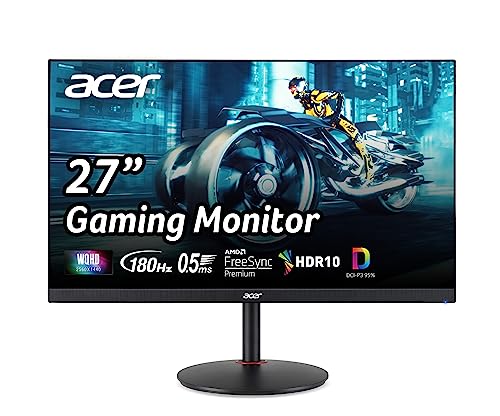 | 9.7PCKitHQ scoreView on Amazon |
03 | 9.6PCKitHQ scoreView on Amazon |
04 | 9.5PCKitHQ scoreView on Amazon |
05 | 9.4PCKitHQ scoreView on Amazon |
06 Highest Native Refresh LG 27G64NA-B 27-inch Ultragear G6 1ms HDR400 Gaming Monitor2560 x 1440, 300 Hz | 9.3PCKitHQ scoreView on Amazon |
07 | 9.2PCKitHQ scoreView on Amazon |
A closer look at each configuration
Acer Nitro 27-inch Gaming Monitor KG271U Z2bmiipx
score
A 27-inch QHD IPS panel at 275Hz with FreeSync Premium, 0.5ms response, and 90% DCI-P3 color.
- Resolution
- 2560 x 1440
- Native refresh rate
- 275 Hz
- Panel
- IPS
- HDMI
- Yes
- Warranty
- 3 year parts and labor
The Acer Nitro KG271U pairs a 27-inch 2560 x 1440 IPS panel with a 275Hz refresh rate through DisplayPort and 144Hz through HDMI. AMD FreeSync Premium syncs frames with the graphics card, and a 0.5ms response time keeps fast motion clear. Two 2W speakers cover game audio, the stand tilts from minus 5 to 25 degrees, and VESA 100 by 100mm mounting fits a monitor arm. The monitor carries a 3 year parts and labor warranty.
Choose it if
- You want 275Hz play on a 27-inch QHD IPS panel
- You want FreeSync Premium with 90% DCI-P3 color
Consider another if
- You need a 300Hz refresh rate like the LG 27G64NA-B
- You need height adjustment like the Acer XV271U
Acer Nitro 27-inch Gaming Monitor XV271U M3bmiiprx
score
A 27-inch QHD IPS panel at 180Hz with FreeSync Premium, an Ergo Stand, and 95% DCI-P3 color.
- Resolution
- 2560 x 1440
- Native refresh rate
- 180 Hz
- Panel
- IPS
- HDMI
- Yes
- Weight
- 12.13 lb
- Warranty
- 3 year parts and labor
The Acer Nitro XV271U pairs a 27-inch 2560 x 1440 IPS panel with a 180Hz refresh rate through DisplayPort and 144Hz through HDMI. AMD FreeSync Premium syncs frames with the graphics card, and the panel covers 95% DCI-P3 color. Two 2W speakers cover game audio. The Ergo Stand tilts from minus 5 to 25 degrees, adjusts height by 4.7 inches, swivels 360 degrees, and pivots plus or minus 90 degrees. VESA 100 by 100mm mounting fits a monitor arm, and the monitor weighs 12.13 lb with a 3 year parts and labor warranty.
Choose it if
- You want 180Hz play on a 27-inch QHD IPS panel
- You want an Ergo Stand with height and pivot
Consider another if
- You need a 275Hz refresh rate like the Acer KG271U
- You need DisplayHDR 400 like the LG 27GR83Q-B
MSI PRO MP273QP E14 27-inch Computer Monitor
score
A 27-inch 2560 x 1440 IPS panel at 144Hz with Adaptive-Sync, DisplayHDR 400, and a height-adjustable stand.
- Resolution
- 2560 x 1440
- Native refresh rate
- 144 Hz
- Panel
- IPS
- HDMI
- Yes
- Warranty
- 3 Years
The MSI PRO MP273QP E14 pairs a 27-inch 2560 x 1440 IPS panel with a 144Hz refresh rate and Adaptive-Sync for smooth motion. DisplayHDR 400 lifts contrast, and HDMI connects your devices. The display carries TÜV certification, and MSI EyesErgo with Anti-Flicker technology and Eye-Q Check support long sessions. The stand adjusts height and tilts, VESA mounting fits a monitor arm, and a built-in speaker covers audio. The monitor carries a 3 Years warranty.
Choose it if
- You want 144Hz play on a 27-inch QHD IPS panel
- You want DisplayHDR 400 with eye-care features
Consider another if
- You need a 180Hz refresh rate like the Acer XV271U
- You need a pivot stand like the Acer XV271U
LG 27GR83Q-B 27-inch Ultragear Gaming Monitor
score
A 27-inch QHD IPS panel at 240Hz with 1ms response, DisplayHDR 400, and G-Sync compatibility.
- Resolution
- 2560x1440
- Native refresh rate
- 240 Hz
- Panel
- IPS
- HDMI
- Yes
- DisplayPort
- Yes
- Weight
- 13.7 lb
- Warranty
- 1 Years Parts and Labor
The LG 27GR83Q-B pairs a 27-inch 2560x1440 IPS panel with a 240Hz refresh rate through DisplayPort or HDMI. A 1ms response time keeps fast motion clear, and DisplayHDR 400 with up to 95 percent DCI-P3 color covers vivid scenes. NVIDIA G-Sync compatibility and AMD FreeSync Premium keep play smooth, and DTS Headphone:X with a 4-pole headphone jack covers game audio. The stand tilts, adjusts height, and pivots, and the monitor weighs 13.7 lb with a 1 Years Parts and Labor warranty.
Choose it if
- You want 240Hz play on a 27-inch QHD IPS panel
- You want G-Sync and FreeSync Premium together
Consider another if
- You need a 300Hz refresh rate like the LG 27G64NA-B
- You need built-in speakers like the Lenovo L27q-4a
MSI PRO MP273Q E14 27-inch Computer Monitor
score
A 27-inch 2560 x 1440 IPS panel at 144Hz with Adaptive Sync, DisplayPort, and a 1500:1 contrast ratio.
- Resolution
- 2560 x 1440
- Native refresh rate
- 144 Hz
- Panel
- IPS
- HDMI
- Yes
- DisplayPort
- Yes
- Weight
- 13.67 lb
- Warranty
- 3 Years
The MSI PRO MP273Q E14 pairs a 27-inch 2560 x 1440 IPS panel with a 144Hz refresh rate and Adaptive Sync for smooth motion. A 1500:1 contrast ratio with wide 178-degree viewing angles keeps colors steady from the side. HDMI 2.0b and DisplayPort 1.2a connect your devices, and a built-in speaker covers audio. TÜV Rheinland Flicker Free and Low Blue Light are named for the display, and Eye-Q Check supports long sessions. The tilt-adjustable stand and VESA 100 by 100mm mounting fit a monitor arm, and the monitor weighs 13.67 lb with a 3 Years warranty.
Choose it if
- You want 144Hz play on a 27-inch QHD IPS panel
- You want DisplayPort and HDMI for two devices
Consider another if
- You need a 180Hz refresh rate like the Acer XV271U
- You need DisplayHDR 400 like the LG 27GR83Q-B
LG 27G64NA-B 27-inch Ultragear G6 1ms HDR400 Gaming Monitor
score
A 27-inch QHD IPS panel at 300Hz with 1ms response, DisplayHDR 400, and G-Sync compatibility.
- Resolution
- 2560 x 1440
- Native refresh rate
- 300 Hz
- Panel
- IPS
- HDMI
- Yes
- DisplayPort
- Yes
- Weight
- 10.1 lb
- Warranty
- 1 Year Parts and Labor
The LG 27G64NA-B pairs a 27-inch 2560 x 1440 IPS panel with a 300Hz refresh rate and a 1ms response time for fast play. DisplayHDR 400 lifts contrast, and NVIDIA G-Sync compatibility with AMD FreeSync Premium keeps play smooth. Black Stabilizer brightens dark scenes, and the crosshair and real-time frame data suit shooter games. The stand tilts, adjusts height, and pivots, and the monitor weighs 10.1 lb with a 1 Year Parts and Labor warranty.
Choose it if
- You want 300Hz play on a 27-inch QHD IPS panel
- You want a crosshair and real-time frame data for shooters
Consider another if
- You need a 3-year warranty like the Acer Nitro
- You need built-in speakers like the Lenovo L27q-4a
Lenovo L27q-4a
score
A 27-inch QHD IPS panel at 100Hz with 1ms response, dual 3W speakers, and Eyesafe Display 2.0.
- Resolution
- QHD
- Native refresh rate
- 100 Hz
- Panel
- IPS
- Weight
- 12.43 lb
- Warranty
- 1 year manufacturer
The Lenovo L27q-4a pairs a 27-inch QHD IPS panel with a 100Hz refresh rate and a 1ms response time for everyday work and play. Dual 3W speakers tuned by MaxxAudio cover meetings and movies, and Eyesafe Display 2.0 with TÜV Low Blue Light is named for the display. VESA MediaSync keeps video playback smooth, and a smart cable management system keeps cords out of sight. The tilt stand sets the viewing angle, VESA mounting fits a monitor arm, and the monitor weighs 12.43 lb with a 1 year manufacturer warranty.
Choose it if
- You want 100Hz play on a 27-inch QHD IPS panel
- You want dual 3W speakers for meetings and movies
Consider another if
- You need a 144Hz refresh rate like the MSI PRO
- You need a 275Hz refresh rate like the Acer KG271U
Make the choice for your setup
Match refresh rate to your games
Refresh rates run from 100Hz on the Lenovo to 300Hz on the LG 27G64NA-B, with 144Hz on both MSI monitors, 180Hz on the Acer XV271U, 240Hz on the LG 27GR83Q-B, and 275Hz on the Acer KG271U. The Acer KG271U runs 275Hz through DisplayPort and 144Hz through HDMI, while the Acer XV271U runs 180Hz through DisplayPort and 144Hz through HDMI. The LG 27G64NA-B runs 300Hz. Both MSI monitors run at 144Hz, and the Lenovo runs at 100Hz with a 1ms response time. Match the refresh rate to the speed of the games you play, and check whether your connection carries the full rate before you choose.
Compare color, HDR, and sync
For color, the Acer KG271U covers 90% DCI-P3, the Acer XV271U covers 95% DCI-P3, and the LG 27GR83Q-B covers up to 95 percent DCI-P3 with DisplayHDR 400. The LG 27G64NA-B also carries DisplayHDR 400, and the MSI PRO MP273QP E14 carries DisplayHDR 400 too. The Acer KG271U adds HDR10 support. The MSI PRO MP273Q E14 lists a 1500:1 contrast ratio with wide 178-degree viewing angles. For sync, the Acer KG271U and the Acer XV271U carry AMD FreeSync Premium, both LG monitors carry G-Sync compatibility with FreeSync Premium, and both MSI monitors carry Adaptive Sync. Match the color figures to the editing you do and the sync to the games you play. Shoppers with a related need can compare our guide to the Best 27 Inch Monitor for Xbox Series S.
Check ports, stands, and warranty
Five monitors connect through DisplayPort: the Acer KG271U, Acer XV271U, LG 27GR83Q-B, MSI PRO MP273Q E14, and LG 27G64NA-B. Six connect through HDMI: the two Acer monitors, both LG monitors, and both MSI monitors. The Acer XV271U Ergo Stand tilts, adjusts height by 4.7 inches, swivels 360 degrees, and pivots. The LG monitors tilt, adjust height, and pivot, and the MSI PRO MP273QP E14 adjusts height and tilts. Speakers sit in the two Acer monitors, both MSI monitors, and the Lenovo. Warranty runs 3 years on the two Acer monitors and both MSI monitors, while both LG monitors and the Lenovo carry 1 year. Compare ports, stands, and warranty before you decide.
Comparing more options? See 24 vs 27 Inch Monitor.
FAQ: 27 IPS QHD Monitor
Which monitor has the 300Hz native refresh rate?
The LG 27G64NA-B runs at 300Hz on a 27-inch QHD IPS panel with a 1ms response time. The Acer KG271U runs at 275Hz, and the LG 27GR83Q-B runs at 240Hz. The Lenovo L27q-4a runs at 100Hz.
Which monitors here have built-in speakers?
The two Acer monitors carry two 2W speakers each, both MSI monitors carry a built-in speaker, and the Lenovo carries dual 3W speakers tuned by MaxxAudio. The LG 27GR83Q-B carries a 4-pole headphone jack for game audio, so plan separate audio if you choose an LG monitor.
Which monitors carry a 3-year warranty here?
The two Acer monitors and both MSI monitors carry a 3-year warranty. The two LG monitors carry a 1-year warranty, and the Lenovo carries a 1-year manufacturer warranty. Check the warranty term against the cover you want before choosing.