
Best 27 Inch Thunderbolt Monitor (2026): Our 5 Picks Ranked
 By Theo LangUpdated
The Dell UltraSharp U2724DE 27-Inch Class WQHD LED Monitor suits buyers who want two Thunderbolt ports on a 27-inch WQHD display at 120Hz. Its 98% DCI-P3 coverage and 5ms response time pair with two USB-C ports, two DisplayPort ports, HDMI, and RJ45. Choose the U2724DE for a WQHD Thunderbolt hub monitor; choose the Dell U2725QE for a 3840x2160 IPS Black panel with Thunderbolt 4 at up to 140W.
Your shortlist at a glance
PCKitHQ scores range from 9.2 to 9.8. See how we pick.
| Product and key specifications | Score and retailer |
|---|---|
01 | 9.8PCKitHQ scoreView on Amazon |
02 | 9.7PCKitHQ scoreView on Amazon |
03 | 9.5PCKitHQ scoreView on Amazon |
04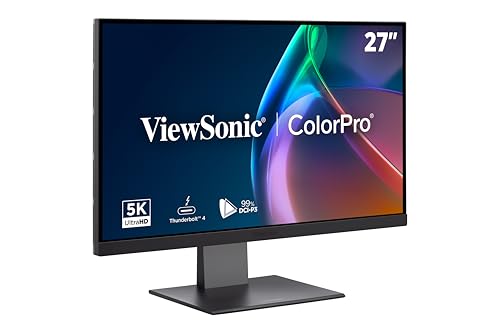 | 9.3PCKitHQ scoreView on Amazon |
05 | 9.2PCKitHQ scoreView on Amazon |
A closer look at each configuration
Dell UltraSharp U2724DE 27-inch Class WQHD LED Monitor
score
The Dell U2724DE pairs a 27-inch WQHD display at 120Hz with two Thunderbolt ports and 98% DCI-P3 coverage.
- Resolution
- WQHD
- Native refresh rate
- 120 Hz
- Screen size
- 27 in
- USB-C
- Yes
- HDMI
- Yes
- DisplayPort
- Yes
- Weight
- 11.53 lb
- Warranty
- 3 Year
This Dell has a 27-inch WQHD display with a 120Hz refresh rate and a 5ms response time. Its 98% DCI-P3 coverage describes the color space, and the ambient light sensor adjusts brightness and color temperature based on the environment. Two Thunderbolt ports, two USB-C ports, two DisplayPort ports, one HDMI port, four USB ports, and RJ45 give the monitor its hub connections. Tilt, swivel, pivot, and height adjustment set the screen position. Dell Color Management software, developed with Calman Verified certification, adjusts the monitor colors. It weighs 11.53 lb and carries a 3 Year warranty.
Choose it if
- You want two Thunderbolt ports on a WQHD monitor
- You want a 27-inch display at 120Hz with 98% DCI-P3
Consider another if
- You need a 3840x2160 panel like the Dell U2725QE
- You need Thunderbolt 4 with 140W power like the U2725QE
Dell UltraSharp U2725QE 27-inch 4K UHD Black Monitor
score
The Dell U2725QE pairs a 27-inch 3840x2160 IPS Black panel at 120Hz with Thunderbolt 4 at up to 140W.
- Resolution
- 3840 x 2160
- Native refresh rate
- 120 Hz
- Screen size
- 27 in
- Panel
- IPS
- USB-C
- Yes
- HDMI
- Yes
- Weight
- 21.43 lb
- Warranty
- 3-Year Advanced Exchange Service and Premium Panel Exchange
This Dell has a 27-inch 3840x2160 IPS Black display at 120Hz with a 5ms response time. Its 99% DCI-P3 coverage is factory calibrated to Delta E less than 1.5. Thunderbolt 4 transmits video, data, and up to 140W power through one cable, with daisy chain support for up to two additional 4K monitors. HDMI 2.1, USB-C, USB-A, and Ethernet ports add connections. Height, tilt, swivel, and pivot adjustments set the screen position. It weighs 21.43 lb and carries a 3-Year Advanced Exchange Service and Premium Panel Exchange warranty.
Choose it if
- You want a 27-inch 3840x2160 panel at 120Hz
- You want Thunderbolt 4 with up to 140W power
Consider another if
- You need a WQHD panel like the Dell U2724DE
- You need a 5120x2880 panel like the BenQ PD2730S
BenQ PD2730S 27-inch 5K 218 PPI Mac Monitor
score
The BenQ PD2730S pairs a 27-inch 5120x2880 panel at 218 PPI with Thunderbolt 4 at up to 90W.
- Resolution
- 5120x2880
- Weight
- 17.5 lb
- Warranty
- 3 Years Manufacturer
This BenQ has a 27-inch 5120x2880 panel at 218 PPI with 98% P3 coverage and a 2000:1 contrast ratio. Thunderbolt 4 delivers up to 90W power and 40Gbps transfers, and it supports two 5K displays or one 8K display with Thunderbolt 4 certified cables. The Nano Matte panel diffuses ambient light, and the built-in KVM switch controls two systems with one keyboard and mouse. The wireless Hotkey Puck switches systems. It weighs 17.5 lb and carries a 3 Years Manufacturer warranty.
Choose it if
- You want a 27-inch 5120x2880 panel at 218 PPI
- You want Thunderbolt 4 with a built-in KVM switch
Consider another if
- You need a 3840x2160 panel like the Dell U2725QE
- You need Thunderbolt 4 with up to 140W power
ViewSonic VP2788-5K 27-inch 5K Mac Ready Monitor
score
The ViewSonic VP2788-5K pairs a 27-inch 5120x2880 IPS panel with Thunderbolt 4 at up to 100W.
- Resolution
- 5120 x 2880
- Screen size
- 27 in
- Panel
- IPS
- USB-C
- Yes
- HDMI
- Yes
- DisplayPort
- Yes
- Weight
- 14 lb
- Warranty
- 3-Year limited warranty on parts, labor and backlight
This ViewSonic has a 27-inch 5120x2880 IPS display with 100% sRGB and 99% DCI-P3 coverage. Thunderbolt 4 carries 40 Gbps data transfer and a 4K video signal over one cable, with up to 100W of power. The Thunderbolt 4 output supports a daisy chain of up to two 5K monitors. The display is Pantone Validated and has HDR400. Thunderbolt 4, USB-C, HDMI, and DisplayPort provide the connections. Tilt, swivel, rotate, and height adjustment set the screen position. It weighs 14 lb and carries a 3-Year limited warranty on parts, labor and backlight.
Choose it if
- You want a 27-inch 5120x2880 IPS panel
- You want Thunderbolt 4 with up to 100W power
Consider another if
- You need a 3840x2160 panel like the Dell U2725QE
- You need Thunderbolt 4 with up to 140W power
ViewSonic VP2776T-4K 27-inch 4K UHD Monitor Thunderbolt 4 USB-C Mac Ready
score
The ViewSonic VP2776T-4K pairs a 27-inch 3840x2160 IPS panel with Thunderbolt 4 at up to 100W.
- Resolution
- 3840 x 2160
- Screen size
- 27 in
- Panel
- IPS
- USB-C
- Yes
- HDMI
- Yes
- DisplayPort
- Yes
- Weight
- 16.8 lb
- Warranty
- 3-Year limited warranty on parts, labor and backlight
This ViewSonic has a 27-inch 3840x2160 IPS display with VESA HDR400 and 400-nit brightness. Its 100% sRGB and 98% DCI-P3 coverage describe the color space, and the display is Pantone Validated. Thunderbolt 4 supports 40 Gbps data, video, and up to 100W power delivery through one cable. Dual 4K daisy chain expansion works through Thunderbolt 4. Thunderbolt 4, USB C, HDMI, DisplayPort, and RJ45 networking provide the connections. It weighs 16.8 lb and carries a 3-Year limited warranty on parts, labor and backlight.
Choose it if
- You want a 27-inch 3840x2160 IPS panel
- You want Thunderbolt 4 with dual 4K daisy chain
Consider another if
- You need a 5120x2880 panel like the BenQ PD2730S
- You need Thunderbolt 4 with up to 140W power
Make the choice for your setup
Compare Thunderbolt 4 power delivery
Thunderbolt 4 power delivery differs across this guide. The Dell U2725QE transmits up to 140W through one Thunderbolt 4 cable. The ViewSonic VP2788-5K and VP2776T-4K each deliver up to 100W through Thunderbolt 4. The BenQ PD2730S delivers up to 90W through Thunderbolt 4. The Dell U2724DE has two Thunderbolt ports; compare its port count against the stated wattage of the others. The BenQ, the ViewSonic VP2788-5K, and the ViewSonic VP2776T-4K each state 40 Gbps data transfer through Thunderbolt 4. Match the stated power figure to the laptop the monitor will charge, and check the cable: the BenQ supports two 5K displays or one 8K display with Thunderbolt 4 certified cables.
Compare resolution and color coverage
Resolution runs from WQHD on the Dell U2724DE to 3840x2160 on the Dell U2725QE and the ViewSonic VP2776T-4K, and to 5120x2880 on the BenQ PD2730S and the ViewSonic VP2788-5K. The BenQ pairs its 5120x2880 panel with 218 PPI and 98% P3 coverage. The Dell U2725QE pairs 3840x2160 with 99% DCI-P3 coverage calibrated to Delta E less than 1.5. The ViewSonic VP2788-5K pairs 5120x2880 with 100% sRGB and 99% DCI-P3 coverage. The ViewSonic VP2776T-4K pairs 3840x2160 with 100% sRGB and 98% DCI-P3 coverage. The Dell U2724DE pairs WQHD with 98% DCI-P3 coverage. Compare the stated resolution against the work: the 5120x2880 panels show more pixels than the 3840x2160 panels, and the WQHD panel shows fewer. Shoppers with a related need can compare our guide to the Best 34 Inch Monitor Curved.
Check daisy chain, ports, and warranty
Daisy chain support differs across the picks. The Dell U2725QE supports daisy chain for up to two additional 4K monitors through Thunderbolt 4. The BenQ PD2730S supports two 5K displays or one 8K display with Thunderbolt 4 certified cables. The ViewSonic VP2788-5K supports a daisy chain of up to two 5K monitors through its Thunderbolt 4 output. The ViewSonic VP2776T-4K supports dual 4K daisy chain expansion through Thunderbolt 4. Ports differ too: the Dell U2724DE has two Thunderbolt ports, two USB-C ports, two DisplayPort ports, HDMI, four USB ports, and RJ45, while the ViewSonic VP2776T-4K has Thunderbolt 4, USB C, HDMI, DisplayPort, and RJ45. The Dell U2724DE carries a 3 Year warranty, the BenQ carries a 3 Years Manufacturer warranty, and both ViewSonic picks carry a 3-Year limited warranty on parts, labor and backlight.
Before you decide, also read 24 vs 27 Inch Monitor.
FAQ: 27 Inch Thunderbolt Monitor
Which monitors in this guide have Thunderbolt 4?
The Dell U2725QE, the BenQ PD2730S, the ViewSonic VP2788-5K, and the ViewSonic VP2776T-4K have Thunderbolt 4. The Dell U2724DE has two Thunderbolt ports. Power delivery runs up to 140W on the U2725QE, up to 100W on the two ViewSonic picks, and up to 90W on the BenQ.
Which picks have a 5120x2880 panel?
The BenQ PD2730S and the ViewSonic VP2788-5K have 5120x2880 panels. The BenQ pairs its panel with 218 PPI and 98% P3 coverage. The ViewSonic pairs its panel with 100% sRGB and 99% DCI-P3 coverage. Both have Thunderbolt 4 and a daisy chain option.
Which monitors support daisy chain setups?
The Dell U2725QE supports daisy chain for up to two additional 4K monitors through Thunderbolt 4. The BenQ PD2730S supports two 5K displays or one 8K display with Thunderbolt 4 certified cables. The ViewSonic VP2788-5K supports a daisy chain of up to two 5K monitors, and the ViewSonic VP2776T-4K supports dual 4K daisy chain expansion.


