
Best 2 in 1 Laptop for Creators (2026): 4 Picks Compared
 By Theo LangUpdated
Choose the ASUS Zenbook Duo 2-in-1 14" Laptop WUXGA OLED Touch if you create across two screens: its two 14-inch OLED touchscreens, 32GB of memory and 4TB SSD let you spread timelines and tools across both displays. Its Intel Core Ultra 9-285H and Intel Arc 140V graphics handle multitasking and creative projects, and dual Thunderbolt 4 ports connect your drives. The other three trade the second screen for a larger display or smaller body.
Your shortlist at a glance
PCKitHQ scores range from 9.2 to 9.8. See how we pick.
| Product and key specifications | Score and retailer |
|---|---|
01 | 9.8PCKitHQ scoreView on Amazon |
02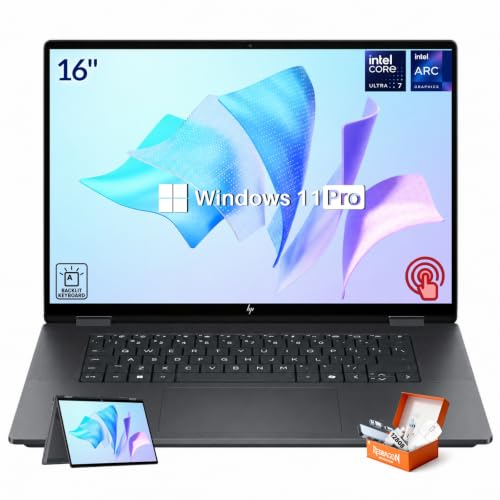 | 9.6PCKitHQ scoreView on Amazon |
03 | 9.4PCKitHQ scoreView on Amazon |
04 | 9.2PCKitHQ scoreView on Amazon |
A closer look at each configuration
ASUS Zenbook Duo 2-in-1 14-inch Laptop Touch
score
Two 14-inch OLED touchscreens, 32GB of memory and a 4TB SSD define this dual-screen laptop for creators.
- Installed memory
- 32 GB
- Installed storage
- 4TB
- Processor
- Intel Core Ultra 9-285H
- Graphics
- Intel Arc 140V
- Operating system
- Windows 11 Pro
- Screen size
- 14 in
- Resolution
- 1920 x 1200
- USB-C
- Yes
- Wi-Fi
- Yes
- Touchscreen
- Yes
- 2-in-1 design
- Yes
- Weight
- 3.9 lb
The ASUS Zenbook Duo pairs two 14-inch OLED WUXGA touchscreens at 1920 x 1200 with a 60Hz refresh rate, so you can keep a timeline on one display and tools on the other. Its Intel Core Ultra 9-285H has 16 cores, and Intel Arc 140V integrated graphics support creative projects and AI-assisted workflows. The 32GB of onboard memory and 4TB PCIe NVMe SSD hold large files and media. Dual Thunderbolt 4 ports, Wi-Fi 7, Bluetooth 5.4 and a backlit keyboard round out the setup, and the 75WHr battery pairs with 65W USB-C power input. The included Dockztorm portable USB hub supports data transfer rates up to 5Gbps. It weighs 3.9 lb.
Choose it if
- You want two 14-inch OLED touchscreens for your work
- Your projects need 32GB of memory and a 4TB SSD
Consider another if
- You need a 16-inch screen like the HP
- You need a 13.3-inch 2880x1800 OLED screen
HP OmniBook X Flip 2-in-1 Laptop
score
The 16-inch 2K IPS touchscreen, 47 TOPS NPU and Thunderbolt 4 define this 360-degree laptop for creators.
- Installed memory
- 16 GB
- Installed storage
- 1TB
- Processor
- Intel Ultra 7 256V
- Graphics
- Intel Arc 140V
- Operating system
- Win 11 Pro
- Screen size
- 16 in
- Resolution
- 1920 x 1200
- USB-C
- Yes
- Wi-Fi
- Yes
- Touchscreen
- Yes
- 2-in-1 design
- Yes
- Weight
- 4.15 lb
- Warranty
- 1 Year
The HP OmniBook X Flip pairs a 16-inch 2K IPS touchscreen at 1920 x 1200 and 400 nits with a 360-degree hinge, so it shifts between laptop, tent, stand and tablet modes. Its Intel Ultra 7 256V processor with Intel AI Boost delivers 47 NPU TOPS, and Intel Arc 140V graphics support creative projects and AI-enhanced workflows. The 16GB LPDDR5X memory and 1TB SSD cover multitasking and storage. Thunderbolt 4 supports data transfers up to 40Gbps, Wi-Fi 6E handles wireless connections, and the 5MP IR camera with HDR supports video calls. It weighs 4.15 lb and carries a 1-year warranty.
Choose it if
- You want a 16-inch 2K touchscreen at 400 nits
- You need a 47 TOPS NPU for AI workflows
Consider another if
- You need dual OLED touchscreens like the Zenbook
- You need 32GB of memory and a 2TB SSD
Lenovo Yoga 7a 2-in-1 Touchscreen Laptop
score
The 16-inch 2K LCD touchscreen, Ryzen AI 7 445 processor and 360-degree hinge define this convertible for creators.
- Installed memory
- 16 GB
- Processor
- AMD Ryzen AI 7 445
- Operating system
- Win11 Pro
- Screen size
- 16 in
- Resolution
- 2K
- Wi-Fi
- Yes
- Touchscreen
- Yes
- 2-in-1 design
- Yes
- Weight
- 3.92 lb
- Warranty
- 1 Year
The Lenovo Yoga 7a pairs a 16-inch 2K LCD touchscreen with a 360-degree flip hinge, so it moves between laptop, tablet, tent and stand modes. Its AMD Ryzen AI 7 445 processor has a dedicated NPU for Copilot+ PC experiences, and the 16:10 workspace supports sketching, note-taking and media viewing with finger and stylus input. The 16GB of memory and 1TB SSD cover office suites, creative design software and multitasking. Wi-Fi 7, a fingerprint reader and a backlit keyboard round out the setup. The slim chassis is finished in Seashell. It weighs 3.92 lb and carries a 1-year warranty.
Choose it if
- You want a 16-inch 2K touchscreen for sketching
- You need a fingerprint reader and backlit keyboard
Consider another if
- You need an OLED touchscreen like the Zenbook
- You need 32GB of memory for large projects
ASUS ProArt PX13 2in1 13.3-inch 2.8K Touch
score
The 13.3-inch 2.8K OLED touchscreen, 32GB of memory and 2TB SSD define this compact creator convertible.
- Installed storage
- 2TB
- Processor
- AMD Ryzen AI Max+ 388
- Operating system
- Win 11 Pro
- Screen size
- 13.3 in
- Resolution
- 2880 × 1800
- Wi-Fi
- Yes
- Touchscreen
- Yes
- 2-in-1 design
- Yes
- Weight
- 3.1 lb
- Warranty
- 1 Year
The ASUS ProArt PX13 pairs a 13.3-inch ASUS Lumina OLED touchscreen at 2880 x 1800 with 100% DCI-P3 color gamut, Pantone Validation and HDR Black 500, plus stylus support for sketching and editing. Its AMD Ryzen AI Max+ 388 processor delivers up to 50 TOPS of AI performance, and the 32GB LPDDR5X memory and 2TB PCIe SSD hold projects, photos and video. The convertible design shifts between laptop, tent, stand and tablet modes. Wi-Fi 7, a MicroSD reader and Copilot+ PC capabilities round out the setup. It is built to military-grade durability standards. It weighs 3.1 lb and carries a 1-year warranty.
Choose it if
- You want a 13.3-inch 2.8K OLED touchscreen
- You need 100% DCI-P3 color and stylus support
Consider another if
- You need a 16-inch screen like the HP
- You need dual touchscreens like the Zenbook
Make the choice for your setup
Compare the screens for creative work
The Zenbook Duo gives you two 14-inch OLED touchscreens at 1920 x 1200, so you can keep reference material visible beside your main workspace. The ProArt PX13 has a single 13.3-inch OLED touchscreen at 2880 x 1800 with 100% DCI-P3 color gamut, Pantone Validation and stylus support. The HP OmniBook X Flip has a 16-inch 2K IPS touchscreen at 1920 x 1200 and 400 nits. The Lenovo Yoga 7a has a 16-inch 2K LCD touchscreen. The HP screen also offers 178-degree wide viewing angles. Screen size, resolution and panel type set what you can see at once, so match the display to the work you do most. A second screen suits timelines and tools, while a larger single screen suits a single canvas.
Match memory and storage to projects
The Zenbook Duo has 32GB of memory and a 4TB SSD, while the ProArt PX13 has 32GB of memory and a 2TB SSD. The HP OmniBook X Flip and the Lenovo Yoga 7a each have 16GB of memory and a 1TB SSD. Compare those installed figures against the files you keep locally: photo libraries, video clips and project folders fill drives fast. Memory and storage are installed figures, so do not add expansion limits to them. Pick the capacity that holds your current projects with room left over for new work, and check that your backup drive connects through the ports you have. The Zenbook Duo also includes a Dockztorm portable USB hub. Shoppers with a related need can compare our guide to the Best Laptop Windows.
Check ports, weight and AI features
The Zenbook Duo has dual Thunderbolt 4 ports, Wi-Fi 7 and Bluetooth 5.4, and the HP OmniBook X Flip has Thunderbolt 4 with data transfers up to 40Gbps and Wi-Fi 6E. The ProArt PX13 has Wi-Fi 7 and a MicroSD reader, and the Yoga 7a has Wi-Fi 7. Check that your drives, displays and card readers match the ports on the machine you pick. For weight, the ProArt PX13 weighs 3.1 lb, the Zenbook Duo 3.9 lb, the Yoga 7a 3.92 lb and the HP OmniBook X Flip 4.15 lb. The HP also has a privacy shutter and Windows Hello sign-in. The HP delivers 47 NPU TOPS and the ProArt up to 50 TOPS for AI workflows, while the Zenbook Duo names AI-assisted workflows and the Yoga 7a names Copilot+ PC experiences.
Before you decide, also read Best Laptop.
FAQ: 2 in 1 Laptop for Creators
Which laptop here has two screens?
The ASUS Zenbook Duo has two 14-inch OLED touchscreens at 1920 x 1200, so you can spread timelines and tools across both displays. Both screens run at 60Hz. The other three laptops have a single touchscreen each: the HP and Lenovo have 16-inch screens, and the ProArt PX13 has a 13.3-inch screen.
How much storage do these laptops have?
The Zenbook Duo has a 4TB SSD, the ProArt PX13 has a 2TB SSD, and the HP OmniBook X Flip and Lenovo Yoga 7a each have a 1TB SSD. Compare those installed figures against the files you keep locally, and check that your backup drive connects through the ports you have.
What do these laptops weigh?
The ProArt PX13 weighs 3.1 lb, the Zenbook Duo weighs 3.9 lb, the Yoga 7a weighs 3.92 lb, and the HP OmniBook X Flip weighs 4.15 lb. Check those weights against your bag and your mount or stand, since a lighter machine is easier to carry between desks.


